Event Statistics
An event-driven microservice consuming fight events from Kafka and computing statistics served via WebSockets.
Introduction
This is the event statistics microservice. It is an event-driven microservice, listening for fight event messages on an Apache Kafka topic utilizing SmallRye Reactive Messaging.
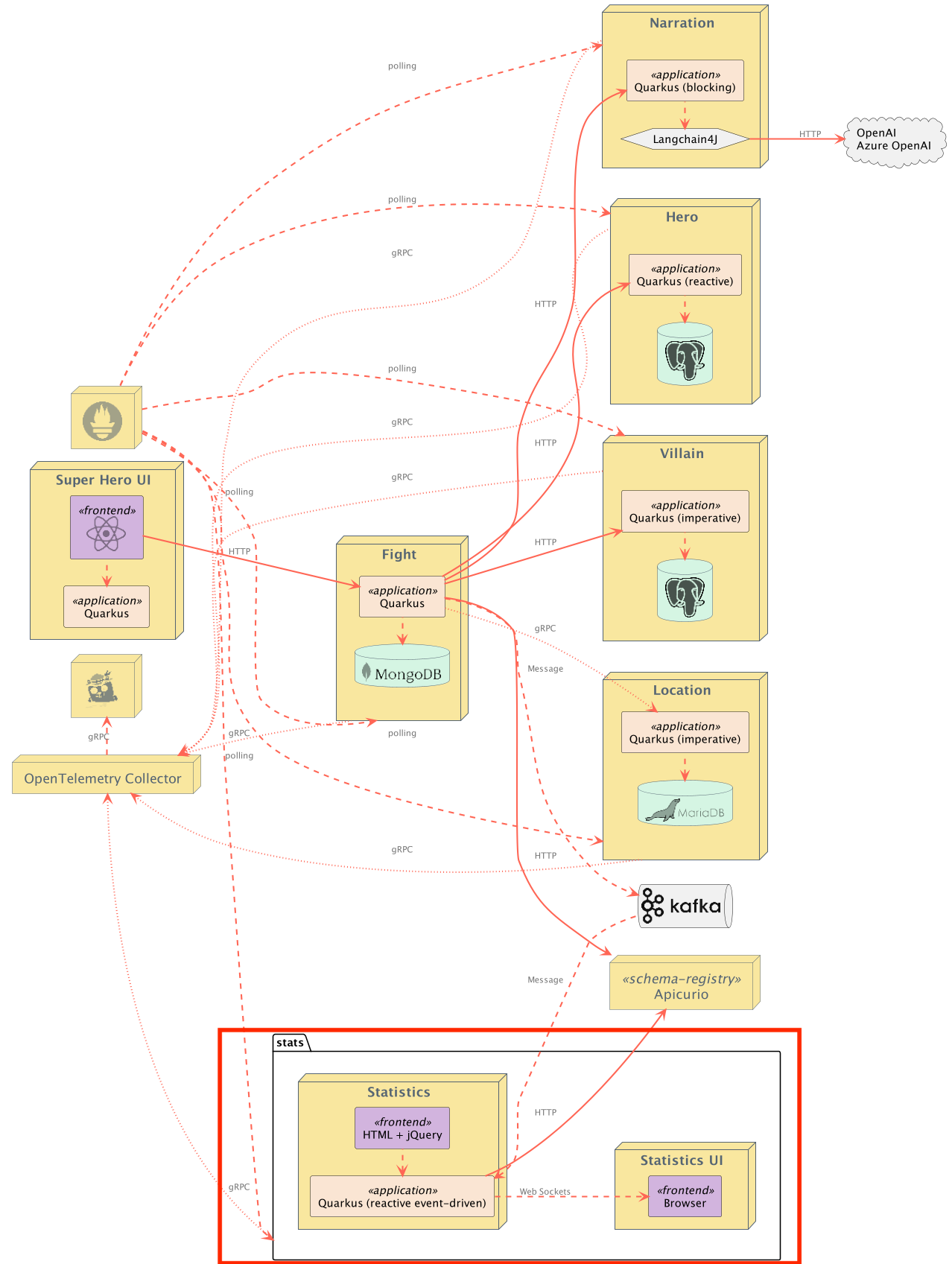
Messages arrive on the fights topic. The SuperStats class listens to these events and keeps track of 2 kinds of statistics: team stats and winner stats.
Messages are stored in Apache Avro format and the fight schema is automatically registered in the Apicurio Schema Registry. This all uses built-in extensions from Quarkus.
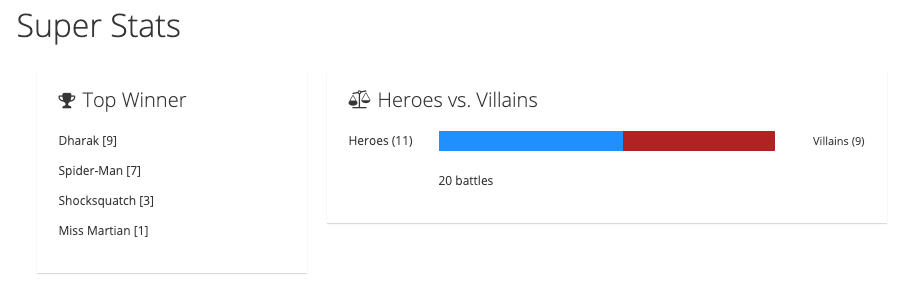
This service also has its own UI where you can see the top winners and the percentage of hero victories!
Team Stats
Team stats are accumulated by the number of wins by heroes vs villains. It is calculated as a percentage of hero wins to villain wins.
Team stats are then sent over the /stats/team WebSocket by the TeamStatsWebSocket WebSocket class. Every time a new fight event is received, the team stats are re-computed and a JSON structure is emitted to anyone listening on the WebSocket.
A sample payload might look like this:
{
    "heroWins": 15,
    "villainWins": 5,
    "numberOfFights": 20,
    "heroWinRatio": 0.75
}
Winner Stats
Winner stats are accumulated by the number of wins of each hero or villain.
Winner stats are then sent over the /stats/winners WebSocket by the TopWinnerWebSocket WebSocket class. Every time a new fight event is received, the winner stats are re-computed and a JSON array containing all the winners and the number of wins for each winner is emitted to anyone listening on the WebSocket.
A sample payload might look like this:
[
    {
        "name": "Chewbacca",
        "score": 5
    },
    {
        "name": "Darth Vader",
        "score": 3
    },
    {
        "name": "Yoda",
        "score": 10
    }
]
Testing
This application has a full suite of tests, including an integration test suite (TeamStatsWebSocketIT and TopWinnerWebSocketIT). The integration test suite uses Quarkus Dev Services to interact with a Kafka instance. Integration tests can inject a KafkaProducer to place messages on the topic and then listen on the WebSockets to verify stats were correctly computed.
Running the Application
The application runs on port 8085 (defined by quarkus.http.port in application.properties).
From the quarkus-super-heroes/event-statistics directory, simply run ./mvnw quarkus:dev to run Quarkus Dev Mode, or running quarkus dev using the Quarkus CLI. The application's UI will be exposed at http://localhost:8085 and the Quarkus Dev UI will be exposed at http://localhost:8085/q/dev. Quarkus Dev Services will ensure an Apache Kafka instance and an Apicurio Schema Registry are started and configured.
Note: Running the application outside of Quarkus dev mode requires standing up an Apache Kafka instance and an Apicurio Schema Registry and binding it to the app.
By default, the application is configured with the following:
| Description | Environment Variable | Java Property | Value |
|---|---|---|---|
| Kafka Bootstrap servers | KAFKA_BOOTSTRAP_SERVERS |
kafka.bootstrap.servers |
PLAINTEXT://localhost:9092 |
| Apicurio Schema Registry | MP_MESSAGING_CONNECTOR_SMALLRYE_KAFKA_APICURIO_REGISTRY_URL |
mp.messaging.connector.smallrye-kafka.apicurio.registry.url |
http://localhost:8086/apis/registry/v2 |
Running Locally via Docker Compose
Pre-built images for this application can be found at quay.io/quarkus-super-heroes/event-statistics.
Pick one of the versions of the application from the table below and execute the appropriate docker compose command from the quarkus-super-heroes/event-statistics directory.
Note: You may see errors as the applications start up. This may happen if an application completes startup before one of its required services (i.e. database, kafka, etc). This is fine. Once everything completes startup things will work fine.
| Description | Image Tag | Docker Compose Run Command |
|---|---|---|
| JVM Java 25 | java25-latest |
docker compose -f deploy/docker-compose/java25.yml up --remove-orphans |
| Native | native-latest |
docker compose -f deploy/docker-compose/native.yml up --remove-orphans |
These Docker Compose files are meant for standing up this application and the required Kafka broker only. Once started the application will be exposed at http://localhost:8085. The Apicurio Schema Registry will be exposed at http://localhost:8086.
Deploying to Kubernetes
The application can be deployed to Kubernetes using pre-built images or by deploying directly via the Quarkus Kubernetes Extension.
Using pre-built images
Pre-built images for this application can be found at quay.io/quarkus-super-heroes/event-statistics.
Deployment descriptors for these images are provided in the deploy/k8s directory. There are versions for OpenShift, Minikube, Kubernetes, and Knative.
Note: The Knative variant can be used on any Knative installation that runs on top of Kubernetes or OpenShift. For OpenShift, you need OpenShift Serverless installed from the OpenShift operator catalog. Using Knative has the benefit that services are scaled down to zero replicas when they are not used.
Pick one of the versions of the application from the table below and deploy the appropriate descriptor from the deploy/k8s directory.
| Description | Image Tag | OpenShift Descriptor | Minikube Descriptor | Kubernetes Descriptor | Knative Descriptor |
|---|---|---|---|---|---|
| JVM Java 25 | java25-latest |
java25-openshift.yml |
java25-minikube.yml |
java25-kubernetes.yml |
java25-knative.yml |
| Native | native-latest |
native-openshift.yml |
native-minikube.yml |
native-kubernetes.yml |
native-knative.yml |
The application is exposed outside of the cluster on port 80.
These are only the descriptors for this application and the required Kafka broker and Apicurio Schema Registry only.
Using Helm
Helm charts for this application are provided in the deploy/helm directory with separate charts per deployment target.
To deploy using Helm (e.g. JVM Java 25 on Kubernetes):
helm install event-statistics deploy/helm/kubernetes/ -f deploy/helm/kubernetes/values-java25.yaml
For native:
helm install event-statistics deploy/helm/kubernetes/ -f deploy/helm/kubernetes/values-native.yaml
Deploying directly via Kubernetes Extensions
Following the deployment section of the Quarkus Kubernetes Extension Guide, you can run one of the following commands to deploy the application and any of its dependencies to your preferred Kubernetes distribution.
Note: For non-OpenShift or minikube Kubernetes variants, you will most likely need to push the image to a container registry by adding the -Dquarkus.container-image.push=true flag, as well as setting the quarkus.container-image.registry, quarkus.container-image.group, and/or the quarkus.container-image.name properties to different values.
| Target Platform | Java Version | Command |
|---|---|---|
| Kubernetes | 25 | ./mvnw clean package -Dquarkus.profile=kubernetes -Dquarkus.kubernetes.deploy=true -DskipTests |
| OpenShift | 25 | ./mvnw clean package -Dquarkus.profile=openshift -Dquarkus.container-image.registry=image-registry.openshift-image-registry.svc:5000 -Dquarkus.container-image.group=$(oc project -q) -Dquarkus.kubernetes.deploy=true -DskipTests |
| Minikube | 25 | ./mvnw clean package -Dquarkus.profile=minikube -Dquarkus.kubernetes.deploy=true -DskipTests |
| Knative | 25 | ./mvnw clean package -Dquarkus.profile=knative -Dquarkus.kubernetes.deploy=true -DskipTests |
| Knative (on OpenShift) | 25 | ./mvnw clean package -Dquarkus.profile=knative-openshift -Dquarkus.container-image.registry=image-registry.openshift-image-registry.svc:5000 -Dquarkus.container-image.group=$(oc project -q) -Dquarkus.kubernetes.deploy=true -DskipTests |