Super Hero Battle UI
A React application served via Quarkus Quinoa for superhero battles with optional AI narration.
Introduction
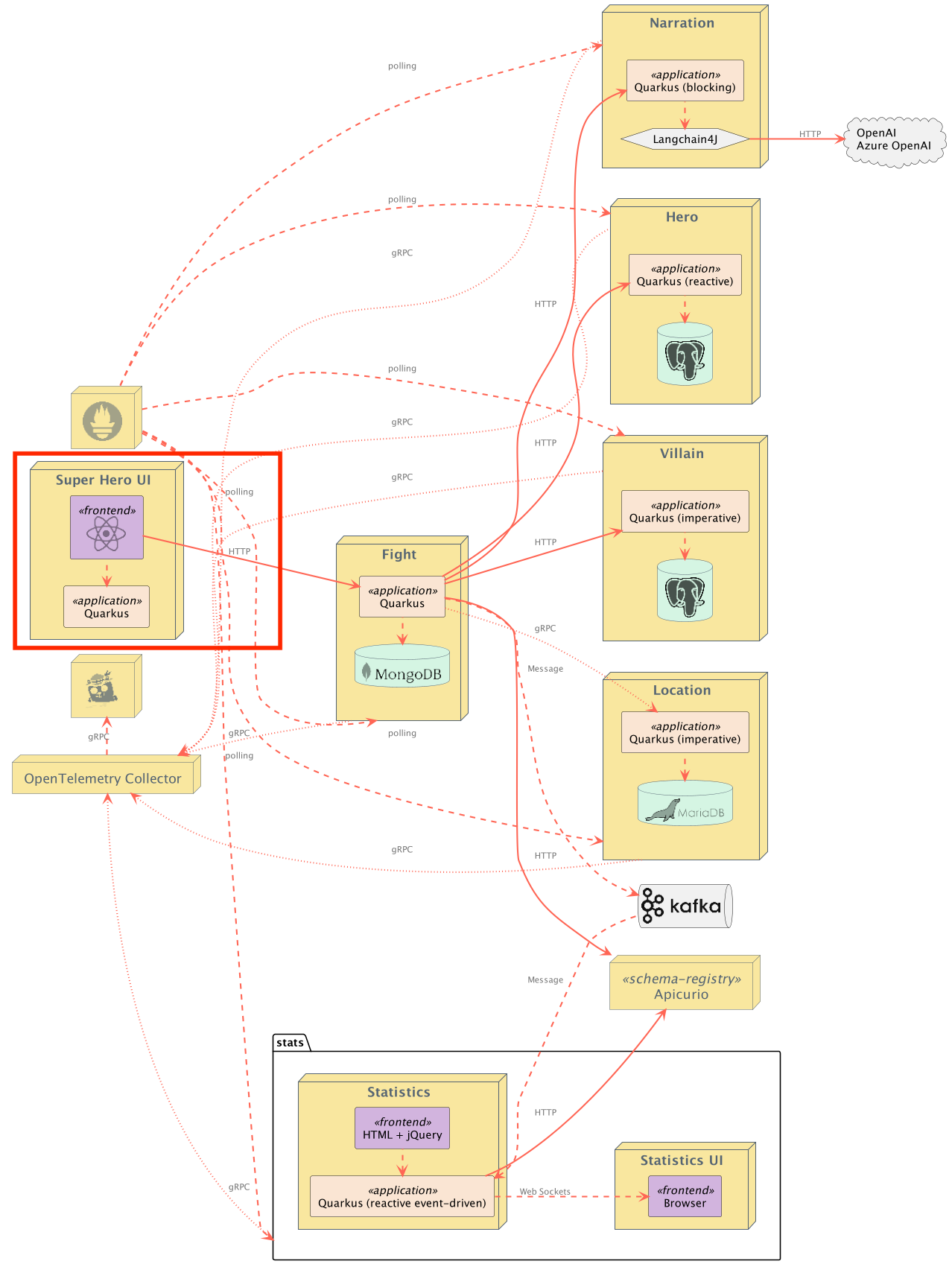
This is the main user interface for the application. The application is a React application served via Quinoa.
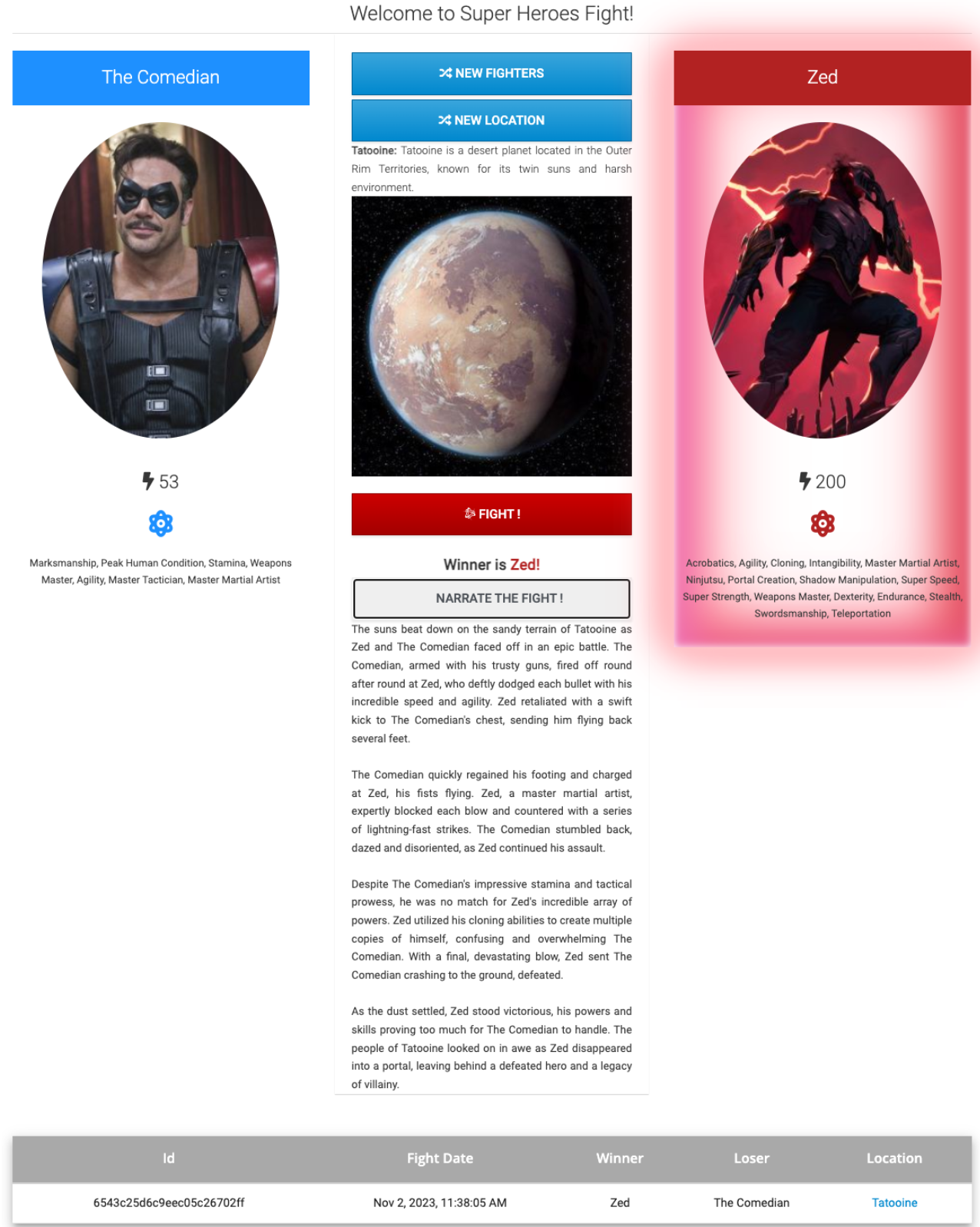
The main UI allows you to pick up one random Hero and Villain by clicking on "New Fighters", then pick a random location for the fight to take place by clicking on "New Location".
Then it's just a matter of clicking on "Fight!" to get them to fight. The table at the bottom shows the list of the previous fights.
Building the Application
Environment variables can be injected into the build using the ngx-env plugin. Remember, these are pulled in at build time and are inserted as string literals in the resulting JS files.
Production builds are served using a Quarkus server. This server serves the compiled React application and an env.js file. This env.js file is generated at startup, and adds a window.APP_CONFIG property that the React application can read from.
Currently, the env.js will expose just the API_BASE_URL that's set at runtime. This will control the base URL to connect to the fights service. The default if unset is http://localhost:8082. You can control the base URL using normal Quarkus configuration, such as setting api.base.url in application.properties or an API_BASE_URL environment variable.
quarkus package
It is also possible to build a native binary, using:
./mvnw -B clean package -DskipTests -Pnative
Local Development
Use the following command:
quarkus dev
This starts both Quarkus and the React hot reloading server at http://localhost:3000. The Quarkus server supplies the env.js file to the Javascript front-end.
The Quarkus server port can be changed in the usual way, with application.properties.
Integration with Microcks
Microcks is an open source tool for API mocking and testing. It allows developers to turn an API contract or Postman Collection into live mocks.
This can be especially useful while developing applications that have downstream dependencies, like the ui-super-heroes application does. The ui-super-heroes application depends on rest-fights.
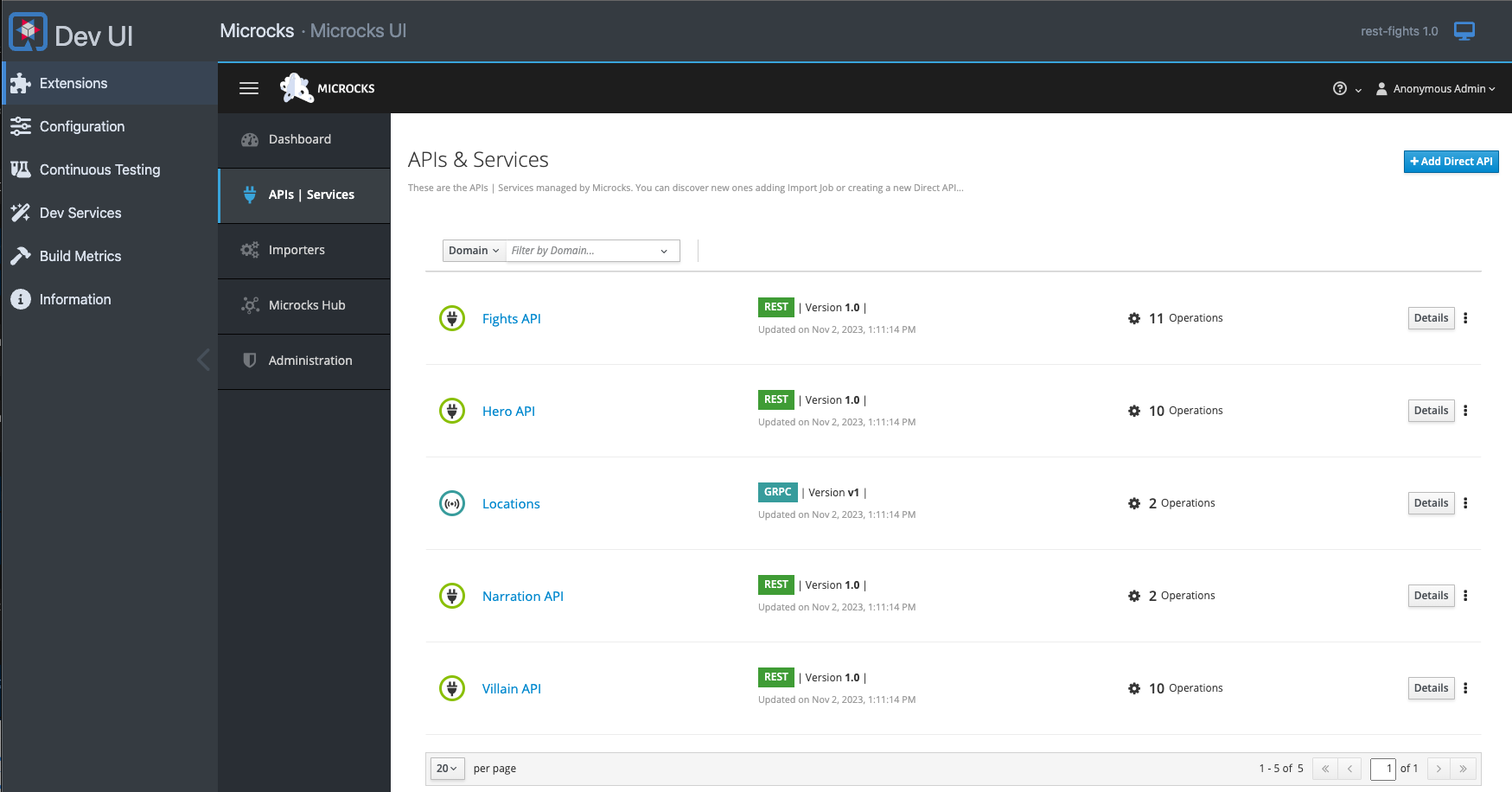
This problem is what the Microcks Quarkus extension solves. This extension has been integrated into ui-super-heroes so that when live coding in dev mode, mock responses from rest-fights will automatically get served.
Furthermore, the Microcks user interface is accessible from the Quarkus Dev UI:
If you wish to disable this functionality, simply add -Dquarkus.profile=no-microcks when you run Quarkus dev mode (via Maven, Gradle, or the Quarkus CLI). In this case, the Microcks dev service will be disabled and the ui-super-heroes application will attempt to make live calls to the downstream services.
Running the Application
As discussed in the Integration with Microcks section, simply running this application in dev mode will get you up and running with default mock responses.
If you want real backend services, follow these instructions:
- Start up all of the downstream services (Heroes Service, Villains Service, Location Service, and Fights Service).
- The Event Statistics Service is optional.
- Follow the steps in the Building the Application section above.
- Start the service using the command
quarkus dev -Dquarkus.profile=no-microcks.- You can also set the environment variable
CALCULATE_API_BASE_URL=trueto have it compute the base URL. Only use this option if the UI url is in the form ofui-super-heroes.somewhere.com. In this instance, settingCALCULATE_API_BASE_URL=truewill replaceui-super-heroesin the URL withrest-fights.
- You can also set the environment variable
There is also a container image available that you can use instead:
docker run -p 8080:8080 -e API_BASE_URL=http://localhost:8082 quay.io/quarkus-super-heroes/ui-super-heroes:latest
Running Locally via Docker Compose
Pre-built images for this application can be found at quay.io/quarkus-super-heroes/ui-super-heroes.
The application can be started outside of docker compose simply with docker run -p 8080:8080 quay.io/quarkus-super-heroes/ui-super-heroes:latest.
If you want to use docker compose, from the quarkus-super-heroes/ui-super-heroes directory run:
docker compose -f deploy/docker-compose/java25.yml up
or
docker compose -f deploy/docker-compose/native.yml up
Once started the application will be exposed at http://localhost:8080.
Deploying to Kubernetes
The application can be deployed to Kubernetes using pre-built images or by deploying directly via the Quarkus Kubernetes Extension.
Using pre-built images
Pre-built images for this application can be found at quay.io/quarkus-super-heroes/ui-super-heroes.
Deployment descriptors for these images are provided in the deploy/k8s directory. There are versions for OpenShift, Minikube, Kubernetes, and Knative.
Note: The Knative variant can be used on any Knative installation that runs on top of Kubernetes or OpenShift. For OpenShift, you need OpenShift Serverless installed from the OpenShift operator catalog. Using Knative has the benefit that services are scaled down to zero replicas when they are not used.
Pick one of the versions of the application from the table below and deploy the appropriate descriptor from the deploy/k8s directory.
| Description | Image Tag | OpenShift Descriptor | Minikube Descriptor | Kubernetes Descriptor | Knative Descriptor |
|---|---|---|---|---|---|
| JVM Java 25 | java25-latest |
java25-openshift.yml |
java25-minikube.yml |
java25-kubernetes.yml |
java25-knative.yml |
| Native | native-latest |
native-openshift.yml |
native-minikube.yml |
native-kubernetes.yml |
native-knative.yml |
The application is exposed outside of the cluster on port 80.
Using Helm
Helm charts for this application are provided in the deploy/helm directory with separate charts per deployment target.
To deploy using Helm (e.g. JVM Java 25 on Kubernetes):
helm install ui-super-heroes deploy/helm/kubernetes/ -f deploy/helm/kubernetes/values-java25.yaml
For native:
helm install ui-super-heroes deploy/helm/kubernetes/ -f deploy/helm/kubernetes/values-native.yaml
Deploying directly via Kubernetes Extensions
Following the deployment section of the Quarkus Kubernetes Extension Guide, you can run one of the following commands to deploy the application and any of its dependencies to your preferred Kubernetes distribution.
Note: For non-OpenShift or minikube Kubernetes variants, you will most likely need to push the image to a container registry by adding the -Dquarkus.container-image.push=true flag, as well as setting the quarkus.container-image.registry, quarkus.container-image.group, and/or the quarkus.container-image.name properties to different values.
| Target Platform | Java Version | Command |
|---|---|---|
| Kubernetes | 25 | ./mvnw clean package -Dquarkus.profile=kubernetes -Dquarkus.kubernetes.deploy=true -DskipTests |
| OpenShift | 25 | ./mvnw clean package -Dquarkus.profile=openshift -Dquarkus.container-image.registry=image-registry.openshift-image-registry.svc:5000 -Dquarkus.container-image.group=$(oc project -q) -Dquarkus.kubernetes.deploy=true -DskipTests |
| Minikube | 25 | ./mvnw clean package -Dquarkus.profile=minikube -Dquarkus.kubernetes.deploy=true -DskipTests |
| Knative | 25 | ./mvnw clean package -Dquarkus.profile=knative -Dquarkus.kubernetes.deploy=true -DskipTests |
| Knative (on OpenShift) | 25 | ./mvnw clean package -Dquarkus.profile=knative-openshift -Dquarkus.container-image.registry=image-registry.openshift-image-registry.svc:5000 -Dquarkus.container-image.group=$(oc project -q) -Dquarkus.kubernetes.deploy=true -DskipTests |
Routing
There are 2 environment variables that can be set on this application to control how the React UI communicates with the rest-fights application:
| Env Var | Default Value | Description |
|---|---|---|
API_BASE_URL |
undefined |
The base URL for the rest-fights application. Set this to a fully qualified URL (i.e. http://www.example.com or http://somehost.com:someport) to define the URL for the rest-fights application. |
CALCULATE_API_BASE_URL |
false on Minikube/Kubernetes. true on OpenShift. |
If true, look at the URL in the browser and replace the ui-super-heroes host name with rest-fights. This is because on OpenShift, each application has its own Route which exposes a unique hostname within the cluster. On Minikube and Kubernetes, an Ingress using different paths is used instead. |