Narration REST API
A blocking HTTP microservice integrating with OpenAI via LangChain4J to narrate fights.
Introduction
This is the Narration REST API microservice. It is a blocking HTTP microservice using the Quarkus LangChain4J extension to integrate with an AI service to generate text narrating a given fight.
The Narration microservice needs to access an AI service to generate the text narrating the fight. The codebase uses OpenAI via the quarkus-langchain4j-openai extension.
Additionally, the service can generate images and image captions from a narration using DALL-E.
This service is implemented using RESTEasy Reactive with blocking endpoints. It uses a contract-first approach: the REST API interface is generated at build time from the OpenAPI specification (src/main/resources/openapi/openapi.yml) using the Quarkiverse OpenAPI Generator Server extension. The OpenAPI spec is the single source of truth for both the generated JAX-RS interface and the Swagger UI documentation.
Additionally, this application favors constructor injection of beans over field injection (i.e. @Inject annotation).
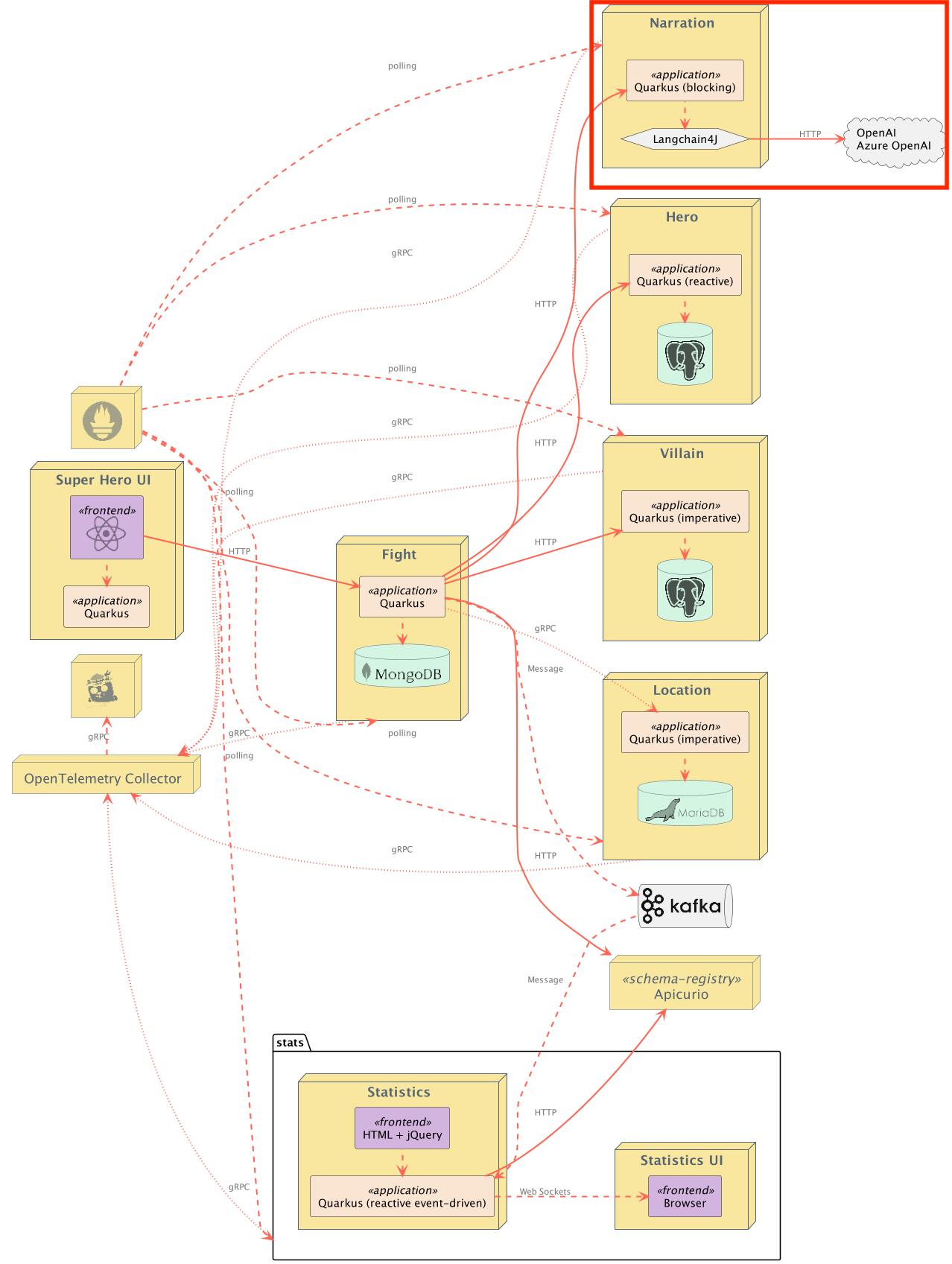
Exposed Endpoints
The following table lists the available REST endpoints. The OpenAPI document for the REST endpoints is also available.
| Path | HTTP method | Response Status | Response Object | Description |
|---|---|---|---|---|
/api/narration |
POST |
200 |
String |
Creates a narration for the passed in Fight request body. |
/api/narration |
POST |
400 |
Invalid Fight |
|
/api/narration/image |
POST |
200 |
FightImage |
Generate an image and caption using DALL-E for a narration |
/api/narration/image |
POST |
400 |
Invalid narration passed in | |
/api/narration/hello |
GET |
200 |
String |
Ping "hello" endpoint |
Contract testing with Pact
Pact is a code-first tool for testing HTTP and message integrations using contract tests. Contract tests assert that inter-application messages conform to a shared understanding that is documented in a contract. Without contract testing, the only way to ensure that applications will work correctly together is by using expensive and brittle integration tests.
Eric Deandrea and Holly Cummins recently spoke about contract testing with Pact and used the Quarkus Superheroes for their demos. Watch the replay and view the slides if you'd like to learn more about contract testing.
The rest-narration application is a Pact Provider, and as such, should run provider verification tests against contracts produced by consumers.
The Pact contract is committed into this application's source tree inside the src/test/resources/pacts directory. In a realistic scenario, if a broker wasn't used, the consumer's CI/CD would commit the contracts into this repository's source control.
The Pact tests use the Quarkus Pact extension. This extension is recommended to give the best user experience and ensure compatibility.
Running the Application
The application runs on port 8087 (defined by quarkus.http.port in application.properties).
From the quarkus-super-heroes/rest-narration directory, simply run ./mvnw quarkus:dev to run Quarkus Dev Mode, or running quarkus dev using the Quarkus CLI. The application will be exposed at http://localhost:8087 and the Quarkus Dev UI will be exposed at http://localhost:8087/q/dev.
Integration with OpenAI Providers
The application uses OpenAI via the quarkus-langchain4j-openai extension. This integration requires creating resources on OpenAI in order to work properly.
CAUTION: Using OpenAI may not be a free resource for you, so please understand this! Unless configured otherwise, this application does NOT communicate with any external service. Instead, by default, it just returns a default narration.
Making live calls to OpenAI Providers
Because of this integration and our goal to keep this application working at all times, all the OpenAI integration is disabled by default. A default narration will be provided. In dev mode, the Quarkus WireMock extension serves a default response.
If you'd like to make live calls to OpenAI, set the -Dquarkus.profile=openai property. This will turn off the Quarkus WireMock functionality and set the application back up to talk to OpenAI. You still need to specify your OpenAI API key, though.
Here's a quick look at what the UI would look like with this integration turned on:
Dev Mode:
quarkus dev --clean -Dquarkus.profile=openai -Dquarkus.langchain4j.openai.api-key=my-key
Running via java -jar:
./mvnw clean package -DskipTests

java -Dquarkus.profile=openai -Dquarkus.langchain4j.openai.api-key=my-key -jar target/quarkus-app/quarkus-run.jar
Note: The application still has resiliency built-in in case of failures.
To enable the OpenAI integration the following properties must be set, either in application.properties or as environment variables:
OpenAI properties
| Description | Environment Variable | Java Property | Value |
|---|---|---|---|
| OpenAI API Key | QUARKUS_LANGCHAIN4J_OPENAI_API_KEY |
quarkus.langchain4j.openai.api-key |
Your OpenAI API Key |
Running Locally via Docker Compose
Pre-built images for this application can be found at quay.io/quarkus-super-heroes/rest-narration.
Pick one of the versions of the application from the table below and execute the appropriate docker compose command from the quarkus-super-heroes/rest-narration directory.
| Description | Image Tag | Docker Compose Run Command |
|---|---|---|
| JVM Java 25 | java25-latest |
docker compose -f deploy/docker-compose/java25.yml up --remove-orphans |
| Native | native-latest |
docker compose -f deploy/docker-compose/native.yml up --remove-orphans |
Important: The running application will NOT make live calls to an OpenAI provider. You will need to modify the descriptors accordingly to have the application make live calls to an OpenAI provider.
These Docker Compose files are meant for standing up this application only. Once started the application will be exposed at http://localhost:8087.
Deploying to Kubernetes
The application can be deployed to Kubernetes using pre-built images or by deploying directly via the Quarkus Kubernetes Extension.
Using pre-built images
Pre-built images for this application can be found at quay.io/quarkus-super-heroes/rest-narration.
Deployment descriptors for these images are provided in the deploy/k8s directory. There are versions for OpenShift, Minikube, Kubernetes, and Knative.
Note: The Knative variant can be used on any Knative installation that runs on top of Kubernetes or OpenShift. For OpenShift, you need OpenShift Serverless installed from the OpenShift operator catalog. Using Knative has the benefit that services are scaled down to zero replicas when they are not used.
Pick one of the versions of the application from the table below and deploy the appropriate descriptor from the deploy/k8s directory.
| Description | Image Tag | OpenShift Descriptor | Minikube Descriptor | Kubernetes Descriptor | Knative Descriptor |
|---|---|---|---|---|---|
| JVM Java 25 | java25-latest |
java25-openshift.yml |
java25-minikube.yml |
java25-kubernetes.yml |
java25-knative.yml |
| Native | native-latest |
native-openshift.yml |
native-minikube.yml |
native-kubernetes.yml |
native-knative.yml |
Important: As with the Docker Compose descriptors above, the running application will NOT make live calls to an OpenAI provider. You will need to modify the descriptors accordingly to have the application make live calls to an OpenAI provider.
The application is exposed outside of the cluster on port 80.
Using Helm
Helm charts for this application are provided in the deploy/helm directory with separate charts per deployment target.
To deploy using Helm (e.g. JVM Java 25 on Kubernetes):
helm install rest-narration deploy/helm/kubernetes/ -f deploy/helm/kubernetes/values-java25.yaml
For native:
helm install rest-narration deploy/helm/kubernetes/ -f deploy/helm/kubernetes/values-native.yaml
Deploying directly via Kubernetes Extensions
Following the deployment section of the Quarkus Kubernetes Extension Guide, you can run one of the following commands to deploy the application and any of its dependencies to your preferred Kubernetes distribution.
Note: For non-OpenShift or minikube Kubernetes variants, you will most likely need to push the image to a container registry by adding the -Dquarkus.container-image.push=true flag, as well as setting the quarkus.container-image.registry, quarkus.container-image.group, and/or the quarkus.container-image.name properties to different values.
| Target Platform | Java Version | Command |
|---|---|---|
| Kubernetes | 25 | ./mvnw clean package -Dquarkus.profile=kubernetes -Dquarkus.kubernetes.deploy=true -DskipTests |
| OpenShift | 25 | ./mvnw clean package -Dquarkus.profile=openshift -Dquarkus.container-image.registry=image-registry.openshift-image-registry.svc:5000 -Dquarkus.container-image.group=$(oc project -q) -Dquarkus.kubernetes.deploy=true -DskipTests |
| Minikube | 25 | ./mvnw clean package -Dquarkus.profile=minikube -Dquarkus.kubernetes.deploy=true -DskipTests |
| Knative | 25 | ./mvnw clean package -Dquarkus.profile=knative -Dquarkus.kubernetes.deploy=true -DskipTests |
| Knative (on OpenShift) | 25 | ./mvnw clean package -Dquarkus.profile=knative-openshift -Dquarkus.container-image.registry=image-registry.openshift-image-registry.svc:5000 -Dquarkus.container-image.group=$(oc project -q) -Dquarkus.kubernetes.deploy=true -DskipTests |