Hero REST API
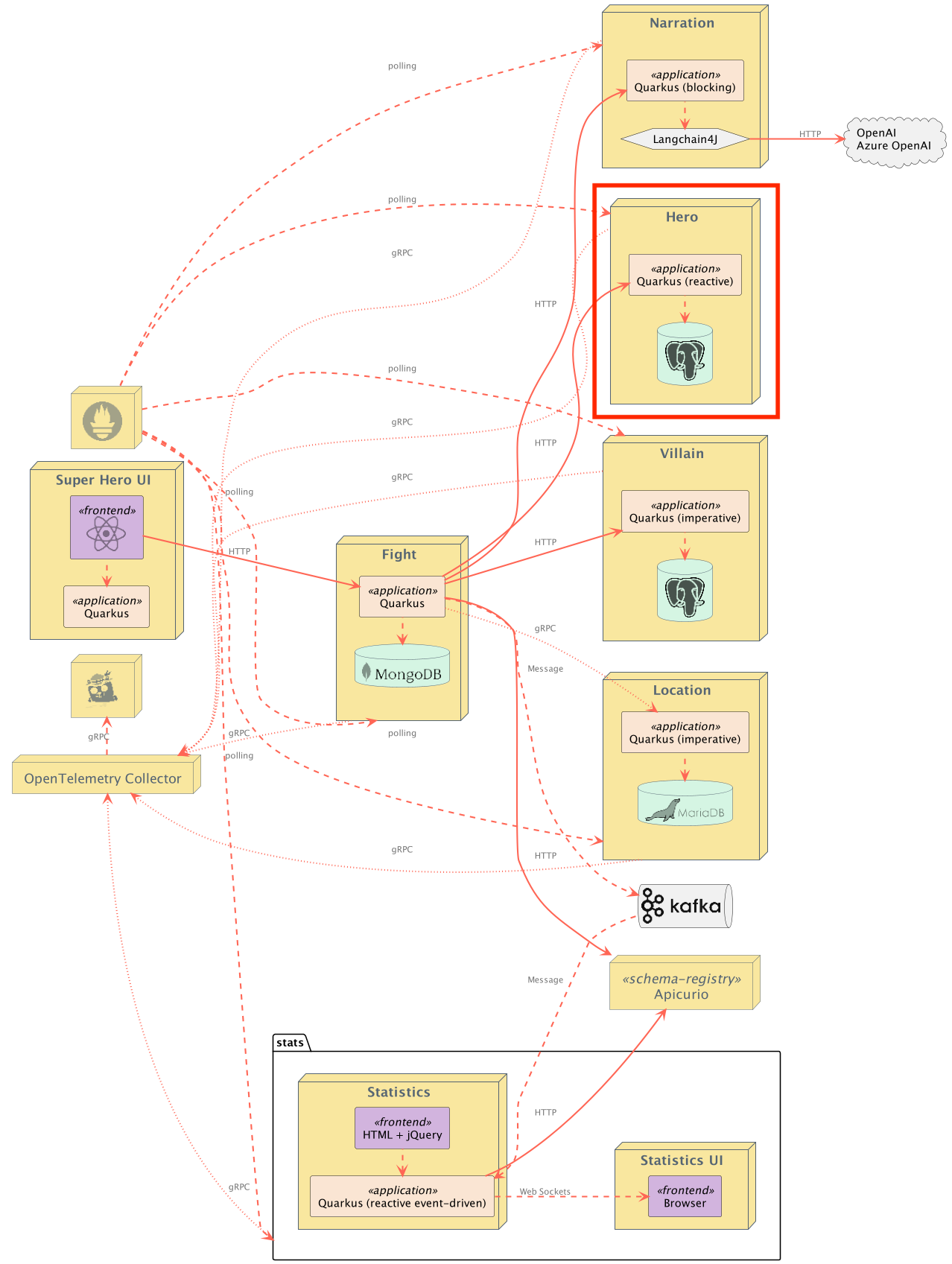
A reactive HTTP microservice exposing CRUD operations on Heroes, stored in a PostgreSQL database.
Introduction
This is the Hero REST API microservice. It is a reactive HTTP microservice exposing CRUD operations on Heroes. Hero information is stored in a PostgreSQL database. This service is implemented using RESTEasy Reactive with reactive endpoints and Quarkus Hibernate Reactive with Panache's repository pattern.
This service uses a contract-first approach: the REST API interface is generated at build time from the OpenAPI specification (src/main/resources/openapi/openapi.yml) using the Quarkiverse OpenAPI Generator Server extension. The OpenAPI spec is the single source of truth for both the generated JAX-RS interface and the Swagger UI documentation.
Additionally, this application favors constructor injection of beans over field injection (i.e. @Inject annotation).
Exposed Endpoints
The following table lists the available REST endpoints. The OpenAPI document for the REST endpoints is also available.
| Path | HTTP method | Query Param(s) | Response Status | Response Object | Description |
|---|---|---|---|---|---|
/api/heroes |
GET |
name_filter |
200 |
List<Hero> |
All Heroes. Empty array ([]) if none. Optional name_filter query parameter for filtering results by name (case-insensitive). |
/api/heroes |
POST |
201 |
New Hero created. Location header contains URL to retrieve Hero |
||
/api/heroes |
POST |
400 |
Invalid Hero passed in request body (or no request body found) | ||
/api/heroes |
DELETE |
204 |
Deletes all Heroes | ||
/api/heroes |
PUT |
201 |
Replaces all heroes with the passed-in heroes. Location header contains URL to retrieve all Heroes |
||
/api/heroes |
PUT |
400 |
Invalid Heros passed in request body (or no request body found) |
||
/api/heroes/random |
GET |
200 |
Hero |
Random Hero | |
/api/heroes/random |
GET |
404 |
No Hero found | ||
/api/heroes/{id} |
GET |
200 |
Hero |
Hero with id == {id} |
|
/api/heroes/{id} |
GET |
404 |
No Hero with id == {id} found |
||
/api/heroes/{id} |
PUT |
204 |
Completely replaces a Hero | ||
/api/heroes/{id} |
PUT |
400 |
Invalid Hero passed in request body (or no request body found) | ||
/api/heroes/{id} |
PUT |
404 |
No Hero with id == {id} found |
||
/api/heroes/{id} |
PATCH |
200 |
Hero |
Partially updates a Hero. Returns the complete Hero. | |
/api/heroes/{id} |
PATCH |
400 |
Invalid Hero passed in request body (or no request body found) | ||
/api/heroes/{id} |
PATCH |
404 |
No Hero with id == {id} found |
||
/api/heroes/{id} |
DELETE |
204 |
Deletes Hero with id == {id} |
||
/api/heroes/hello |
GET |
200 |
String |
Ping "hello" endpoint |
Contract testing with Pact
Pact is a code-first tool for testing HTTP and message integrations using contract tests. Contract tests assert that inter-application messages conform to a shared understanding that is documented in a contract. Without contract testing, the only way to ensure that applications will work correctly together is by using expensive and brittle integration tests.
Eric Deandrea and Holly Cummins recently spoke about contract testing with Pact and used the Quarkus Superheroes for their demos. Watch the replay and view the slides if you'd like to learn more about contract testing.
The rest-heroes application is a Pact Provider, and as such, should run provider verification tests against contracts produced by consumers.
Contracts generally should be hosted in a Pact Broker and then automatically discovered in the provider verification tests. One of the main goals of the Superheroes application is to be super simple and just "work" by anyone who may clone the repo. Therefore, the Pact contract is committed into the application's source tree inside the src/test/resources/pacts directory. In a realistic scenario, if a broker wasn't used, the consumer's CI/CD would commit the contracts into this repository's source control.
The Pact tests use the Quarkus Pact extension. This extension is recommended to give the best user experience and ensure compatibility.
End-to-End UI testing with Playwright
The application UI is tested using Playwright. We are using the Quarkus Playwright extension for this.
During tests, the UI is loaded in a headless browser and interactions are tested during unit and integration tests.
Benchmarking with Hyperfoil
There are some Hyperfoil benchmarks available for this service. See the hyperfoil directory in the source repository for more details.
Running the Application
The application runs on port 8083 (defined by quarkus.http.port in application.yml).
From the quarkus-super-heroes/rest-heroes directory, simply run ./mvnw quarkus:dev to run Quarkus Dev Mode, or running quarkus dev using the Quarkus CLI. The application will be exposed at http://localhost:8083 and the Quarkus Dev UI will be exposed at http://localhost:8083/q/dev.
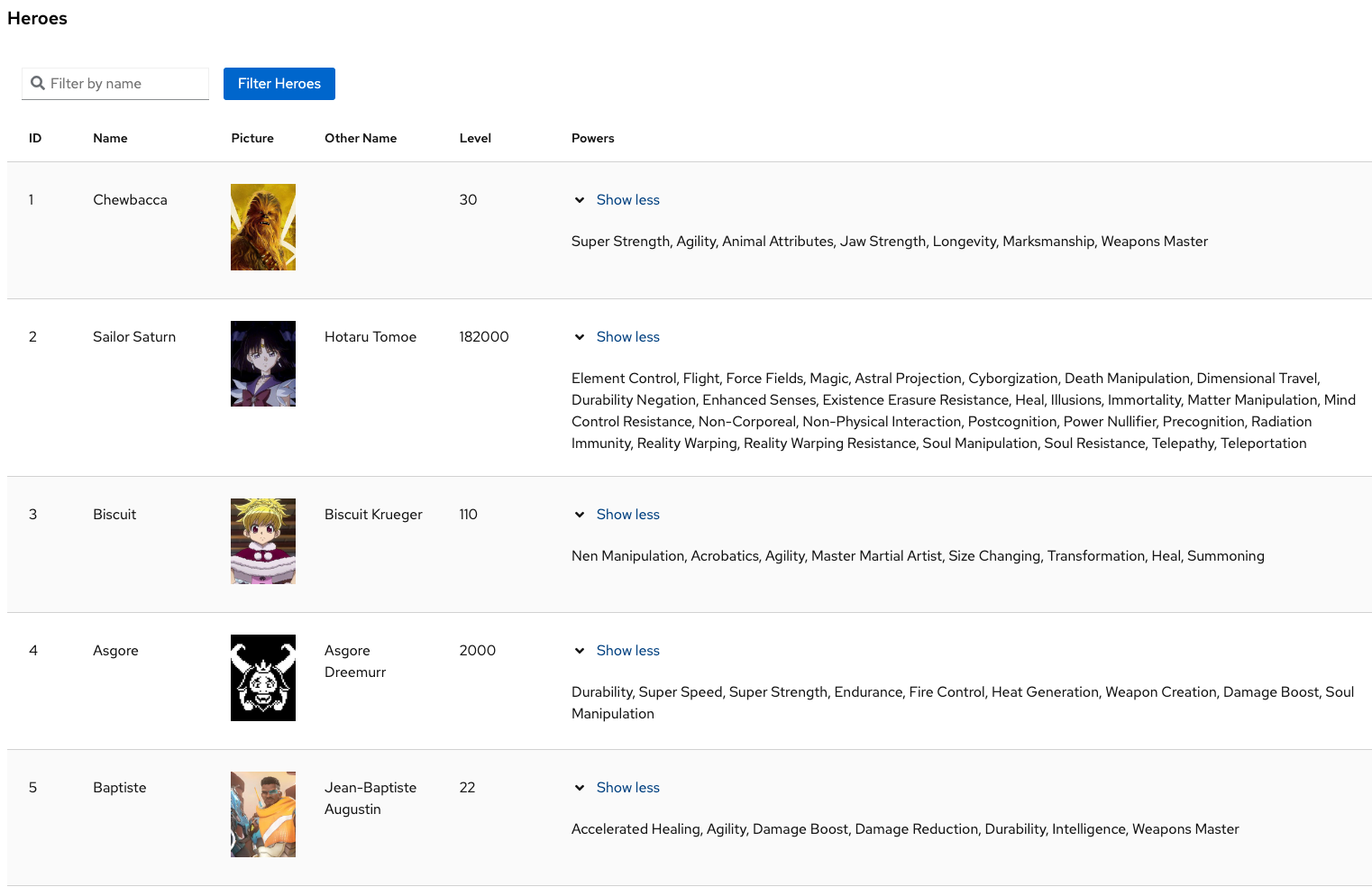
The application also contains a simple UI, showing the list of Heroes currently stored. This UI is available at the root path (http://localhost:8083). The UI is built using the Quarkus Qute templating engine.
NOTE: Running the application outside of Quarkus dev mode requires standing up a PostgreSQL instance and binding it to the app. By default, the application is configured with the following:
| Description | Environment Variable | Java Property | Value |
|---|---|---|---|
| Database URL | QUARKUS_DATASOURCE_REACTIVE_URL |
quarkus.datasource.reactive.url |
postgresql://localhost:5432/heroes_database |
| Database username | QUARKUS_DATASOURCE_USERNAME |
quarkus.datasource.username |
superman |
| Database password | QUARKUS_DATASOURCE_PASSWORD |
quarkus.datasource.password |
superman |
Running Locally via Docker Compose
Pre-built images for this application can be found at quay.io/quarkus-super-heroes/rest-heroes.
Pick one of the versions of the application from the table below and execute the appropriate docker compose command from the quarkus-super-heroes/rest-heroes directory.
NOTE: You may see errors as the applications start up. This may happen if an application completes startup before one of its required services (i.e. database, kafka, etc). This is fine. Once everything completes startup things will work fine.
| Description | Image Tag | Docker Compose Run Command |
|---|---|---|
| JVM Java 25 | java25-latest |
docker compose -f deploy/docker-compose/java25.yml up --remove-orphans |
| Native | native-latest |
docker compose -f deploy/docker-compose/native.yml up --remove-orphans |
These Docker Compose files are meant for standing up this application and the required database only. If you want to stand up the entire system, follow the instructions in the main project README.
Once started the application will be exposed at http://localhost:8083.
Deploying to Kubernetes
The application can be deployed to Kubernetes using pre-built images or by deploying directly via the Quarkus Kubernetes Extension. Each of these is discussed below.
Using pre-built images
Pre-built images for this application can be found at quay.io/quarkus-super-heroes/rest-heroes.
Deployment descriptors for these images are provided in the deploy/k8s directory. There are versions for OpenShift, Minikube, Kubernetes, and Knative.
NOTE: The Knative variant can be used on any Knative installation that runs on top of Kubernetes or OpenShift. For OpenShift, you need OpenShift Serverless installed from the OpenShift operator catalog. Using Knative has the benefit that services are scaled down to zero replicas when they are not used.
Pick one of the versions of the application from the table below and deploy the appropriate descriptor from the deploy/k8s directory.
| Description | Image Tag | OpenShift Descriptor | Minikube Descriptor | Kubernetes Descriptor | Knative Descriptor |
|---|---|---|---|---|---|
| JVM Java 25 | java25-latest |
java25-openshift.yml |
java25-minikube.yml |
java25-kubernetes.yml |
java25-knative.yml |
| Native | native-latest |
native-openshift.yml |
native-minikube.yml |
native-kubernetes.yml |
native-knative.yml |
The application is exposed outside of the cluster on port 80.
These are only the descriptors for this application and the required database only. If you want to deploy the entire system, follow the instructions in the main project README.
Using Helm
Helm charts for this application are provided in the deploy/helm directory with separate charts per deployment target.
To deploy using Helm (e.g. JVM Java 25 on Kubernetes):
helm install rest-heroes deploy/helm/kubernetes/ -f deploy/helm/kubernetes/values-java25.yaml
For native:
helm install rest-heroes deploy/helm/kubernetes/ -f deploy/helm/kubernetes/values-native.yaml
Deploying directly via Kubernetes Extensions
Following the deployment section of the Quarkus Kubernetes Extension Guide (or the deployment section of the Quarkus OpenShift Extension Guide if deploying to OpenShift), you can run one of the following commands to deploy the application and any of its dependencies to your preferred Kubernetes distribution.
NOTE: For non-OpenShift or minikube Kubernetes variants, you will most likely need to push the image to a container registry by adding the -Dquarkus.container-image.push=true flag, as well as setting the quarkus.container-image.registry, quarkus.container-image.group, and/or the quarkus.container-image.name properties to different values.
| Target Platform | Java Version | Command |
|---|---|---|
| Kubernetes | 25 | ./mvnw clean package -Dquarkus.profile=kubernetes -Dquarkus.kubernetes.deploy=true -DskipTests |
| OpenShift | 25 | ./mvnw clean package -Dquarkus.profile=openshift -Dquarkus.container-image.registry=image-registry.openshift-image-registry.svc:5000 -Dquarkus.container-image.group=$(oc project -q) -Dquarkus.kubernetes.deploy=true -DskipTests |
| Minikube | 25 | ./mvnw clean package -Dquarkus.profile=minikube -Dquarkus.kubernetes.deploy=true -DskipTests |
| Knative | 25 | ./mvnw clean package -Dquarkus.profile=knative -Dquarkus.kubernetes.deploy=true -DskipTests |
| Knative (on OpenShift) | 25 | ./mvnw clean package -Dquarkus.profile=knative-openshift -Dquarkus.container-image.registry=image-registry.openshift-image-registry.svc:5000 -Dquarkus.container-image.group=$(oc project -q) -Dquarkus.kubernetes.deploy=true -DskipTests |
You may need to adjust other configuration options as well (see Quarkus Kubernetes Extension configuration options and Quarkus OpenShift Extension configuration options).