Fight REST API
A reactive HTTP microservice orchestrating fights between Heroes and Villains, with resilience patterns, service discovery, and Kafka integration.
Introduction
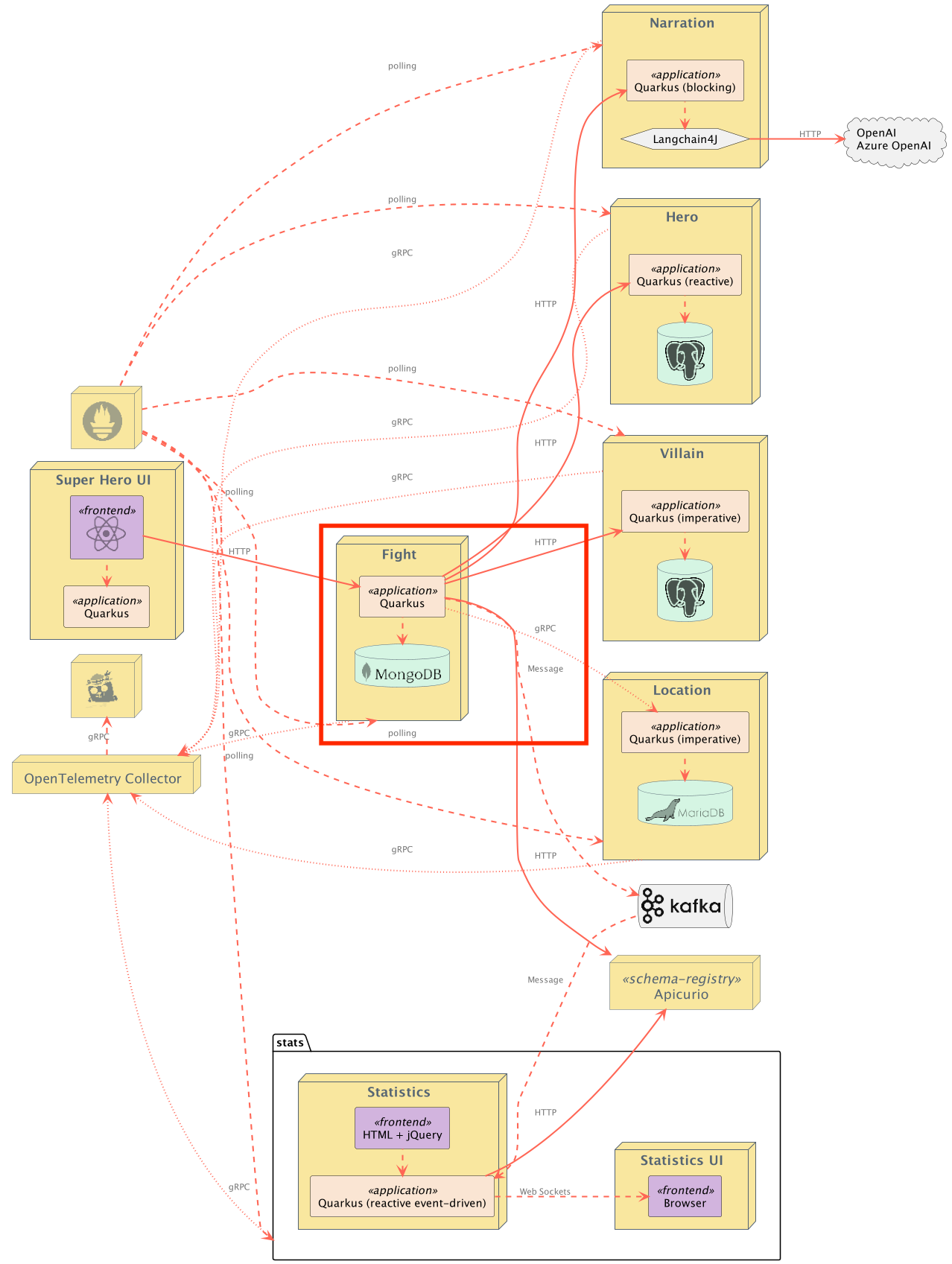
This is the Fight REST API microservice. It is a reactive HTTP microservice exposing an API for performing fights between Heroes and Villains, in a location obtained from the Location Service. Once a winner has been determined, the Narration service creates a narration of the fight.
Each fight and its corresponding narration is then persisted into a MongoDB database and can be retrieved via the REST API. This service is implemented using RESTEasy Reactive with reactive endpoints and Quarkus MongoDB Reactive with Panache's active record pattern.
This service uses a contract-first approach: the REST API interface is generated at build time from the OpenAPI specification (src/main/resources/openapi/openapi.yml) using the Quarkiverse OpenAPI Generator Server extension. The OpenAPI spec is the single source of truth for both the generated JAX-RS interface and the Swagger UI documentation.
Fight messages are also published on an Apache Kafka topic called fights. The event-statistics service listens for these events. Messages are stored in Apache Avro format and the fight schema is automatically registered in the Apicurio Schema Registry. This all uses built-in extensions from Quarkus.
Exposed Endpoints
The following table lists the available REST endpoints. The OpenAPI document for the REST endpoints is also available.
| Path | HTTP method | Response Status | Response Object | Description |
|---|---|---|---|---|
/api/fights |
GET |
200 |
List<Fight> |
No query params: all fights. Optional page (zero-based) and size (default 20, max 100): paginated fights, newest first. Empty array ([]) if none or page beyond data. |
/api/fights |
POST |
200 |
Fight |
Performs a fight. |
/api/fights |
POST |
400 |
Invalid FightRequest passed in request body (or no request body found) |
|
/api/fights/randomfighters |
GET |
200 |
Fighters |
Finds random fighters |
/api/fights/randomlocation |
GET |
200 |
FightLocation |
Finds a random fight location |
/api/fights/{id} |
GET |
200 |
Fight |
Fight with id == {id} |
/api/fights/{id} |
GET |
404 |
No Fight with id == {id} found |
|
/api/fights/narrate |
POST |
200 |
String |
Performs a narration of the given FightToNarrate |
/api/fights/narrate |
POST |
400 |
String |
Invalid FightToNarrate passed in request body (or no request body found) |
/api/fights/narrate/image |
POST |
200 |
FightImage |
Generate an image and caption using DALL-E for a narration |
/api/fights/narrate/image |
POST |
400 |
Invalid narration passed in | |
/api/fights/hello/heroes |
GET |
200 |
String |
Invokes the "hello" endpoint of the Heroes microservice |
/api/fights/hello/villains |
GET |
200 |
String |
Invokes the "hello" endpoint of the Villains microservice |
/api/fights/hello/narration |
GET |
200 |
String |
Invokes the "hello" endpoint of the Narration microservice |
/api/fights/hello/locations |
GET |
200 |
String |
Invokes the "hello" endpoint of the Location microservice |
Configuration
The FightConfig class stores all the application-specific configuration that can be overridden at runtime.
Resiliency
Timeouts
The FightService class uses timeouts from SmallRye Fault Tolerance to protect against calls to the downstream Hero, Villain, Narration, and Location services.
Fallbacks
The FightService class uses fallbacks from SmallRye Fault Tolerance to protect against calls to the downstream Hero, Villain, Narration, and Location services.
Retries
Retry logic to the downstream Hero, Villain, Narration, and Location services is implemented in the clients for each service.
Hero Client
The HeroRestClient is implemented using the reactive rest client. All of its configuration can be found in application.properties under the quarkus.rest-client.hero-client key. This client is not exposed outside of the io.quarkus.sample.superheroes.fight.client package.
The HeroClient class wraps the HeroRestClient and adds some resiliency to it:
- The downstream Hero service returns a
404if no randomHerois found.HeroClienthandles this case and simulates the service returning nothing. - In the event the downstream Hero service returns an error,
HeroClientadds 3 retries with a 200ms delay between each retry.
Villain Client
The VillainClient is implemented using the JAX-RS client API with the RESTEasy Reactive client. All of its configuration can be found in application.properties under the fight.villain.client-base-url key.
- The downstream Villain service returns a
404if no randomVillainis found.VillainClienthandles this case and simulates the service returning nothing. - In the event the downstream Villain service returns an error,
VillainClientadds 3 retries with a 200ms delay between each retry.
Narration Client
The NarrationClient is implemented using the reactive rest client. All of its configuration can be found in application.properties under the quarkus.rest-client.narration-client key.
Location Client
The LocationClient is implemented using the Quarkus gRPC client. All of its configuration can be found in application.properties under the quarkus.grpc.clients.locations key.
Service Discovery and Client Load Balancing
The fight service implements service discovery and client-side load balancing when making downstream calls to the rest-heroes, rest-villains, and rest-narration services. The service discovery is implemented in Quarkus using SmallRye Stork.
Stork integrates directly with the Quarkus REST Client Reactive. This means that there is no additional code needed in order to take advantage of Stork's service discovery and client-side load balancing.
You could disable Stork completely for the HeroRestClient by setting quarkus.rest-client.hero-client.url to any non-Stork URL (i.e. something that doesn't start with stork://). Similarly, you could disable Stork completely for the VillainClient by setting fight.villain.client-base-url to any non-Stork URL or for the NarrationClient by setting quarkus.rest-client.narration-client.url to any non-Stork URL.
Service Discovery
In local development mode, as well as when running via Docker Compose, SmallRye Stork is configured using static list discovery. In this mode, the downstream URLs are statically defined in an address list. In application.properties, see the quarkus.stork.hero-service.service-discovery.address-list, quarkus.stork.villain-service.service-discovery.address-list, and quarkus.stork.narration-service.service-discovery.address-list properties.
When running in Kubernetes, Stork is configured to use the Kubernetes Service Discovery. In this mode, Stork will read the Kubernetes Services for the rest-heroes, rest-villains, and rest-narration services to obtain the instance information. Additionally, the instance information has been configured to refresh every minute. See the rest-fights-config ConfigMap in the Kubernetes deployment descriptors. Look for the quarkus.stork.* properties within the various ConfigMaps.
All of the other Stork service discovery mechanisms (Consul and Eureka) can be used simply by updating the configuration appropriately according to the Stork documentation.
Client-Side Load Balancing
In all cases, the default load balancing algorithm used is round robin. All of the other load balancing algorithms (random, least requests, least response time, and power of two choices) are available on the application's classpath, so feel free to play around with them by updating the configuration appropriately according to the Stork documentation.
Testing
This application has a full suite of tests, including an integration test suite.
- The test suite uses Wiremock for mocking http calls to the downstream Hero, Villain, and Narration services.
- The test suite configures the application to use the in-memory connector from SmallRye Reactive Messaging for verifying interactions with Kafka.
- The integration test suite uses Quarkus Dev Services to interact with a Kafka instance so messages placed onto the Kafka broker by the application can be verified.
Contract testing with Pact
Pact is a code-first tool for testing HTTP and message integrations using contract tests. Contract tests assert that inter-application messages conform to a shared understanding that is documented in a contract. Without contract testing, the only way to ensure that applications will work correctly together is by using expensive and brittle integration tests.
Eric Deandrea and Holly Cummins recently spoke about contract testing with Pact and used the Quarkus Superheroes for their demos. Watch the replay and view the slides if you'd like to learn more about contract testing.
The rest-fights application is both a Pact Consumer and a Pact Provider. As a Consumer, it should be responsible for defining the contracts between itself and its providers (rest-heroes, rest-villains, rest-narration, and grpc-locations). As a Provider, it should run provider verification tests against contracts produced by consumers.
The consumer contract tests generate the Pact contract files for each downstream service while also providing mock instances of the rest-heroes, rest-villains, rest-narration, and grpc-locations providers.
Note: The grpc-locations service uses gRPC/protobuf and not REST, therefore the consumer contract tests between rest-fights and grpc-locations use the Pact protobuf plugin. There is no installation necessary. When the tests execute the plugin will be automatically installed.
The contracts are committed into the provider's version control simply for ease of use and reproducibility. The consumer contract tests and provider verification tests are executed during this project's CI/CD processes. They run against any pull requests and any commits back to the main branch.
The Pact tests use the Quarkus Pact extension. This extension is recommended to give the best user experience and ensure compatibility.
Integration with Microcks
Microcks is an open source tool for API mocking and testing. It allows developers to turn an API contract or Postman Collection into live mocks.
This can be especially useful while developing applications that have downstream dependencies, like the rest-fights application does. The rest-fights application depends on rest-heroes, rest-villains, rest-narration, and grpc-locations. Due to the resiliency built into rest-fights, the rest-fights application can function without the downstream dependencies. However, it would be nice to be able to live code in rest-fights and have mock data get served to rest-fights.
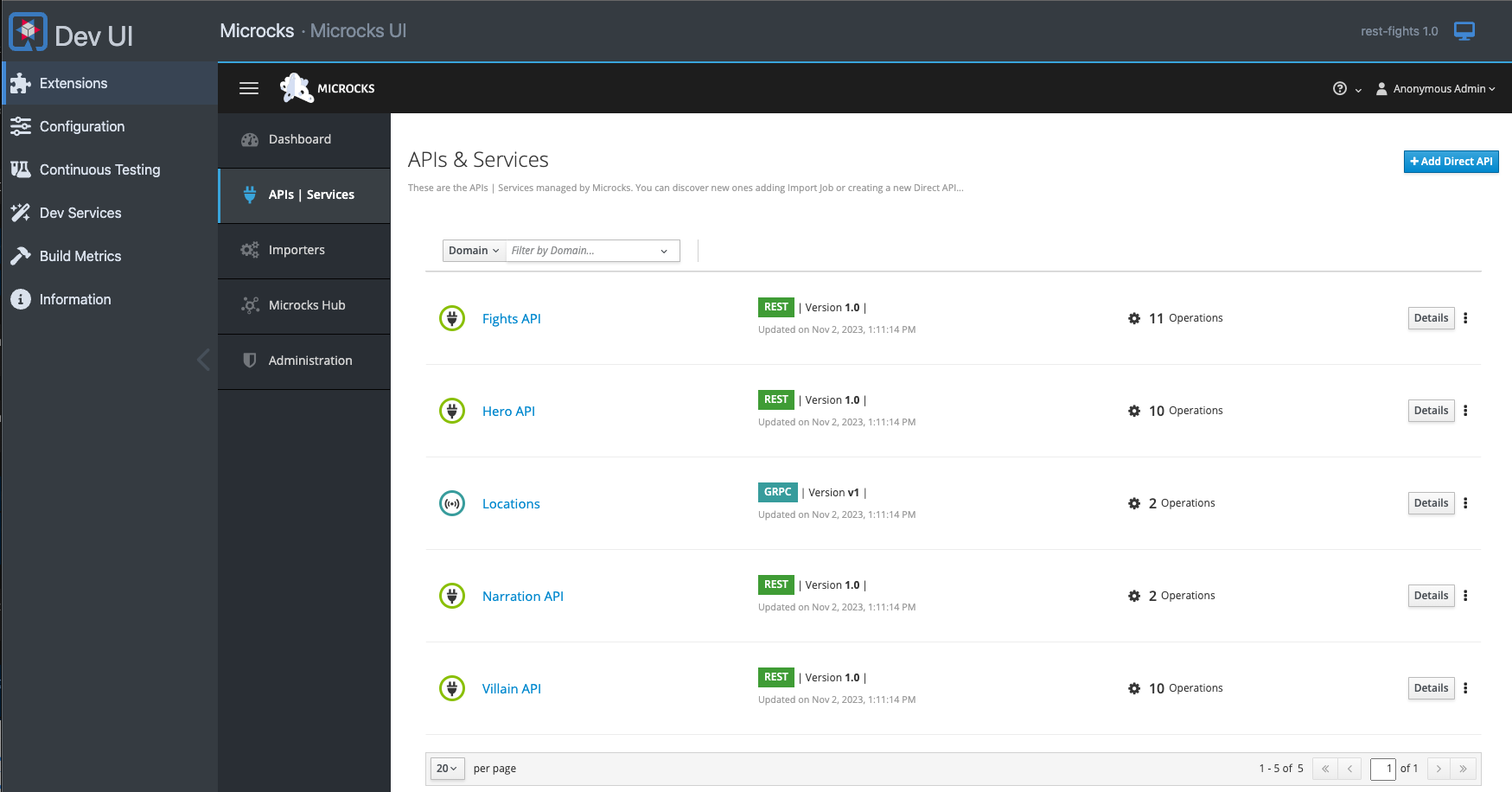
This problem is what the Microcks Quarkus extension solves. This extension has been integrated into rest-fights so that when live coding in dev mode, mock responses from rest-heroes, rest-villains, rest-narration, and grpc-locations will automatically get served.
Furthermore, the Microcks user interface is accessible from the Quarkus Dev UI:
If you wish to disable this functionality, simply add -Dquarkus.profile=no-microcks when you run Quarkus dev mode (via Maven, Gradle, or the Quarkus CLI). In this case, the Microcks dev service will be disabled and the rest-fights application will attempt to make live calls to the downstream services.
Benchmarking with Hyperfoil
There are some Hyperfoil benchmarks available for this service. See the benchmarks directory for more details.
Running the Application
First you need to start up all of the downstream services (Heroes Service, Villains Service, and Location Service - the Narration Service and Event Statistics Service are optional).
The application runs on port 8082 (defined by quarkus.http.port in application.properties).
From the quarkus-super-heroes/rest-fights directory, simply run ./mvnw quarkus:dev to run Quarkus Dev Mode, or running quarkus dev using the Quarkus CLI. The application will be exposed at http://localhost:8082 and the Quarkus Dev UI will be exposed at http://localhost:8082/q/dev. Quarkus Dev Services will ensure the MongoDB instance, an Apache Kafka instance, and an Apicurio Schema Registry are all started and configured.
Note: Running the application outside of Quarkus Dev Mode requires standing up a MongoDB instance, an Apache Kafka instance, and an Apicurio Schema Registry and binding them to the app.
Furthermore, since this service also communicates with additional downstream services (rest-heroes, rest-villains, and rest-narration), those would need to be stood up as well, although this service does have fallbacks in case those other services aren't available.
By default, the application is configured with the following:
| Description | Environment Variable | Java Property | Value |
|---|---|---|---|
| Database Host | QUARKUS_MONGODB_HOSTS |
quarkus.mongodb.hosts |
localhost:27021 |
| Database username | QUARKUS_MONGODB_CREDENTIALS_USERNAME |
quarkus.mongodb.credentials.username |
superfight |
| Database password | QUARKUS_MONGODB_CREDENTIALS_PASSWORD |
quarkus.mongodb.credentials.password |
superfight |
| Kafka Bootstrap servers | KAFKA_BOOTSTRAP_SERVERS |
kafka.bootstrap.servers |
PLAINTEXT://localhost:9092 |
| Apicurio Schema Registry | MP_MESSAGING_CONNECTOR_SMALLRYE_KAFKA_APICURIO_REGISTRY_URL |
mp.messaging.connector.smallrye-kafka.apicurio.registry.url |
http://localhost:8086/apis/registry/v2 |
| Heroes Service URL | QUARKUS_REST_CLIENT_HERO_CLIENT_URL |
quarkus.rest-client.hero-client.url |
stork://hero-service |
| Villains Service URL | FIGHT_VILLAIN_CLIENT_BASE_URL |
fight.villain.client-base-url |
stork://villain-service |
| Narration Service URL | QUARKUS_REST_CLIENT_NARRATION_CLIENT_URL |
quarkus.rest-client.narration-client.url |
stork://narration-service |
| Location Service Host | QUARKUS_GRPC_CLIENTS_LOCATIONS_HOST |
quarkus.grpc.clients.locations.host |
localhost |
| Location Service Port | QUARKUS_GRPC_CLIENTS_LOCATIONS_PORT |
quarkus.grpc.clients.locations.port |
localhost |
Running Locally via Docker Compose
Pre-built images for this application can be found at quay.io/quarkus-super-heroes/rest-fights.
Only Fights Service
Pick one of the versions of the application from the table below and execute the appropriate docker compose command from the quarkus-super-heroes/rest-fights directory.
Note: You may see errors as the applications start up. This may happen if an application completes startup before one of its required services (i.e. database, kafka, etc). This is fine. Once everything completes startup things will work fine.
| Description | Image Tag | Docker Compose Run Command |
|---|---|---|
| JVM Java 25 | java25-latest |
docker compose -f deploy/docker-compose/java25.yml up --remove-orphans |
| Native | native-latest |
docker compose -f deploy/docker-compose/native.yml up --remove-orphans |
Fights Service and all Downstream Dependencies
The above Docker Compose files are meant for standing up this application and the required database, Kafka broker, and Apicurio Schema Registry only. If you want to stand up this application and its downstream services (rest-villains, rest-heroes, rest-narration, and grpc-locations), pick one of the versions from the table below and execute the appropriate docker compose command from the quarkus-super-heroes/rest-fights directory.
Note: You may see errors as the applications start up. This may happen if an application completes startup before one of its required services (i.e. database, kafka, etc). This is fine. Once everything completes startup things will work fine.
| Description | Image Tag | Docker Compose Run Command |
|---|---|---|
| JVM Java 25 | java25-latest |
docker compose -f deploy/docker-compose/java25-all-downstream.yml up --remove-orphans |
| Native | native-latest |
docker compose -f deploy/docker-compose/native-all-downstream.yml up --remove-orphans |
Only Downstream Dependencies
If you want to develop the Fights service (i.e. via Quarkus Dev Mode) but want to stand up just its downstream services (rest-villains, rest-heroes, rest-narration, and grpc-locations), pick one of the versions from the table below and execute the appropriate docker compose command from the quarkus-super-heroes directory.
Note: You may see errors as the applications start up. This may happen if an application completes startup before one of its required services (i.e. database, kafka, etc). This is fine. Once everything completes startup things will work fine.
| Description | Image Tag | Docker Compose Run Command |
|---|---|---|
| JVM Java 25 | java25-latest |
docker compose -f rest-heroes/deploy/docker-compose/java25.yml -f rest-villains/deploy/docker-compose/java25.yml -f rest-narration/deploy/docker-compose/java25.yml -f grpc-locations/deploy/docker-compose/java25.yml up --remove-orphans |
| Native | native-latest |
docker compose -f rest-heroes/deploy/docker-compose/native.yml -f rest-villains/deploy/docker-compose/native.yml -f rest-narration/deploy/docker-compose/native.yml -f grpc-locations/deploy/docker-compose/java25.yml up --remove-orphans |
Once started the application will be exposed at http://localhost:8082. The Apicurio Schema Registry will be exposed at http://localhost:8086.
Deploying to Kubernetes
The application can be deployed to Kubernetes using pre-built images or by deploying directly via the Quarkus Kubernetes Extension.
Using pre-built images
Pre-built images for this application can be found at quay.io/quarkus-super-heroes/rest-fights.
Deployment descriptors for these images are provided in the deploy/k8s directory. There are versions for OpenShift, Minikube, Kubernetes, and Knative.
Note: The Knative variant can be used on any Knative installation that runs on top of Kubernetes or OpenShift. For OpenShift, you need OpenShift Serverless installed from the OpenShift operator catalog. Using Knative has the benefit that services are scaled down to zero replicas when they are not used.
Pick one of the versions of the application from the table below and deploy the appropriate descriptor from the deploy/k8s directory.
| Description | Image Tag | OpenShift Descriptor | Minikube Descriptor | Kubernetes Descriptor | Knative Descriptor |
|---|---|---|---|---|---|
| JVM Java 25 | java25-latest |
java25-openshift.yml |
java25-minikube.yml |
java25-kubernetes.yml |
java25-knative.yml |
| Native | native-latest |
native-openshift.yml |
native-minikube.yml |
native-kubernetes.yml |
native-knative.yml |
The application is exposed outside of the cluster on port 80.
These are only the descriptors for this application and the required database, Kafka broker, and Apicurio Schema Registry only. If you want to deploy this application and its downstream services (rest-villains, rest-heroes, rest-narration, and grpc-locations), pick one of the versions of the application from the table below and deploy the appropriate descriptor from the deploy/k8s directory.
| Description | Image Tag | OpenShift Descriptor | Minikube Descriptor | Kubernetes Descriptor | Knative Descriptor |
|---|---|---|---|---|---|
| JVM Java 25 | java25-latest |
java25-openshift-all-downstream.yml |
java25-minikube-all-downstream.yml |
java25-kubernetes-all-downstream.yml |
java25-knative-all-downstream.yml |
| Native | native-latest |
native-openshift-all-downstream.yml |
native-minikube-all-downstream.yml |
native-kubernetes-all-downstream.yml |
native-knative-all-downstream.yml |
Each application is exposed outside of the cluster on port 80.
Using Helm
Helm charts for this application are provided in the deploy/helm directory with separate charts per deployment target.
To deploy using Helm (e.g. JVM Java 25 on Kubernetes):
helm install rest-fights deploy/helm/kubernetes/ -f deploy/helm/kubernetes/values-java25.yaml
For native:
helm install rest-fights deploy/helm/kubernetes/ -f deploy/helm/kubernetes/values-native.yaml
To deploy rest-fights with all downstream dependencies:
helm dependency update deploy/helm/kubernetes-all-downstream
helm install super-heroes-fights deploy/helm/kubernetes-all-downstream/ -f deploy/helm/kubernetes-all-downstream/values-java25.yaml
Deploying directly via Kubernetes Extensions
Following the deployment section of the Quarkus Kubernetes Extension Guide, you can run one of the following commands to deploy the application and any of its dependencies to your preferred Kubernetes distribution.
Note: For non-OpenShift or minikube Kubernetes variants, you will most likely need to push the image to a container registry by adding the -Dquarkus.container-image.push=true flag, as well as setting the quarkus.container-image.registry, quarkus.container-image.group, and/or the quarkus.container-image.name properties to different values.
| Target Platform | Java Version | Command |
|---|---|---|
| Kubernetes | 25 | ./mvnw clean package -Dquarkus.profile=kubernetes -Dquarkus.kubernetes.deploy=true -DskipTests |
| OpenShift | 25 | ./mvnw clean package -Dquarkus.profile=openshift -Dquarkus.container-image.registry=image-registry.openshift-image-registry.svc:5000 -Dquarkus.container-image.group=$(oc project -q) -Dquarkus.kubernetes.deploy=true -DskipTests |
| Minikube | 25 | ./mvnw clean package -Dquarkus.profile=minikube -Dquarkus.kubernetes.deploy=true -DskipTests |
| Knative | 25 | ./mvnw clean package -Dquarkus.profile=knative -Dquarkus.kubernetes.deploy=true -DskipTests |
| Knative (on OpenShift) | 25 | ./mvnw clean package -Dquarkus.profile=knative-openshift -Dquarkus.container-image.registry=image-registry.openshift-image-registry.svc:5000 -Dquarkus.container-image.group=$(oc project -q) -Dquarkus.kubernetes.deploy=true -DskipTests |