Step 04 - Event-Driven Agentic Workflows with Quarkus Flow
The trip planner can now generate recommendations and check them before returning a response, but a customer may need time to read the itinerary before agreeing to a booking. Keeping the planning request open while they decide would tie approval to a long-lived HTTP connection. (Miles of Smiles management did suggest a 30-second countdown timer to “encourage decisiveness”. It was vetoed.)
Quarkus Flow lets the workflow pause after generating a plan and release its thread while the customer decides. It uses Kafka to carry the request and decision as CloudEvents, so approval can arrive in a separate HTTP request and resume the matching workflow.
By the end of the exercise, the customer can refresh the browser, return to the same pending trip with its original request details, and approve or reject it.
Keeping track of in-flight workflows
When a customer creates a trip, the workflow runs the same planning pipeline as before, but this time it publishes the plan as a CloudEvent onto a Kafka topic, and then waits for the customer to make up their mind. It might be a minute or it might be after lunch. When the decision comes in, it picks up the workflow from where it left off (making sure to continue the right customer’s workflow) and finalizes the trip and returns the confirmation to the customer.
flowchart TD
    request[Trip requested] --> planning[Generate trip plan]
    planning -->|Plan ready| publish[Publish plan for approval]
    planning -->|Failure| failed[Publish failure]
    publish --> wait[Wait for matching decision]
    wait --> decision{Approved?}
    decision -->|Yes| booking[Simulate booking]
    decision -->|No| rejected[Publish rejection]
    booking -->|Success| confirmed[Publish simulated confirmation]
booking -->|Failure| failedA CloudEvent carries the trip details as its data and uses attributes such as type, source, and id to identify the event. Kafka transports these events between the application and Flow.
Starting from the Step 04 project
This chapter starts from the completed Step 04 project instead of your Step 03 working copy. Moving from a synchronous REST call to an event-driven workflow touches the build, the configuration, both REST resources, and several new classes, and most of those changes are wiring that carries events between the REST API and the workflow. Starting from the finished project lets us concentrate on how Flow starts, pauses, and resumes a trip, while the rest of this page walks through every change so you know how the project differs from the one you built in Step 03.
Container Runtime Needed
Kafka runs through Dev Services, so a container runtime such as Docker or Podman must be running for this and the following chapters. (check the requirements page for installation instructions)
Copy section-3/step-04 to a working directory outside the step folders and open that copy in your IDE. All paths and commands below refer to this working copy.
The agents, guardrails, skill, and browser page are the same as in Step 03. What has changed in this step is how a request reaches that pipeline and how its result gets back to the customer:
flowchart LR
    browser[Browser] -->|"POST /trip/plan"| planApi[Planning API]
    browser -->|"PUT /trip/approve"| approvalApi[Approval API]
    planApi -->|Trip requested| flowIn[(flow-in topic)]
    approvalApi -->|Decision| flowIn
    flowIn --> workflow[Trip planner workflow]
    workflow -->|Plan and outcome| flowOut[(flow-out topic)]
    flowOut --> store[Trip plan store]
store -->|Status| planApiThe planning and approval APIs publish requests and decisions to flow-in. Flow publishes the plan and final outcome to flow-out, where the trip plan store records them so the planning API can return the current status to the browser.
Connecting Flow to Kafka
To enable Quarkus Flow, its messaging and LangChain4j integrations and the Kafka connector, we’ll need to add a few new dependencies to our pom.xml. Quarkus Flow comes with its own BOM to keep its dependencies nicely in sync.
<dependency>
    <groupId>io.quarkiverse.flow</groupId>
    <artifactId>quarkus-flow-bom</artifactId>
    <version>${quarkus-flow.version}</version>
    <type>pom</type>
    <scope>import</scope>
</dependency>
<dependency>
    <groupId>io.quarkiverse.flow</groupId>
    <artifactId>quarkus-flow</artifactId>
</dependency>
<dependency>
    <groupId>io.quarkiverse.flow</groupId>
    <artifactId>quarkus-flow-messaging</artifactId>
</dependency>
<dependency>
    <groupId>io.quarkiverse.flow</groupId>
    <artifactId>quarkus-flow-langchain4j</artifactId>
</dependency>
<dependency>
    <groupId>io.quarkus</groupId>
    <artifactId>quarkus-messaging-kafka</artifactId>
</dependency>
Next, we need to add a few configuration items to the application.properties file to configure Quarkus flow to use Kafka, and to know which topics to send and receive Flow messages from. We also need to configure the appropriate message serializers.
# Quarkus Flow messaging bridge
quarkus.flow.messaging.defaults-enabled=true

# Kafka channels for Flow events
mp.messaging.incoming.flow-in.connector=smallrye-kafka
mp.messaging.incoming.flow-in.topic=flow-in
mp.messaging.incoming.flow-in.value.deserializer=org.apache.kafka.common.serialization.StringDeserializer
mp.messaging.incoming.flow-in.key.deserializer=org.apache.kafka.common.serialization.StringDeserializer

mp.messaging.outgoing.flow-out.connector=smallrye-kafka
mp.messaging.outgoing.flow-out.topic=flow-out
mp.messaging.outgoing.flow-out.value.serializer=org.apache.kafka.common.serialization.StringSerializer
mp.messaging.outgoing.flow-out.key.serializer=org.apache.kafka.common.serialization.StringSerializer

mp.messaging.outgoing.flow-in-producer.connector=smallrye-kafka
mp.messaging.outgoing.flow-in-producer.topic=flow-in
mp.messaging.outgoing.flow-in-producer.value.serializer=io.quarkus.kafka.client.serialization.ObjectMapperSerializer
mp.messaging.outgoing.flow-in-producer.key.serializer=org.apache.kafka.common.serialization.StringSerializer

mp.messaging.incoming.flow-out-consumer.connector=smallrye-kafka
mp.messaging.incoming.flow-out-consumer.topic=flow-out
mp.messaging.incoming.flow-out-consumer.value.deserializer=org.apache.kafka.common.serialization.StringDeserializer
mp.messaging.incoming.flow-out-consumer.key.deserializer=org.apache.kafka.common.serialization.StringDeserializer
mp.messaging.incoming.flow-out-consumer.auto.offset.reset=earliest
The application sends requests and decisions through flow-in-producer to the flow-in topic, where Flow reads them. Plans and final outcomes travel back through flow-out to the application’s flow-out-consumer, which records them for the browser.
Sending the trip request as an event
In the previous version, planTrip() called the planning agents and returned their plan directly. Now the REST endpoint starts a workflow instead. It first stores the trip and creates a PlanningRequest containing the trip details and a request ID. It then publishes that request as a com.tripplanner.trip.requested CloudEvent. Flow listens for that event and starts a workflow instance to generate the plan.
flowchart TD
    trip[Trip details] --> register[Store assigns request ID]
    register --> data[Event data: request ID and trip details]
    attributes[CloudEvent attributes: type, source, id] --> event[Trip requested CloudEvent]
    data --> event
    event --> topic[flow-in topic]
topic --> flow[Flow starts the workflow]public Response planTrip(TripRequest request) {
Response invalid = validatePlanRequest(request);
if (invalid != null) return invalid;
PlanningRequest input = tripPlanStore.register(request);
OutgoingCloudEventMetadata<PlanningRequest> metadata = OutgoingCloudEventMetadata.<PlanningRequest>builder()
.withId(input.requestId())
.withSource(URI.create("api:/trip/plan"))
.withType("com.tripplanner.trip.requested")
.withDataContentType("application/json")
.build();
try {
flowInProducer.send(Message.of(input, Metadata.of(metadata)).withNack(failure -> {
tripPlanStore.submissionFailed(input.requestId(), failure);
return CompletableFuture.completedFuture(null);
}));
} catch (RuntimeException failure) {
tripPlanStore.submissionFailed(input.requestId(), failure);
}
try {
TripPlanStatus result = tripPlanStore.awaitPlan(input.requestId(), planTimeout);
if (result == null) {
TripPlanStatus pending = tripPlanStore.byRequestId(input.requestId());
return Response.status(504).entity(pending.withError("planning_timeout",
"Planning is taking longer than expected. The workflow may still complete; check its status before retrying.")).build();
}
int code = "failed".equals(result.status()) ? new TripError(result.error(), result.message()).httpStatus() : 200;
return Response.status(code).entity(result).build();
} catch (InterruptedException interrupted) {
Thread.currentThread().interrupt();
return Response.status(503).entity(new TripError("wait_interrupted",
"The wait was interrupted. The workflow may still complete; check its status before retrying.")).build();
}
}
register() returns the trip details and new ID as a PlanningRequest. The emitter sends it through flow-in-producer with CloudEvent metadata, and the event type starts a Flow instance. awaitPlan() then waits for the store to receive a plan or failure, for at most trip.planning.timeout.
The request still waits for the plan, because the customer needs it on screen, but it returns as soon as the workflow pauses for approval. Its response body is now a TripPlanStatus, which wraps the plan together with the workflow identifiers.
The resource also has two new endpoints. GET /trip/plan/status looks up a trip by either identifier, and GET /trip/plan/latest returns the most recent trip, which is how the browser restores a pending trip after a refresh.
Starting and resuming the workflow
Once Flow starts the workflow, it needs a way to call the existing planning pipeline. TripPlannerFlowAdapter provides that connection: it passes the trip details to TripPlannerSystem during planning and creates a (simulated) booking confirmation after approval. The workflow controls when those calls happen and publishes the results.
public TripPlan planFromRequest(TripRequest request) {
    return tripPlannerSystem.planTrip(
            request.destination(),
            request.startDate(),
            String.valueOf(request.days()),
            request.tripType(),
            String.valueOf(request.travelers()),
            request.budget(),
            request.preferences());
}

public BookingConfirmation finalizeBooking(TripApproval approval) {
    return new BookingConfirmation(
            "MOS-" + UUID.randomUUID().toString().substring(0, 8).toUpperCase(),
            "Booking confirmed.");
}
The workflow itself publishes the generated plan and waits for the customer’s decision before continuing. Its descriptor() method connects the incoming trip event to the planning task, the approval wait, and the final outcome events.
Open src/main/java/com/tripplanner/agentic/flow/TripPlannerFlow.java and find the descriptor() method:
@Override
public Workflow descriptor() {
    return FlowWorkflowBuilder.workflow("trip-planner-flow")
            .schedule(on(one("com.tripplanner.trip.requested").first()))
            .tasks(
                    withInstanceId("planTrip", this::plan, PlanningRequest.class),
                    switchWhenOrElse((TripPlanStatus result) -> "failed".equals(result.status()),
                            "publishFailure", "requestApproval", TripPlanStatus.class),
                    emitJson("requestApproval", "com.tripplanner.trip.approval.requested", TripPlanStatus.class),
                    listen("waitApproval",
                            toOne(consumed("com.tripplanner.trip.approval.done")
                                    .envelope(this::matchesDecision))),
                    withInstanceId("resolveDecision", this::resolveDecision, TripApproval.class),
                    switchCase(
                            caseOf((TripPlanStatus result) -> "confirmed".equals(result.status()), TripPlanStatus.class)
                                    .then("publishConfirmation"),
                            caseOf((TripPlanStatus result) -> "rejected".equals(result.status()), TripPlanStatus.class)
                                    .then("publishRejection"),
                            caseDefault("publishFailure")),
                    emitJson("publishConfirmation", "com.tripplanner.booking.finalized", TripPlanStatus.class)
                            .then(FlowDirectiveEnum.END),
                    emitJson("publishRejection", "com.tripplanner.trip.rejected", TripPlanStatus.class)
                            .then(FlowDirectiveEnum.END),
                    emitJson("publishFailure", "com.tripplanner.trip.failed", TripPlanStatus.class))
            .build();
}
The definition reads top to bottom, one call per stage of the trip:
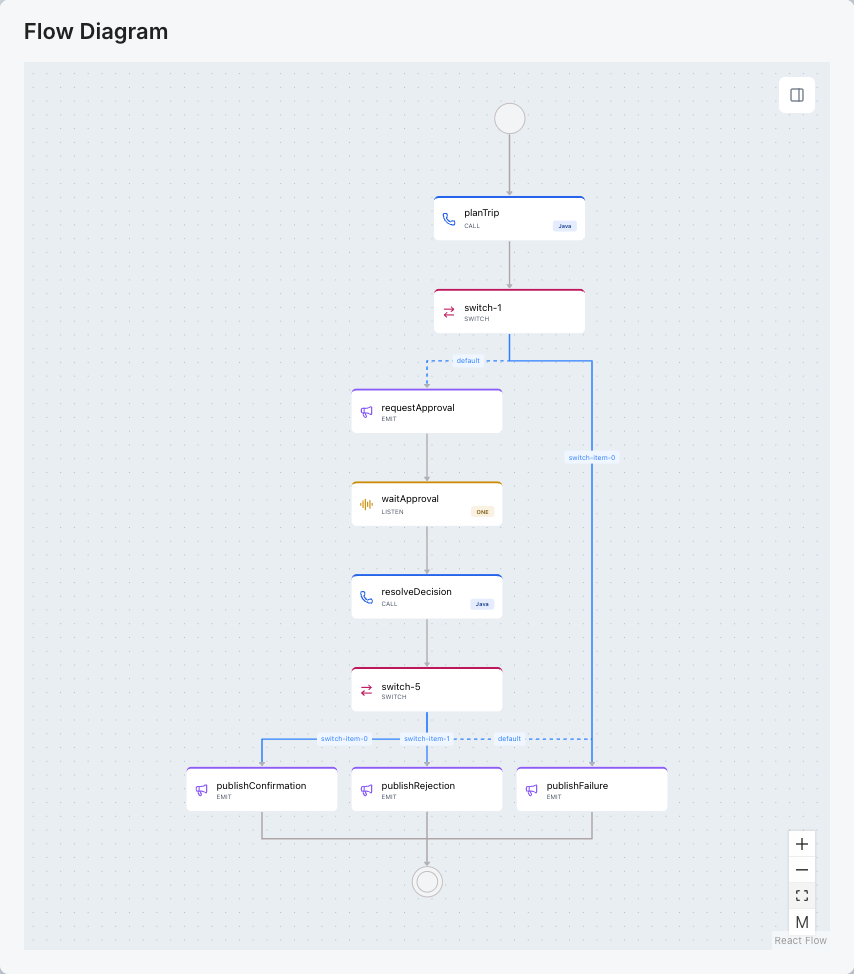
schedule()starts a new workflow instance for everycom.tripplanner.trip.requestedevent.withInstanceId()hands the instance identifier to the planning task, so it can tie the workflow to the original request.switchWhenOrElse()sends a failed plan straight topublishFailureand skips approval.emitJson()publishes the plan ascom.tripplanner.trip.approval.requested.listen()pauses the workflow until acom.tripplanner.trip.approval.doneevent arrives. Its.envelope(this::matchesDecision)filter ignores an event with the wrongflowinstanceid, a mismatched decision, or an unreadable payload, and the workflow keeps waiting.switchCase()publishes the confirmation, rejection, or failure.ENDstops each outcome from running into the next one.
A rejection goes straight to publishRejection and ends the workflow, so only an approved trip reaches the booking adapter. Every planning request starts its own workflow instance, and several trips can wait for a decision at the same time.
The three helper methods below descriptor() are the tasks the workflow runs. plan() binds the instance to its request in the store before calling the adapter, resolveDecision() checks the decision and finalizes the booking, and matchesDecision() is the listen() filter.
Complete Flow class
The complete source includes the imports, the injected adapter, store, and ObjectMapper, and all three helper methods.
package com.tripplanner.agentic.flow;

import static io.quarkiverse.flow.dsl.FlowDSL.*;

import com.fasterxml.jackson.databind.ObjectMapper;
import com.tripplanner.model.PlanningRequest;
import com.tripplanner.model.TripApproval;
import com.tripplanner.model.TripPlanStatus;
import io.quarkiverse.flow.Flow;
import io.cloudevents.CloudEvent;
import io.serverlessworkflow.impl.WorkflowContextData;
import io.serverlessworkflow.api.types.FlowDirectiveEnum;
import io.serverlessworkflow.api.types.Workflow;
import io.quarkiverse.flow.dsl.FlowWorkflowBuilder;
import jakarta.enterprise.context.ApplicationScoped;
import jakarta.inject.Inject;
import java.util.Objects;
import java.io.IOException;

@ApplicationScoped
public class TripPlannerFlow extends Flow {

    @Inject
    TripPlannerFlowAdapter adapter;

    @Inject
    TripPlanStore store;

    @Inject
    ObjectMapper objectMapper;

    @Override
    public Workflow descriptor() {
        return FlowWorkflowBuilder.workflow("trip-planner-flow")
                .schedule(on(one("com.tripplanner.trip.requested").first()))
                .tasks(
                        withInstanceId("planTrip", this::plan, PlanningRequest.class),
                        switchWhenOrElse((TripPlanStatus result) -> "failed".equals(result.status()),
                                "publishFailure", "requestApproval", TripPlanStatus.class),
                        emitJson("requestApproval", "com.tripplanner.trip.approval.requested", TripPlanStatus.class),
                        listen("waitApproval",
                                toOne(consumed("com.tripplanner.trip.approval.done")
                                        .envelope(this::matchesDecision))),
                        withInstanceId("resolveDecision", this::resolveDecision, TripApproval.class),
                        switchCase(
                                caseOf((TripPlanStatus result) -> "confirmed".equals(result.status()), TripPlanStatus.class)
                                        .then("publishConfirmation"),
                                caseOf((TripPlanStatus result) -> "rejected".equals(result.status()), TripPlanStatus.class)
                                        .then("publishRejection"),
                                caseDefault("publishFailure")),
                        emitJson("publishConfirmation", "com.tripplanner.booking.finalized", TripPlanStatus.class)
                                .then(FlowDirectiveEnum.END),
                        emitJson("publishRejection", "com.tripplanner.trip.rejected", TripPlanStatus.class)
                                .then(FlowDirectiveEnum.END),
                        emitJson("publishFailure", "com.tripplanner.trip.failed", TripPlanStatus.class))
                .build();
    }

    private TripPlanStatus plan(String instanceId, PlanningRequest input) {
        TripPlanStatus status = store.bind(input, instanceId);
        try {
            return status.outcome("awaiting_approval", Objects.requireNonNull(adapter.planFromRequest(status.request())), null);
        } catch (Exception failure) {
            return status.failed(failure);
        }
    }

    private TripPlanStatus resolveDecision(String instanceId, TripApproval approval) {
        TripPlanStatus status = store.byInstanceId(instanceId);
        try {
            if (!store.matchesDecision(instanceId, approval)) {
                throw new IllegalStateException("Decision does not match the pending workflow");
            }
            if ("rejected".equals(approval.status())) return status.outcome("rejected", status.plan(), null);
            if (!"approved".equals(approval.status())) throw new IllegalArgumentException("Invalid decision");
            return status.outcome("confirmed", status.plan(), Objects.requireNonNull(adapter.finalizeBooking(approval)));
        } catch (Exception failure) {
            return status.failed(failure);
        }
    }

    private boolean matchesDecision(CloudEvent event, WorkflowContextData context) {
        // One envelope predicate keeps both checks: dataAs() would replace an existing envelope predicate.
        String instanceId = context.instanceData().id();
        if (!instanceId.equals(event.getExtension("flowinstanceid")) || event.getData() == null) return false;
        try {
            return store.matchesDecision(instanceId, objectMapper.readValue(event.getData().toBytes(), TripApproval.class));
        } catch (IOException malformed) {
            return false;
        }
    }
}
The matchesDecision() helper reads the instance extension and deserializes the decision with the injected mapper before checking the store. It keeps both checks in a single envelope predicate. Adding dataAs() after an instance-envelope filter would replace that predicate in this DSL instead of combining the checks.
Handling failures outside the REST call
Previously, a guardrail exception happened during the REST call, where GuardrailExceptionMapper could turn it into an HTTP response. Planning now runs inside the workflow after the REST endpoint publishes the request, so that mapper cannot handle exceptions from the agents. Instead, we’ll now need to carry failures back through the workflow events.
During planning or booking, the workflow catches failures and publishes a failed TripPlanStatus. TripError.from() gives guardrail failures a safe message, and the store records the result for the browser. If booking fails, the plan the customer reviewed stays available.
Keeping the result attached to its request
The API needs a requestId to track the trip as soon as the HTTP request arrives. Flow assigns an instanceId when it starts the workflow. The REST resource publishes the request ID with the original TripRequest in com.tripplanner.trip.requested, and the store links it to the new instance ID so later events and browser requests refer to the same trip.
The TripPlanStatus record carries the trip details and current outcome in both API responses and workflow events.
package com.tripplanner.model;

public record TripPlanStatus(String requestId, String instanceId, TripRequest request, String status,
                             TripPlan plan, BookingConfirmation confirmation, String error, String message) {
    public TripPlanStatus outcome(String state, TripPlan tripPlan, BookingConfirmation booking) {
        return new TripPlanStatus(requestId, instanceId, request, state, tripPlan, booking, null, null);
    }

    public TripPlanStatus withError(String code, String text) {
        return new TripPlanStatus(requestId, instanceId, request, status, plan, confirmation, code, text);
    }

    public TripPlanStatus failed(Throwable failure) {
        TripError safe = TripError.from(failure, plan != null);
        return new TripPlanStatus(requestId, instanceId, request, "failed", plan, null, safe.error(), safe.message());
    }
}
Along with both identifiers, the record carries:
requestandplan, the original trip details and the generated plan, which let the browser restore the trip after a refresh.status, the current state.confirmationonce booking completes, orerrorandmessagewhen something fails.
The status field follows the trip from planning through the customer’s decision:
stateDiagram-v2
    [*] --> planning
    planning --> awaiting_approval: plan ready
    planning --> failed: planning failed
    awaiting_approval --> decision_submitted: customer decides
    decision_submitted --> confirmed: approved and booked
    decision_submitted --> rejected: rejected
decision_submitted --> failed: booking failedWhen a workflow task fails, failed() moves the trip to failed without discarding a generated plan. If the HTTP wait times out, withError() adds a message to the response without changing the status, because the workflow may still finish.
TripPlanStore keeps every trip in memory so the REST API can return the status recorded from workflow events. It maps each requestId to the trip’s current status and each workflow instanceId back to its requestId. It also holds the decision submitted for each waiting instance and remembers the most recent request for /trip/plan/latest.
@ApplicationScoped
public class TripPlanStore implements WorkflowExecutionListener {
    private static final Logger LOG = Logger.getLogger(TripPlanStore.class);
    private final Map<String, TripPlanStatus> requests = new HashMap<>();
    private final Map<String, String> instances = new HashMap<>();
    private final Map<String, TripApproval> decisions = new HashMap<>();
    private String latestRequestId;

    @Inject
    ObjectMapper objectMapper;

    public synchronized PlanningRequest register(TripRequest request) {
        String requestId = UUID.randomUUID().toString();
        requests.put(requestId, new TripPlanStatus(requestId, null, request, "planning", null, null, null, null));
        latestRequestId = requestId;
        return new PlanningRequest(requestId, request);
    }
register() creates the entry when the planning request arrives, and bind() links the Flow instance to it when the workflow’s plan() task starts.
The workflow’s events come back to the store on flow-out-consumer. Each event type published by an emitJson() task maps to a trip state, and the flowinstanceid extension, which Flow adds to every event it publishes, says which instance sent it.
@Incoming("flow-out-consumer")
public CompletionStage<Void> consume(Message<String> message) {
    CloudEventMetadata<?> event = message.getMetadata(CloudEventMetadata.class).orElse(null);
    if (event == null) return message.ack();
    String instanceId = event.<String>getExtension("flowinstanceid").orElse(null);
    String state = switch (event.getType()) {
        case "com.tripplanner.trip.approval.requested" -> "awaiting_approval";
        case "com.tripplanner.booking.finalized" -> "confirmed";
        case "com.tripplanner.trip.rejected" -> "rejected";
        case "com.tripplanner.trip.failed" -> "failed";
        default -> null;
    };
    if (instanceId == null || state == null) return message.ack();
    try {
        accept(instanceId, state, objectMapper.readValue(message.getPayload(), TripPlanStatus.class));
    } catch (JsonProcessingException e) {
        LOG.warn("Ignoring malformed trip outcome event");
    }
    return message.ack();
}
The store checks every incoming event before recording it. accept() makes sure the workflow identifier matches a registered request and that the trip is in the right state, so a stale approval request for a rejected trip is ignored and the trip stays rejected. Once an outcome is accepted, the store wakes the awaitPlan() call in the waiting planning request. A workflow that fails while publishing its outcome has no event to send, so the store also implements Flow’s WorkflowExecutionListener and handles WorkflowFailedEvent in onWorkflowFailed() as well. When a workflow really fails, the store records a safe failure for that request and keeps any plan the customer already reviewed.
Resuming with the customer’s decision
The approval endpoint is new in this step. TripApprovalResource accepts PUT /trip/approve with the workflow’s instanceId and a status of approved or rejected. It first asks the store to record the decision, which accepts it only for a trip that is waiting for a decision, and then publishes the decision for Flow.
    TripPlanStatus submitted = store.submitDecision(approval);

    OutgoingCloudEventMetadata<TripApproval> metadata = OutgoingCloudEventMetadata.<TripApproval>builder()
            .withId(UUID.randomUUID().toString())
            .withSource(URI.create("api:/trip/approve"))
            .withType("com.tripplanner.trip.approval.done")
            .withDataContentType("application/json")
            .withExtension("flowinstanceid", approval.instanceId())
            .build();

    try {
        flowIn.send(Message.of(approval, Metadata.of(metadata)).withNack(failure -> {
            store.submissionFailed(submitted.requestId(), failure);
            return CompletableFuture.completedFuture(null);
        }));
    } catch (RuntimeException failure) {
        store.submissionFailed(submitted.requestId(), failure);
        return Response.serverError().entity(store.byInstanceId(approval.instanceId())).build();
    }
    return Response.accepted(submitted).build();
}
The event type com.tripplanner.trip.approval.done is the one the workflow’s listen() step waits for. The flowinstanceid extension names the instance the customer is deciding on, and matchesDecision() compares it with the waiting workflow, so each decision resumes the workflow it was made for. The endpoint answers with HTTP 202 as soon as the event is sent, because the workflow finishes the booking afterwards.
sequenceDiagram
    participant Browser
    participant API as REST and in-memory store
    participant Flow as Flow via Kafka
    Browser->>API: POST trip details
    API->>Flow: Trip requested with request ID
    Flow->>Flow: Bind instance ID and generate plan
    Flow-->>API: Approval requested with both IDs and plan
    API-->>Browser: Plan and instance ID
    Note over Browser,Flow: HTTP request finished, workflow waiting
    Browser->>API: Refresh and GET latest
    API-->>Browser: Same request, plan and instance ID
    Browser->>API: PUT decision for instance ID
    API->>Flow: Decision event with instance extension
    API-->>Browser: 202 decision_submitted
    Flow-->>API: Confirmed, rejected or failed event
    Browser->>API: GET status for instance ID
API-->>Browser: Recorded outcome with reviewed planThe browser shows the workflow identifier so you can compare it with the CloudEvents later. The page shows decision_submitted and keeps polling GET /trip/plan/status until the backend reports confirmed, rejected, or failed.
Validation, timeouts, and error responses
PUT /trip/approve needs a nonblank instanceId and a status of approved or rejected. An invalid decision returns HTTP 400, an unknown trip 404, and a trip in any other state 409, so only decisions for a trip awaiting approval reach Kafka.
Trying it out: following a trip through the running application
Whew, that was a lot of code and theory right? Let’s see it in action now, and hopefully it’ll all make sense!
Start dev mode from your working copy with ./mvnw quarkus:dev (.\mvnw.cmd quarkus:dev on Windows), then open http://localhost:8080.
Generate a trip with a future start date and note its workflow identifier. A family trip to the California coast for seven days and four travelers is a useful comparison with the previous chapters.
The page shows the generated plan and offers Approve Trip and Reject Trip. The workflow identifier above the itinerary identifies this trip when you inspect its events later.
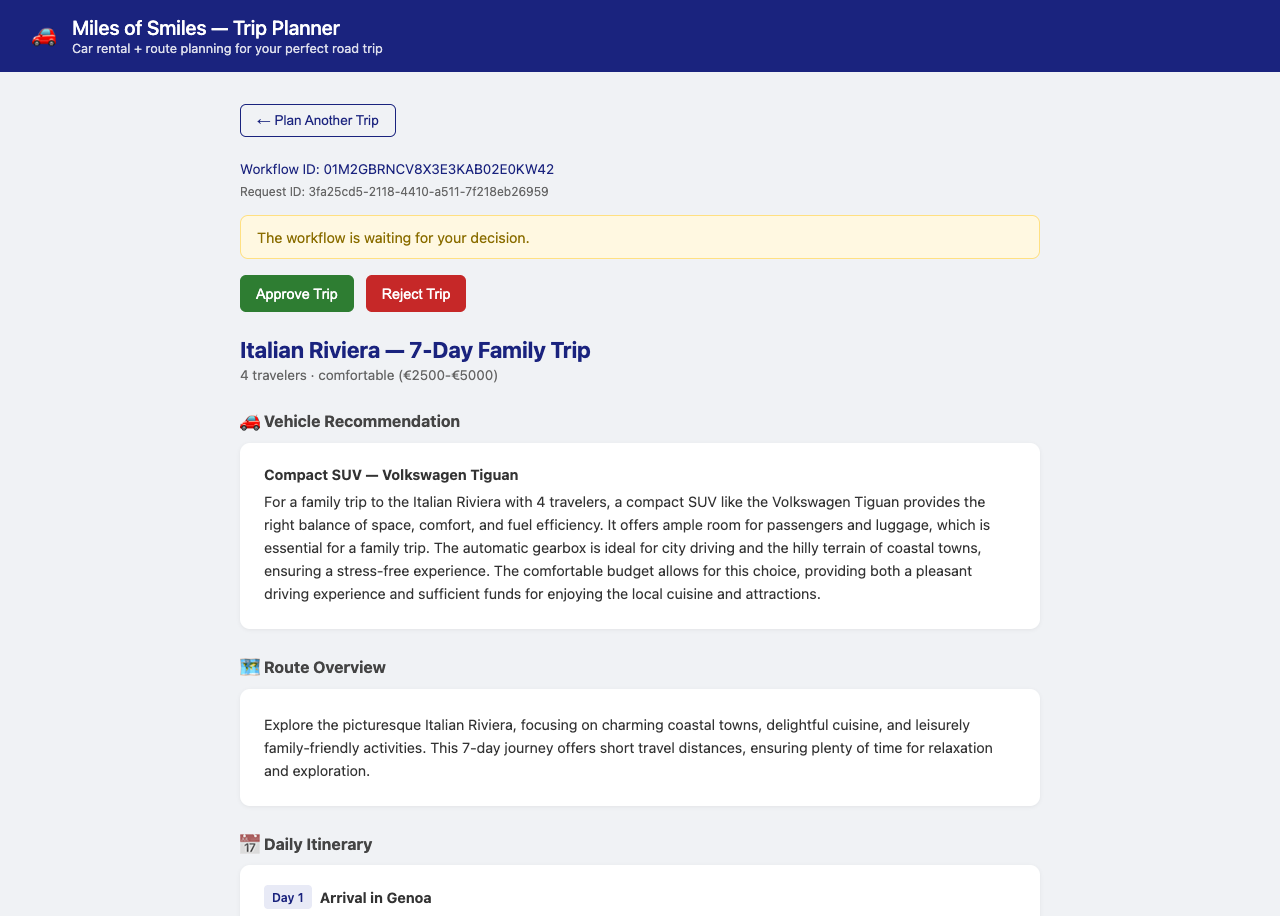
Refresh the browser without restarting the application. Compare the restored workflow identifier and plan with the ones you noted, and check the original destination, start date, duration, travelers, budget, and preferences in the restored form or /trip/plan/latest response. The same pending trip should come back from the store, with the plan the agents already generated.
Approving the pending trip
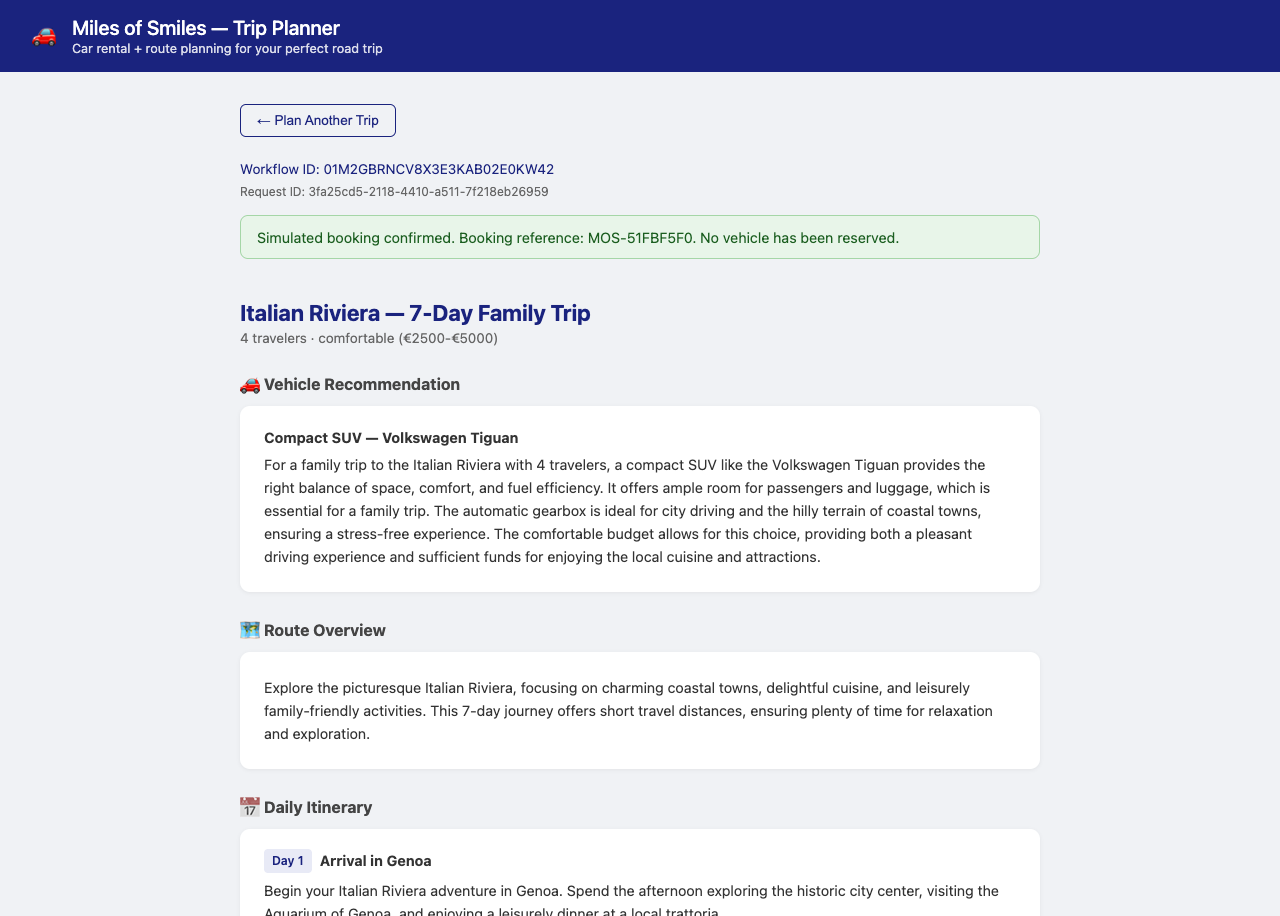
Click Approve Trip. The plan stays visible while the decision is submitted and the simulated booking finishes. The page then shows confirmed with a MOS-... booking reference. The booking is simulated, much to the disappointment of the sales team, who were hoping to see real reservations.
Rejecting a different trip
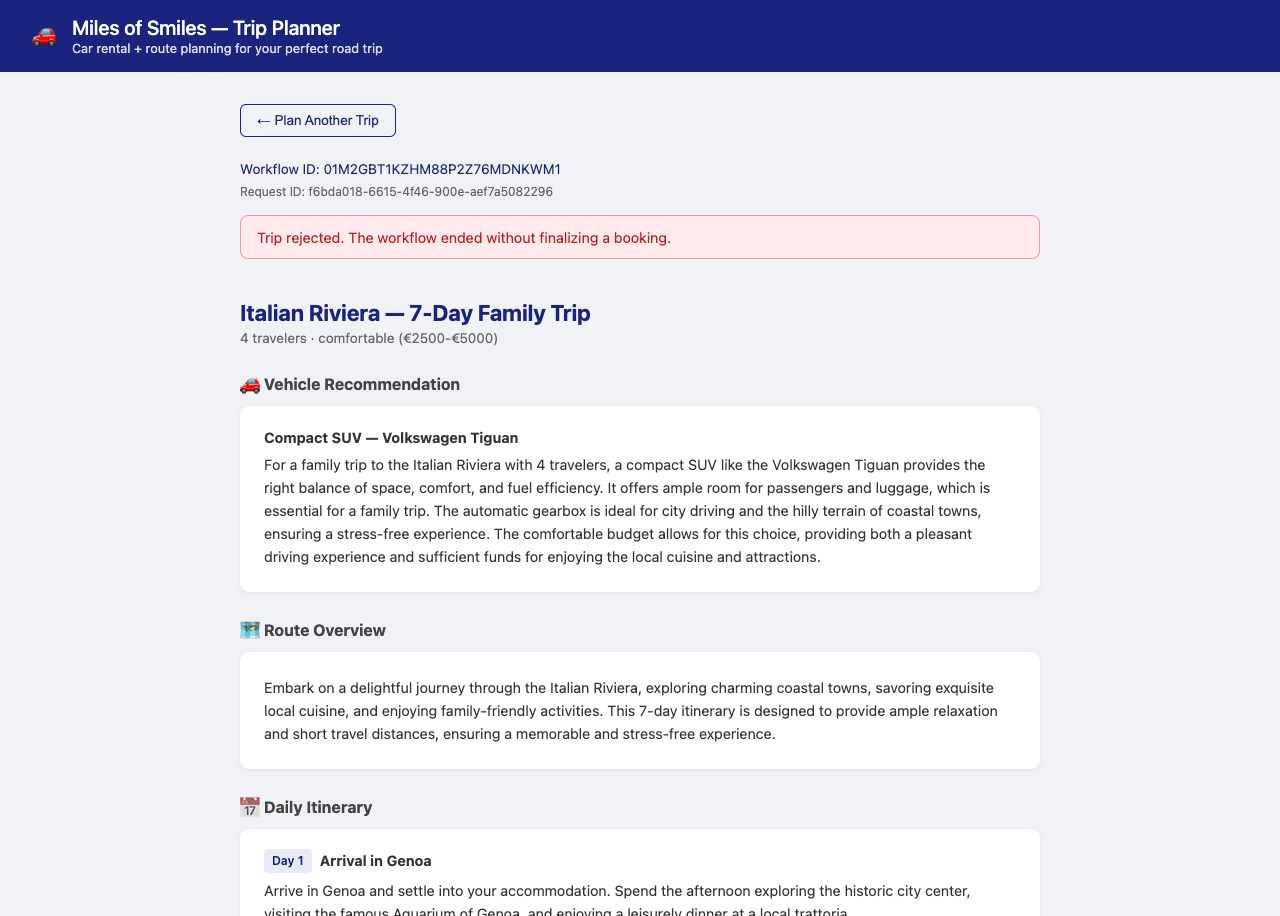
Generate another trip, note its new workflow identifier, and click Reject Trip. The page briefly shows decision_submitted, then reports rejected while keeping the plan visible.
Refresh the browser and confirm that this trip remains rejected with its plan still visible.
Inspecting the workflow and events
Now let’s hop over to the Dev UI to inspect what has just happened.
Open the Dev UI at http://localhost:8080/q/dev. You’ll notice a new Quarkus Workflows card. Click on it and then select Workflows. Inspect trip-planner-flow. Its diagram shows the planning task, the approval publication, the wait, and the outcome branches.
Go back to the main Dev UI page and open Apache Kafka Client > Topics. Inspect flow-in. Find the com.tripplanner.trip.requested and com.tripplanner.trip.approval.done events for the approved trip. The first has the request ID and original trip details in its payload; the second has the workflow identifier in its ce_flowinstanceid header and decision payload.
Inspect flow-out and click the approved trip’s com.tripplanner.trip.approval.requested and com.tripplanner.booking.finalized messages to open their values and headers. Compare their ce_flowinstanceid headers with the workflow identifier you noted in the browser. Kafka carries CloudEvent attributes as ce_ headers, so both messages should name the same instance. Their payloads contain the plan and original request, while ce_flowtaskid identifies the publishing task.
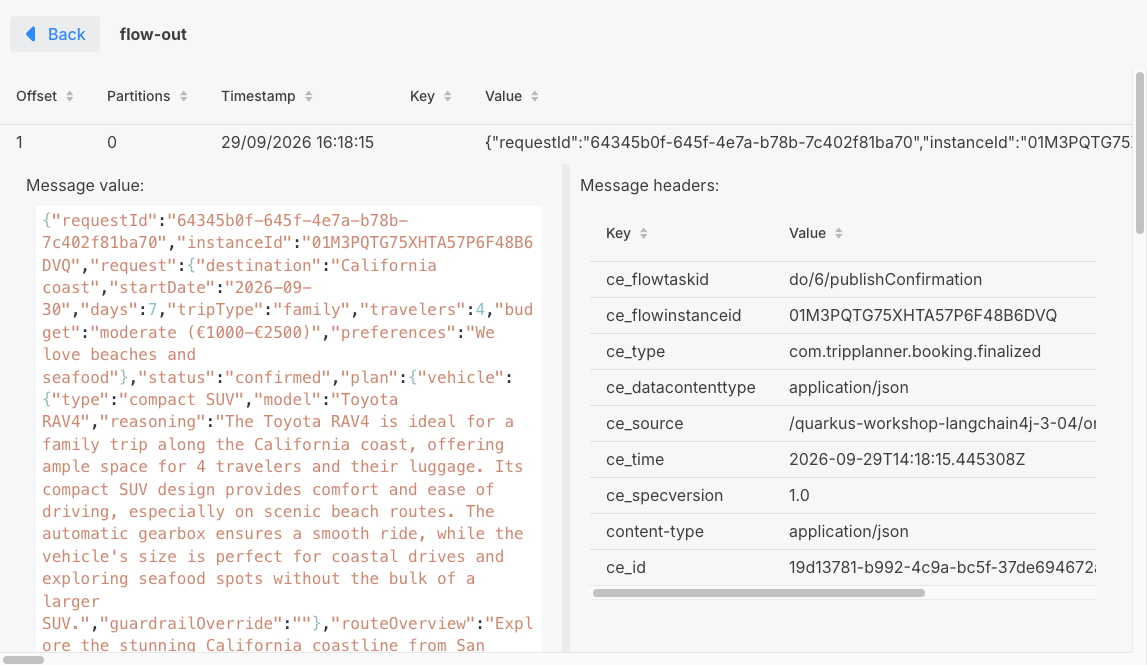
Find the rejected trip’s messages in flow-out using its workflow identifier. Its events should end with com.tripplanner.trip.rejected, with no booking confirmation for that instance.
What’s next?
The customer can now leave a plan awaiting approval and return after a browser refresh, with a decision event resuming the matching workflow. In Step 05, we’ll persist workflow and trip state so the same journey can continue after an application restart.
Continue to Step 05 - Resilient Agentic Workflows with Persistence