Step 01 - Agent Skills and Discovery
Welcome to Section 3: Enterprise Agentic Patterns
In section 2, we focused on the various ways you can orchestrate and implement agents into a full-blow agentic system. In this section, we’re going to continue our deep dive into agentic AI and explore additional capabilities you will likely need in order to build an enterprise-grade agentic system.
Note
If you’re not familiar with how to implement and orchestrate agents, feel free to visit section 2 first.
A new scenario
Miles of Smiles, the fictitious car rental company we’ve been following throughout this workshop, has decided they want a Customer Trip Planner app. This trip planner should help customers build out a trip based on their destination, trip duration and trip style as well as personal preferences for the trip. Based on those criteria, the trip planner then returns a recommended itinerary with activities and sights to see, and it will also recommend an appropriate rental vehicle as well as a cost estimate.
flowchart LR
    Family[Family vacation\nItalian Riviera] --> Planner[Trip planner]
    Adventure[Adventure trip\nSwiss Alps] --> Planner
    Business[Business travel\nmeetings + leisure] --> Planner
    Planner --> Vehicle[Vehicle]
    Planner --> Route[Route & itinerary]
Planner --> Costs[Cost estimate]What are we building?
To keep the focus on the new concepts of this step, the workshop provides starter code with all the UI components already built for the trip planner form.
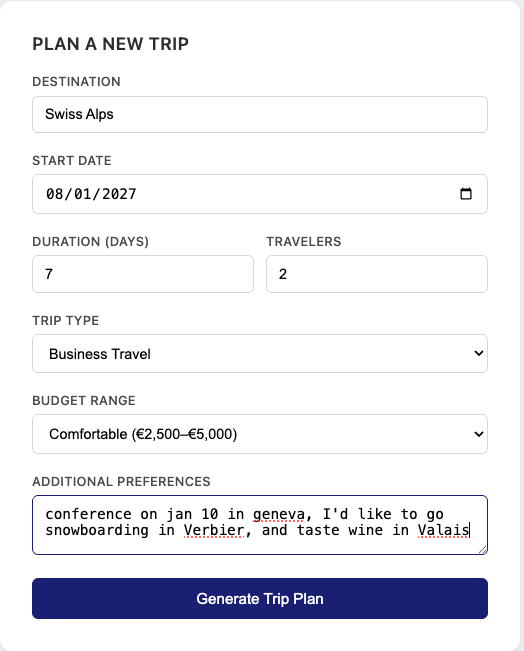
This starter code also has an existing set of agents to plan a basic trip. When the customer creates a trip, the top level trip planner agent will call 2 agents in parallel to recommend a vehicle, and plan an itinerary. Based on that data, a cost estimator agent will come up with an estimate, and finally the trip plan will be assembled and sent back to the UI.
flowchart TD
    Request[Customer's trip request] --> Vehicle[Recommend a vehicle]
    Request --> Itinerary[Plan the itinerary]
    Vehicle --> Costs[Estimate costs]
    Itinerary --> Costs
Costs --> Plan[Assemble the trip plan]These existing agents rely on general instructions baked into their prompts so there is no separate guidance for family holidays, adventure trips, or business travel yet.
In this step, we’re going to add skills. Skills are essentially instructions in a Markdown file that agents can request at runtime through a built-in activate_skill tool. Whereas fixed prompts go to the model on every request, q skill’s full content is only sent if the agent activates it.
flowchart TD
    subgraph fixed [Sent on every request]
        Prompt["@UserMessage prompt in Java"]
    end

    subgraph ondemand [Sent after activation]
        Skills["SKILL.md files\nvehicle-selection, family-trip, ..."]
    end

    Prompt --> Agent[Agent]
    Agent -->|"activate_skill"| Skills
    Skills -->|"injected into conversation"| Agent
Agent --> Result[Tailored recommendation]Keeping specific skills, like travel expertise, outside the fixed prompts lets Miles of Smiles update its advice without rewriting the agents and only load specific guidance if the model deems it useful to its response.
Preparing a working copy
Build it hands-on or follow along
You have the option to build the new features hands-on by working from the starter code, or if you prefer to just follow along, you can go directly to the completed step 01 project. If you’re going with the hands-on option and something doesn’t end up working, you can also compare your code with the step 01 solution to see what you’ve missed. (a little birdie told us your code assistant can help with that too 😉). Make sure you have gone through the workshop requirements and you have the source code available.
Copy section-3/step-00 to a working directory outside the step folders and open that copy in your IDE. All paths and commands below refer to this working project, including when it’s time to run the application.
Dynamic skill discovery and activation
In the previous sections you’ve already seen how system and user prompts work through the @SystemMessage and @UserMessage annotations. They are a good way to give a model context and instructions, but that guidance is sent on every invocation. Skills keep domain guidance in separate Markdown files, so an agent can request just the part that matters for the current trip.
Adding skills to Quarkus LangChain4j
To be able to handle skill discovery and injection in Quarkus LangChain4j, you need to add the quarkus-langchain4j-skills extension. Run the following maven command to add it:
Then add the following line to src/main/resources/application.properties to tell the extension where to find skill files:
This points the extension at the src/main/resources/skills/ directory on the classpath. You can also point it at filesystem paths for skills you want to manage outside the project.
Create skills from other sources
Skills do not have to be file-system based. You can also build them from a database, a remote API, or content generated at runtime, using the upstream LangChain4j builder API.
Defining skills
We’re going to add four skills split along two purposes. A vehicle-selection skill contains guidance on picking the right vehicle category and applies regardless of trip type. Then we’ll add 3 additional skills containing itinerary and route planning conventions based on what kind of trip the customer will take: family-trip, adventure-trip, and business-trip.
Skills live in their own subdirectory, in this case under src/main/resources/skills/, as a file named SKILL.md. A YAML frontmatter block (a block of metadata that sits at the top of a Markdown file) supplies its name and description, followed by the guidance in Markdown. See the Skills extension documentation for all configuration options.
Create src/main/resources/skills/vehicle-selection/SKILL.md with the following content:
---
name: vehicle-selection
description: Guidance for selecting the right rental vehicle category based on trip type, passenger count, terrain, and budget.
---

# Vehicle Selection Guidance

## By Trip Type
- **Family:** Prioritize space over style. An MPV or 7-seat SUV fits car seats, luggage, and restless passengers. Automatic gearbox is strongly preferred — manual clutch work in Alpine traffic or Italian city centres is fatiguing with children.
- **Adventure:** Ground clearance matters more than engine power. A compact SUV handles most classified mountain roads. Full 4WD is only necessary for unclassified tracks, winter Alpine passes, and Norwegian fjord roads outside summer.
- **Business:** Comfort over capability. Executive sedan (BMW 5 Series class) for client-facing trips; a well-specced compact for solo city-hopping. Diesel for motorway-heavy legs over 400 km/day.

## By Group Size
- 1–2 travelers: compact, compact SUV, or convertible for scenic routes
- 3–4 travelers: estate or compact SUV
- 5+ travelers: MPV or 7-seat SUV; consider two vehicles for 7+

## Key Rules
- Always recommend automatic gearbox for city-heavy itineraries and mountain destinations.
- 4WD adds cost (roughly €15–25/day). Only recommend it when terrain genuinely requires it.
- Full electric vehicles are only practical on well-serviced corridors. Avoid recommending EV for rural Southern or Eastern Europe routes.
Create src/main/resources/skills/family-trip/SKILL.md:
---
name: family-trip
description: Itinerary planning guidance for family road trips — stop frequency, kid-friendly pacing, accommodation, and toll considerations.
---

# Family Road Trip Planning

## Pacing
- Break every 2–3 hours for young children. Build explicit stops into the itinerary — do not treat them as optional.
- Cap driving at 5–6 hours per day. On trips of 7+ days, include **exactly one** rest day spread across the middle of the trip, not including the arrival and departure days.
- In each driving day's description, state the approximate total driving time and the planned breaks, including when to stop and for how long. Keep driving time separate from time spent on breaks; these are planning estimates, not verified journey times.
- Any day with no driving — whether planned as a rest day or simply spent in one location — must have its title start with "Rest day - no driving:". Stay at the same overnight base and suggest activities reachable on foot or by public transport, with no car transfers or driving excursions.
- Use motorway service areas (Autogrill in Italy, Aires in France) as planned stops — they have playgrounds, toilets, and food.

## What to Include in the Itinerary
- Kid-friendly anchors at each overnight stop: a beach, castle, aquarium, adventure park, or accessible hiking trail.
- A gelato stop is never wrong.
- Scenic routes (Alpine passes, coastlines, wine regions) are worth the extra time when children are old enough to appreciate them.

## Accommodation
- For stays of 3+ nights, prefer vacation rentals (agriturismo in Italy, gîte in France) over hotels — a kitchen and outdoor space make a real difference with children.
- Look for "familienzimmer" (Germany/Austria) or "camera familiare" (Italy) room categories — one room sleeping a family at a fixed rate, cheaper than two rooms.

## Tolls and Budget
- Switzerland and Austria require motorway vignettes (CHF 40 and €9.90–€29 respectively). Factor these in upfront — they catch families by surprise.
- France and Italy toll each motorway segment. A full cross-country route can add €50–100 in tolls each way.
Create src/main/resources/skills/adventure-trip/SKILL.md:
---
name: adventure-trip
description: Itinerary planning guidance for adventurous road trips — legendary driving roads, outdoor activity integration, seasonal access, and remote-area practicalities.
---

# Adventure Road Trip Planning

## Legendary Roads to Include
Weave these into itineraries when the destination is nearby:
- **Stelvio Pass (Italy):** 48 hairpin bends, 2,758 m. Open June–October. A must for any Northern Italy or Dolomites itinerary.
- **Transfăgărășan (Romania):** Open July–October. Fill the tank before starting — no fuel near the pass.
- **Furka Pass (Switzerland):** Open June–October. Pairs well with the Grimsel Pass on the same day.
- **Trollstigen (Norway):** Open May–October. 11% gradient. Spectacular waterfall viewpoint at the top.
- **Route Napoléon (France):** Open year-round. 325 km through Haute-Provence — less traffic than coastal routes.

## Activity Integration
- Match each overnight stop to at least one outdoor activity: a trailhead, a via ferrata starting point, a wild swim, a paragliding site.
- Note difficulty and gear requirements. Alpine hiking needs proper boots — flag this in itinerary notes.
- Build a weather contingency for each day that depends on conditions (an indoor alternative nearby).

## Seasonal and Practical Rules
- Most high Alpine passes close October–June. Confirm specific dates before finalizing a route.
- Remote legs can have genuine fuel gaps of 80–100 km. Flag these explicitly and tell the traveler to fill up beforehand.
- Wild camping is legal in Scandinavia (Allemansrätten); prohibited in most of Southern Europe. Use designated campsites in France, Italy, and Spain.
Create src/main/resources/skills/business-trip/SKILL.md:
---
name: business-trip
description: Itinerary planning guidance for business road trips — efficient routing, city access restrictions, meeting-paced scheduling, and productivity stops.
---

# Business Road Trip Planning

## Routing Principles
- Optimize for time, not distance. Use motorways throughout — scenic detours cost business travelers more than they're worth.
- Germany's autobahn has no speed limit on many sections; France and Italy are capped at 130 km/h. Account for these differences in time estimates.
- The A6/A7 Paris–Lyon–Marseille corridor and the A1 Rome–Milan are both heavily tolled (€40–60 each way). Factor this into cost estimates.

## City Access Restrictions
- **Italy:** ZTL (Zona a Traffico Limitato) zones in Rome, Florence, and Milan restrict non-resident vehicles during business hours. Camera-enforced; fines arrive weeks later via the rental company. Tell the traveler to use park-and-ride or public transport for the last leg.
- **UK:** London's ULEZ covers all of Greater London (£12.50/day for non-compliant vehicles). Most rental cars comply, but worth confirming at booking.
- **Parking:** Budget €20–50/day for city-centre parking in a garage. Pre-booking saves 20–40%.

## Meeting-Day Scheduling
- Cap driving at 3–4 hours on any day with an important meeting. Arriving fatigued after 6 hours on the motorway is a real risk.
- Build at least one driving-free day into any multi-city itinerary of 4+ stops.

## Productivity on the Road
- French autoroute Aires and Italian Autogrill stops have reliable WiFi and power outlets — usable for focused work or a call.
- A local SIM with a data plan (€10–20 for 15–30 GB) is more reliable than service area WiFi for video calls.
The extension presents the skill names and descriptions to the LLM and exposes an activate_skill tool for agents.
Controlling skill access with @Skills
Only the vehicle and itinerary agents need direct access to these skills. You can control which agents have access to all or some skills by using the @Skills annotation. Note that making a skill available does not guarantee that the model will use it, so we’ll also add prompt instructions and check the tool calls when testing.
Open src/main/java/com/tripplanner/agentic/agents/VehicleAdvisorAgent.java and update the highlighted lines, including the import, prompt, and annotation:
package com.tripplanner.agentic.agents;

import com.tripplanner.model.TripPlan;
import dev.langchain4j.agentic.Agent;
import dev.langchain4j.service.UserMessage;
import io.quarkiverse.langchain4j.skills.Skills;

public interface VehicleAdvisorAgent {

    @UserMessage("""
            You are a vehicle specialist for road trips.
            Before answering, activate the vehicle-selection skill.
            Based on the skill guidance and the trip details below, recommend the most suitable vehicle.
            Consider the destination terrain, trip type, number of travelers, and budget.

            - Destination: {destination}
            - Trip type: {tripType}
            - Number of travelers: {travelers}
            - Budget: {budget}
            - Additional preferences: {preferences}
            """)
    @Agent(description = "Recommends the best vehicle for the trip based on destination, travelers, and budget",
           outputKey = "vehicle")
    @Skills({"vehicle-selection"})
    TripPlan.VehicleRecommendation recommendVehicle(String destination,
                                                    String tripType,
                                                    String travelers,
                                                    String budget,
                                                    String preferences);
}
In the same directory, update the highlighted lines in ItineraryPlannerAgent.java:
package com.tripplanner.agentic.agents;

import com.tripplanner.model.ItineraryResult;
import dev.langchain4j.agentic.Agent;
import dev.langchain4j.service.UserMessage;
import io.quarkiverse.langchain4j.skills.Skills;

public interface ItineraryPlannerAgent {

    @UserMessage("""
            You are an expert trip itinerary planner.
            Before answering, activate the skill named "{tripType}-trip".
            Create a detailed day-by-day itinerary and a route overview for the trip.
            Include a title, description, and overnight stop for each day.
            Consider the travel dates when suggesting activities and seasonal attractions.

            - Destination: {destination}
            - Start date: {startDate}
            - Duration: {days} days
            - Trip type: {tripType}
            - Additional preferences: {preferences}
              Do not reference specific vehicle or car brand names in itinerary descriptions — vehicle selection is handled separately.
            """)
    @Agent(description = "Creates a detailed day-by-day itinerary and route overview",
           outputKey = "itineraryResult")
    @Skills({"family-trip", "adventure-trip", "business-trip"})
    ItineraryResult planItinerary(String destination,
                                  String startDate,
                                  String days,
                                  String tripType,
                                  String preferences);
}
As you can see, the vehicle advisor agent has access to vehicle-selection guidance only, which applies across trip types. The itinerary planner on the other hand has access to the three trip-specific skills.
The highlighted prompt changes ask the model to activate a skill before answering. Again, be aware that these instructions encourage tool use, but the model can still skip the call and answer from its own knowledge.
Note
A bare @Skills annotation, without parameters, gives an agent access to all available skills. With the explicit lists used here, adding a new skill also requires updating the relevant annotation.
Running the working project
We have added a skills extension, @Skills annotation, steered the prompt and added a few skills files. Pretty easy, right? Now let’s see it in action.
From the root of your working copy, start the application in a terminal where your OPENAI_API_KEY is set:
Once started, open http://localhost:8080 in your browser. The trip form shown at the top of this page is where you will enter each test request.
Planning a family beach vacation
Fill in the form with:
- Destination:
Italian Riviera - Start date: a future date of your choice
- Duration:
7days - Travelers:
4 - Trip type:
Family Vacation - Budget:
Moderate (€1,000–€2,500) - Preferences:
We love coastal towns and good food
Click Generate Trip Plan. The family skill asks for rest days on a week-long trip, along with driving-time estimates and regular breaks.
While the agents work, the UI shows a wait screen.

Read the vehicle recommendation and daily itinerary. Look for family-friendly choices such as luggage space, regular breaks. Do you see a rest day?
Inspecting skill tool calls in the Dev UI
While it may seem like the skills were used, it’s also entirely possible that the model produced the family travel advice from its own knowledge while ignoring the skill instructions. The execution history and logs let us check whether it really did request the skill and received its content before judging the itinerary.
Open the Quarkus Dev UI at http://localhost:8080/q/dev-ui (or press the letter d from your terminal). The extensions page lists a LangChain4j Agentic card alongside the other installed extensions.
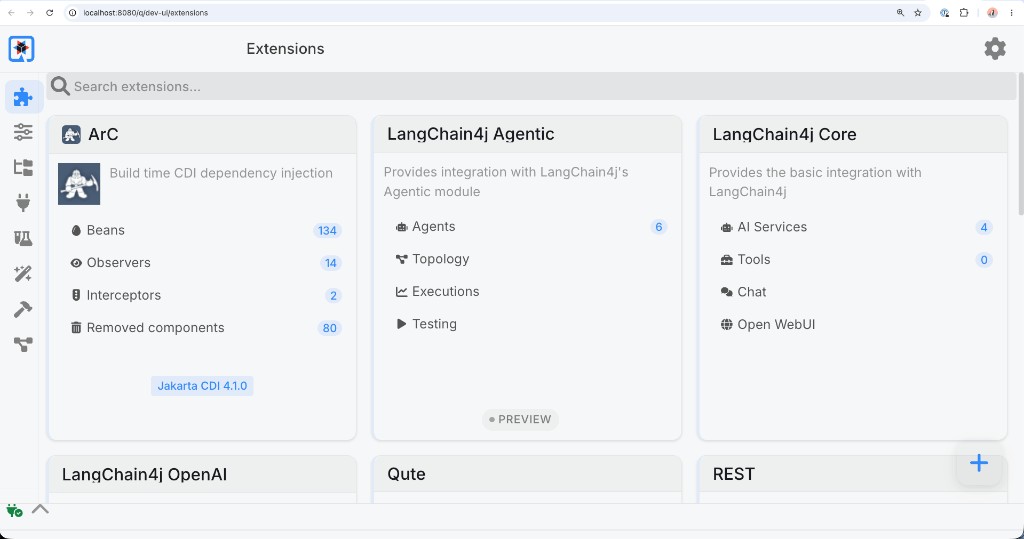
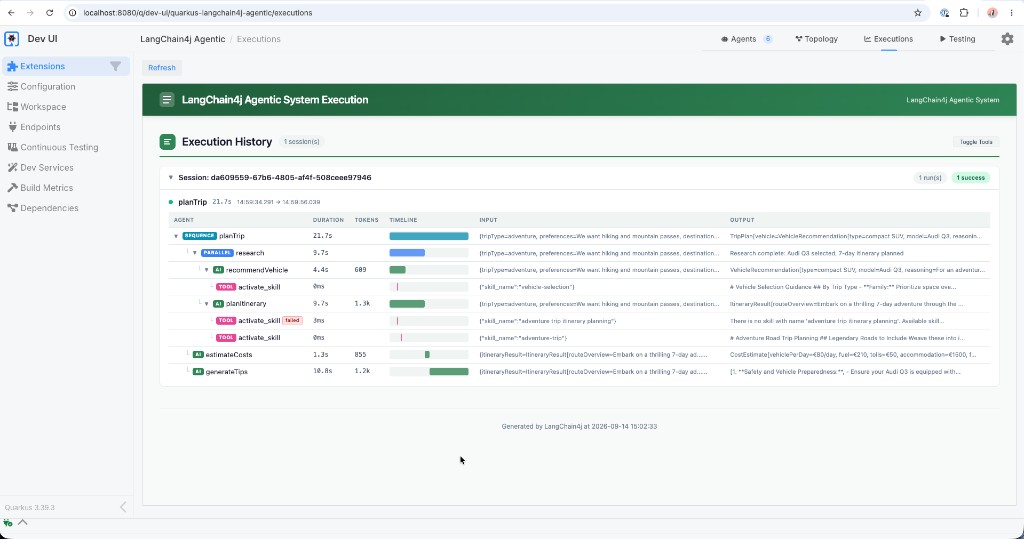
Click Executions in the LangChain4j Agentic card. Because the planner extends MonitoredAgent, this view records agent invocations with their durations, token usage, inputs, and outputs.
Inspect the activate_skill calls and their results under the vehicle and itinerary agents. Look for vehicle-selection and family-trip. A successful family activation returns the Markdown headed # Family Road Trip Planning which you can see in the output field.
The terminal logs provide another way to check discovery and activation. ==Check the startup logs for the skill count, then scroll through the request and response logs after generating a trip plan.
Not seeing the request or response logs?
The starter already enables log-requests and log-responses in src/main/resources/application.properties, but if for some reason they’re not set, or set to false, go ahead and add them and make sure they’re set to true:
At startup, the skills extension reports how many files it found:
INFO [io.quarkiverse.langchain4j.skills.runtime.SkillsRecorder] Loaded 4 skill(s) from directory: classpath:skills
When an agent with skills enabled makes its first request, the outgoing body includes the activate_skill tool definition in the tools array, which means the tool is available to the model.
"tools" : [ {
  "type" : "function",
  "function" : {
    "name" : "activate_skill",
    "description" : "Returns the full instructions for a skill. Call this before following any skill-specific steps.",
    "parameters" : {
      "type" : "object",
      "properties" : {
        "skill_name" : {
          "type" : "string",
          "description" : "The name of the skill to activate"
        }
      },
      "required" : [ "skill_name" ]
    }
  }
} ]
The evidence that the model actually got called the tool is in the Response log. Look for a tool_calls entry with activate_skill and the skill name in the arguments:
"tool_calls" : [ {
  "id" : "call_GvYO3PDO7EnJCU0v7Ix28zXp",
  "type" : "function",
  "function" : {
    "name" : "activate_skill",
    "arguments" : "{\"skill_name\":\"vehicle-selection\"}"
  }
} ]
Once a call succeeds, the next request log includes a tool message with the full skill content. This excerpt is from the vehicle advisor after vehicle-selection was activated:
{
  "role" : "tool",
  "tool_call_id" : "call_GvYO3PDO7EnJCU0v7Ix28zXp",
  "content" : "# Vehicle Selection Guidance\n\n## By Trip Type\n- **Family:** Prioritize space over style. An MPV or 7-seat SUV fits car seats, luggage, and restless passengers...\n- **Adventure:** Ground clearance matters more than engine power. A compact SUV handles most classified mountain roads..."
}
See if you can find the corresponding family-trip call and its returned content as well. Match tool_call_id to the call’s id to avoid confusing an earlier result in the conversation with the current activation.
Updating the travel guidance
Suppose Miles of Smiles wants to recommend more rest days for week-long family trips. You (or they) can change this advice in the skill without editing the Agent prompts.
First, to make our dev mode testing smoother, add this dev-mode setting to application.properties so edits to the family skill trigger an application reload:
Why add this watched-resources property?
The extension keeps skill content in memory, so edits need an application reload to take effect. This setting makes Quarkus reload on the next HTTP request after the file changes. Paths are relative to src/main/resources/, and additional files can be listed with commas.
Notice how many rest days were mentioned in the original trip plan (there should be exactly one), then open src/main/resources/skills/family-trip/SKILL.md and change “exactly one rest day” to “exactly two rest days”. Leave dev mode running. The watched-resource setting reloads the application on the next request, which also clears its in-memory execution history.
Click Plan Another Trip and generate a plan with the same form values. Then inspect the new family-trip tool result for the updated rest-day instruction and compare the itineraries. Does the new plan include two rest days without driving?
Comparing family and adventure skill selection
The itinerary planner also has guidance for other trip types. Let’s see which skill it chooses for an adventure trip.
Click Plan Another Trip, keep the remaining family form values, and change these fields:
- Destination:
Swiss Alps - Trip type:
Adventure Trip - Preferences:
We want hiking and mountain passes
Click Generate Trip Plan, then inspect the invocation history again and notice it now used the adventure-trip activation instead of family trip, and the reccomendations for the trip have changed as well.
Taking it further
If you want more practice with skills, try these additional scenarios and see what happens to the result:
-
Add child-seat guidance to
family-trip/SKILL.md. Ask the itinerary agent to include the advice in the route overview and request any missing age, height, or weight details before suggesting a specific seat. Compare a request to rent a child seat with one whose preferences say “We are bringing our own child seat”, checking both the activated skill content and the recommendation. -
Select Business Travel and confirm the
business-tripskill is activated instead. Planning one destination three or four times with different trip types is a quick way to see how much the itinerary changes when only the skill selection differs. -
Try a bare
@Skillsannotation on one agent to give it access to every discovered skill, then compare which skills the model picks when the list is not restricted.
What’s next?
The planner now keeps its travel advice in Markdown files that Miles of Smiles can update without touching the Java code. What if the trip planner suggests something that’s completely unsuitable though, like recommending a Ferrari to a group of 8 on a string budget? In Step 02, we’ll add guardrails that catch unsuitable recommendations before a customer ever sees them.
Continue to Step 02 - Guardrails and Compliance
Troubleshooting
Error: OPENAI_API_KEY not set
Set the environment variable in the terminal used to run the application. For Linux or macOS:
Then restart the application from your working copy.
Response takes too long or times out
This workshop uses relatively basic and cheap models so they tend to be slow.
The Step 01 workflow invokes three agents, with vehicle selection and itinerary planning running in parallel before cost estimation. Skill activation can add model requests within an agent invocation. Check quarkus.langchain4j.openai.timeout in application.properties and try a shorter trip duration. The starter configures a 120-second timeout.
Skills not being activated
Check the following before generating another plan:
quarkus.langchain4j.skills.directories=classpath:skillsis set inapplication.properties.- Skill files are named
SKILL.md(case-sensitive) and placed in subdirectories undersrc/main/resources/skills/. - Each file has valid YAML frontmatter with both
nameanddescriptionfields. - The skill’s name appears in the agent’s explicit
@Skillslist. - The prompt asks the model to activate a skill, and the model supports tool calling.
An activation returns the old skill content
Check that %dev.quarkus.live-reload.watched-resources includes the edited skill file, then refresh the application page. The completed Step 01 project watches only skills/family-trip/SKILL.md. The terminal should show fresh Loaded 4 skill(s) and Live reload total time messages before the next generation.