Step 02 - Guardrails and Compliance
A family of five asks Miles of Smiles for a road trip, but the vehicle agent recommends a two-seat sports car. Even with the skills we added in Step 01, the model-backed agents can still overlook our instructions when generating a response. Such are the joys of working with probabilistic AI models. Similarly, the model might suggest an unsafe itinerary that goes through dangerous areas. The application therefore needs safety and compliance checks of its own before passing recommendations to the rest of the planning pipeline and especially before returning the final result to the user.
In this step we’ll attach output guardrails to the vehicle and itinerary agents so they can request another response or rewrite a recommendation. We’ll also give the cost estimator a tool that calculates rental prices from a small rate list, with a tool input guardrail to reject invalid arguments before the calculation runs.
Per-agent output guardrails
The input guardrails from Section 1 checked the customer’s message before it reached the model. Output guardrails run after an agent has finished its model and tool interactions, allowing the application to inspect the response before accepting it and potentially calling a next agent with incorrect information, or returning the result to the end user.
For our scenario, we need to check the recommendations the parallel itinerary and vehicle selection agents produce before the cost estimator uses them. An itinerary guardrail will look for a missing or empty itinerary and a short list of dangerous-area phrases, while a vehicle guardrail will compare the recommendation with the customer’s request.
Guardrails can take different kinds of action based on the context and how we implement them. They can either accept the original answer if everything looks good, or take action by either correcting the result itself or going back to the model and asking it to retry. In that case you have the option of simply retrying with the same instructions as before, or reprompting by adding additional context to the request. The diagram below shows these four possible paths a guardrail can take:
flowchart LR
    accTitle: Four ways an output guardrail can respond
    accDescr: The guardrail accepts the original answer with success or a Java correction with successWith. Both continue the workflow. Retry requests another answer without new guidance, while reprompt adds instructions. Each new model answer is checked again, up to the configured attempt limit.
    Model[Model response] --> Check{Guardrail checks}
    Check --> Pass["Accept original answer<br/><b>success()</b>"]
    Check --> Fix["Accept with deterministic correction<br/><b>successWith(AiMessage)</b>"]
    Check --> Retry["Try again without new guidance<br/><b>retry(errorMessage)</b>"]
    Check --> Reprompt["Try again with instructions<br/><b>reprompt(errorMessage, instructions)</b>"]
    Pass --> Continue[Continue workflow]
    Fix --> Continue
    Retry --> Model
    Reprompt --> Model

    classDef accepted fill:#e8f5e9,stroke:#2e7d32,color:#16351a
    classDef regenerate fill:#fff3e0,stroke:#b56500,color:#593200
    class Pass,Fix,Continue accepted
class Retry,Reprompt regenerateYou can also set an attempt limit when registering the guardrails so that repeated failures stop planning instead of looping indefinitely.
Tool guardrails
Aside from adding guardrails to agents, you can also add guardrails to local or MCP tool calls. Checking tool arguments can be particularly important when a tool can modify the file system or write to a database. Before a destructive action such as deleting files or removing database records, a tool input guardrail can check whether the requested paths or records are within the permitted scope. A tool output guardrail on the other hand inspects the response from a tool for correctness before the agentic system continues with potentially incorrect data.
For the Miles of Smiles app, we’re going to give the cost estimator agent a rental calculator tool so it can calculate the vehicle cost using Miles of Smiles’ daily rates. If the model requests an unknown vehicle category or a rental of zero days, the calculator might return invalid information, which might end up causing issues in the system. For that, we will add a tool input guardrail to check the values before the calculator runs.
A tool input guardrail sits between the agent’s tool request and the calculation. Valid arguments let the tool execute. Invalid arguments block that call and return an error to the model as a tool result, giving it a chance to correct its request.
flowchart LR
    Agent[Cost agent] -->|Category and days| Check{Valid arguments?}
    Check -->|No| Error[Error returned to model]
    Error --> Agent
    Check -->|Yes| Tool[Calculate rental price]
Tool -->|Daily rate and subtotal| AgentPreparing the working copy
Continue in your Step 01 working copy and apply the changes below. Use the completed Step 02 project for comparison if you get stuck.
The completed project already contains the changes below. You can follow along through the implementation, then join the exercise at Testing the new guardrail implementation.
Open section-3/step-02 and start dev mode:
Validating structured output with retry()
Let’s start with adding the guardrail for the itinerary agent. It will ask the model to retry when its response has invalid JSON, an empty itinerary, but also when it is suggesting an itinerary that mentions dangerous areas such as a war zone or which has a travel ban.
Create src/main/java/com/tripplanner/guardrails/TripSafetyGuardrail.java:
package com.tripplanner.guardrails;

import com.fasterxml.jackson.databind.ObjectMapper;
import com.tripplanner.model.ItineraryResult;
import com.tripplanner.model.TripPlan.DayItinerary;
import dev.langchain4j.data.message.AiMessage;
import dev.langchain4j.guardrail.OutputGuardrail;
import dev.langchain4j.guardrail.OutputGuardrailResult;
import io.quarkus.logging.Log;
import jakarta.enterprise.context.ApplicationScoped;
import jakarta.inject.Inject;

import java.util.List;
import java.util.Objects;
import java.util.Set;
import java.util.stream.Collectors;
import java.util.stream.Stream;

@ApplicationScoped
public class TripSafetyGuardrail implements OutputGuardrail {

    private static final Set<String> DANGEROUS_KEYWORDS = Set.of(
            "war zone", "conflict area", "active military", "travel ban",
            "do not travel", "armed conflict", "combat zone", "no-go zone");

    @Inject
    ObjectMapper objectMapper;

    @Override
    public OutputGuardrailResult validate(AiMessage responseFromLLM) {
        String text = responseFromLLM.text();
        if (text == null || text.isBlank()) {
            Log.info("🛡️ [TripSafetyGuardrail] SKIP — No text content; tool-call content was not validated");
            return success();
        }

        ItineraryResult result;
        try {
            result = objectMapper.readValue(extractJson(text), ItineraryResult.class);
        } catch (Exception e) {
            Log.info("🛡️ [TripSafetyGuardrail] RETRY — Response is not valid JSON");
            return retry("The response is not valid JSON. Please return a valid JSON object matching the ItineraryResult format.");
        }

        if (result.itinerary() == null || result.itinerary().isEmpty()) {
            Log.info("🛡️ [TripSafetyGuardrail] RETRY — Itinerary is missing or empty");
            return retry("The trip plan must include a day-by-day itinerary. Please provide at least one day.");
        }

        String planText = Stream.concat(
                        Stream.of(result.routeOverview()),
                        result.itinerary().stream().map(DayItinerary::description))
                .filter(Objects::nonNull)
                .collect(Collectors.joining(" "))
                .toLowerCase();

        List<String> dangerousMatches = DANGEROUS_KEYWORDS.stream().filter(planText::contains).toList();
        if (!dangerousMatches.isEmpty()) {
            String matched = String.join(", ", dangerousMatches);
            Log.infof("🛡️ [TripSafetyGuardrail] RETRY — Dangerous content detected: %s", matched);
            return retry("The trip plan references potentially dangerous areas (" + matched
                    + "). Please regenerate the plan avoiding these areas and suggesting safe alternatives.");
        }

        Log.info("🛡️ [TripSafetyGuardrail] PASS — Nonempty itinerary; no configured phrases in route overview or day descriptions");
        return success();
    }

    static String extractJson(String text) {
        String trimmed = text.strip();
        if (trimmed.startsWith("{")) {
            return trimmed;
        }
        int start = trimmed.indexOf('{');
        int end = trimmed.lastIndexOf('}');
        if (start >= 0 && end > start) {
            return trimmed.substring(start, end + 1);
        }
        return trimmed;
    }
}
validate() runs three checks in order and returns as soon as one fails:
- The response must parse as JSON.
extractJson()strips any Markdown fences the model wraps around it. - The
itineraryarray must contain at least one day. - The route overview and day descriptions must not contain any phrase from
DANGEROUS_KEYWORDS.
A failed check returns retry(), which asks the model for a new response. The message passed to retry() goes to the log, not to the model, so the second attempt gets the same prompt as the first. Each branch also logs its decision (PASS, RETRY, or SKIP) with Quarkus’s static Log helper, and we’ll use those lines later to follow a real request.
Here’s what a retry looks like when the second response passes:
sequenceDiagram
    participant A as Itinerary agent
    participant M as Model
    participant G as Itinerary guardrail
    A->>M: Request itinerary
    M-->>A: JSON containing a flagged phrase
    A->>G: Validate response
    G-->>A: Request another attempt
    A->>M: Regenerate without added instructions
    M-->>A: JSON passing the checks
    A->>G: Validate response
    G-->>A: Accept
Note over A: Deserialize as ItineraryResultRewriting and reprompting with successWith() and reprompt()
The next step is to create a guardrail for the vehicle selection agent. The guardrail needs to check whether a recommended car fits the customer’s group size and budget. It checks the economy-budget rule first, then corrects small-vehicle recommendations for groups of four or more.
Create src/main/java/com/tripplanner/guardrails/TripAppropriatenessGuardrail.java:
package com.tripplanner.guardrails;

import com.fasterxml.jackson.core.JsonProcessingException;
import com.fasterxml.jackson.databind.ObjectMapper;
import com.tripplanner.model.TripPlan.VehicleRecommendation;
import dev.langchain4j.data.message.AiMessage;
import dev.langchain4j.guardrail.OutputGuardrail;
import dev.langchain4j.guardrail.OutputGuardrailRequest;
import dev.langchain4j.guardrail.OutputGuardrailResult;
import io.quarkus.logging.Log;
import jakarta.enterprise.context.ApplicationScoped;
import jakarta.inject.Inject;

import java.io.UncheckedIOException;
import java.util.Locale;
import java.util.Set;

@ApplicationScoped
public class TripAppropriatenessGuardrail implements OutputGuardrail {

    private static final Set<String> SMALL_VEHICLE_KEYWORDS = Set.of(
            "sports car", "sport car", "coupé", "coupe", "convertible", "2-seater", "two-seater", "roadster");

    private static final Set<String> LUXURY_BRANDS = Set.of(
            "ferrari", "porsche", "lamborghini", "maserati", "bentley", "rolls-royce", "aston martin", "mclaren",
            "land rover", "range rover", "jaguar", "bmw", "mercedes", "audi", "lexus");

    @Inject
    ObjectMapper objectMapper;

    @Override
    public OutputGuardrailResult validate(OutputGuardrailRequest guardrailRequest) {
        String text = guardrailRequest.responseFromLLM().aiMessage().text();
        if (text == null || text.isBlank()) {
            Log.info("🛡️ [TripAppropriatenessGuardrail] SKIP — No text content; tool-call content was not validated");
            return success();
        }

        VehicleRecommendation vehicle;
        try {
            vehicle = objectMapper.readValue(TripSafetyGuardrail.extractJson(text), VehicleRecommendation.class);
        } catch (Exception e) {
            Log.info("🛡️ [TripAppropriatenessGuardrail] SKIP — Response is not valid JSON; suitability was not validated");
            return success();
        }

        if (vehicle == null || isBlank(vehicle.type()) || isBlank(vehicle.model())) {
            Log.info("🛡️ [TripAppropriatenessGuardrail] SKIP — Vehicle type or model is missing; suitability was not validated");
            return success();
        }

        var variables = guardrailRequest.requestParams().variables();
        String budget = (String) variables.get("budget");
        String tripType = (String) variables.get("tripType");
        String preferences = variables.get("preferences") instanceof String s ? s : "";
        int travelers;
        try {
            // Prompt variables may contain text or numeric method arguments.
            travelers = Integer.parseInt(String.valueOf(variables.get("travelers")));
        } catch (NumberFormatException e) {
            Log.info("🛡️ [TripAppropriatenessGuardrail] SKIP — Traveler count is missing or invalid; suitability was not validated");
            return success();
        }
        if (budget == null || budget.isBlank() || tripType == null || tripType.isBlank()) {
            Log.info("🛡️ [TripAppropriatenessGuardrail] SKIP — Trip variables are missing or incomplete; suitability was not validated");
            return success();
        }

        String vehicleType = vehicle.type().toLowerCase(Locale.ROOT);
        String vehicleModel = vehicle.model().toLowerCase(Locale.ROOT);

        // Check the original model before a generic rewrite can hide a budget violation.
        if (budget.toLowerCase(Locale.ROOT).contains("economy") && isLuxuryBrand(vehicleModel)) {
            Log.infof("🛡️ [TripAppropriatenessGuardrail] REPROMPT — Luxury vehicle '%s' does not match economy budget — asking model to retry with an affordable option", vehicleModel);
            return reprompt("The vehicle recommendation is a luxury vehicle but the budget is economy. "
                    + "Please recommend an affordable, budget-friendly vehicle instead.",
                    "The previous vehicle recommendation is a luxury vehicle that does not fit the economy budget. "
                    + "Respond ONLY with a valid JSON vehicle recommendation object (with fields: type, model, reasoning) "
                    + "for an affordable, budget-friendly, non-luxury vehicle suitable for this trip. Do not explain or acknowledge — just output the JSON.");
        }

        if (travelers >= 4 && isSmallVehicle(vehicleType)) {
            String reason = "Original recommendation '" + vehicleType + "' is too small for " + travelers + " travelers";
            Log.infof("🛡️ [TripAppropriatenessGuardrail] REWRITE — %s; returned a generic category recommendation", reason);
            return successWith(AiMessage.from(toJson(genericVehicle(travelers, tripType, reason))));
        }

        // If the user asked for a luxury brand but the output doesn't contain it, the model
        // already overrode the request on its own. Annotate the result so the UI can show why.
        String requestedBrand = requestedLuxuryBrand(preferences);
        if (requestedBrand != null && !vehicleModel.contains(requestedBrand)) {
            String reason = "Requested brand '" + requestedBrand + "' is not suitable for this trip; a more appropriate vehicle was selected";
            var annotated = new VehicleRecommendation(vehicle.type(), vehicle.model(), vehicle.reasoning(), reason);
            Log.infof("🛡️ [TripAppropriatenessGuardrail] ANNOTATE — Preferences mentioned '%s' but output is '%s' — %s", requestedBrand, vehicleModel, reason);
            return successWith(AiMessage.from(toJson(annotated)));
        }

        Log.info("🛡️ [TripAppropriatenessGuardrail] PASS — No configured small-vehicle or economy-brand rule matched");
        return success();
    }

    private boolean isSmallVehicle(String vehicleType) {
        return SMALL_VEHICLE_KEYWORDS.stream().anyMatch(vehicleType::contains);
    }

    private boolean isLuxuryBrand(String vehicleModel) {
        return LUXURY_BRANDS.stream().anyMatch(vehicleModel::contains);
    }

    private String requestedLuxuryBrand(String preferences) {
        if (preferences == null || preferences.isBlank()) return null;
        String lower = preferences.toLowerCase(Locale.ROOT);
        return LUXURY_BRANDS.stream().filter(lower::contains).findFirst().orElse(null);
    }

    private VehicleRecommendation genericVehicle(int travelers, String tripType, String reason) {
        String replacement = switch (tripType.toLowerCase(Locale.ROOT)) {
            case "adventure" -> "SUV";
            case "business" -> "Estate";
            default -> "MPV";
        };
        return new VehicleRecommendation(
                replacement,
                (replacement.equals("MPV") ? "Family MPV" : replacement) + "; specific model subject to availability.",
                "Vehicle corrected by guardrail: original recommendation was too small for "
                        + travelers + " travelers. Suggested category: " + replacement
                        + ". Confirm seating, luggage capacity, price, and availability with the rental provider.",
                reason);
    }

    private String toJson(VehicleRecommendation vehicle) {
        try {
            return objectMapper.writeValueAsString(vehicle);
        } catch (JsonProcessingException e) {
            throw new UncheckedIOException(e);
        }
    }

    private static boolean isBlank(String value) {
        return value == null || value.isBlank();
    }
}
requestParams().variables() gives the guardrail the trip details for this agent call, so retries are checked against the same group size and budget. From there, a recommendation ends up in one of four places:
REPROMPT: an economy budget with a brand fromLUXURY_BRANDS.reprompt()tells the model what was wrong and asks for JSON straight away instead of an acknowledgement, which keeps it in structured-output mode.REWRITE: a small vehicle for four or more travelers.rewriteVehicle()swaps in an SUV for adventure trips, an Estate for business trips, or an MPV otherwise, andsuccessWith()accepts the corrected JSON without another model call. A family getsFamily MPV; specific model subject to availability., with a note asking them to confirm capacity, price, and availability.ANNOTATE: the customer asked for a luxury brand, but the model already picked something sensible. The response passes through unchanged apart from an explanation.PASS: none of the rules matched.
Deterministic validation limitations
As you can see, we added a simple set of strings for the small vehicles and luxury brands. It’s very possible that the LLM suggests a luxury vehicle that is not in this list, or a small vehicle that is described in a different way and our guardrail would not catch the issue. In Step 7 we will introduce evaluation guardrail patterns that involve a different AI model to evaluate the response from the main model.
Registering guardrails with @OutputGuardrails
Now we need to tell the agents to actually use the guardrails after they run by adding an @OutputGuardrails() annotation.
Open src/main/java/com/tripplanner/agentic/agents/ItineraryPlannerAgent.java and add the highlighted imports and annotation:
package com.tripplanner.agentic.agents;

import com.tripplanner.guardrails.TripSafetyGuardrail;
import com.tripplanner.model.ItineraryResult;
import dev.langchain4j.agentic.Agent;
import dev.langchain4j.service.UserMessage;
import dev.langchain4j.service.guardrail.OutputGuardrails;
import io.quarkiverse.langchain4j.skills.Skills;

public interface ItineraryPlannerAgent {

    @UserMessage("""
            You are an expert trip itinerary planner.
            Before answering, activate the skill named "{tripType}-trip".
            Create a detailed day-by-day itinerary and a route overview for the trip.
            Include a title, description, and overnight stop for each day.
            Consider the travel dates when suggesting activities and seasonal attractions.

            - Destination: {destination}
            - Start date: {startDate}
            - Duration: {days} days
            - Trip type: {tripType}
            - Additional preferences: {preferences}
              Do not reference specific vehicle or car brand names in itinerary descriptions — vehicle selection is handled separately.
            """)
    @Agent(description = "Creates a detailed day-by-day itinerary and route overview",
           outputKey = "itineraryResult")
    @OutputGuardrails(value = TripSafetyGuardrail.class, maxRetries = 3)
    @Skills({"family-trip", "adventure-trip", "business-trip"})
    ItineraryResult planItinerary(String destination,
                                  String startDate,
                                  String days,
                                  String tripType,
                                  String preferences);
}
Make the corresponding additions in src/main/java/com/tripplanner/agentic/agents/VehicleAdvisorAgent.java:
package com.tripplanner.agentic.agents;

import com.tripplanner.guardrails.TripAppropriatenessGuardrail;
import com.tripplanner.model.TripPlan;
import dev.langchain4j.agentic.Agent;
import dev.langchain4j.service.UserMessage;
import dev.langchain4j.service.guardrail.OutputGuardrails;
import io.quarkiverse.langchain4j.skills.Skills;

public interface VehicleAdvisorAgent {

    @UserMessage("""
            You are a vehicle specialist for road trips.
            Before answering, activate the vehicle-selection skill.
            Based on the skill guidance and the trip details below, recommend the most suitable vehicle.
            Consider the destination terrain, trip type, number of travelers, and preferences.

            - Destination: {destination}
            - Trip type: {tripType}
            - Number of travelers: {travelers}
            - Additional preferences: {preferences}
            """)
    @Agent(description = "Recommends the best vehicle for the trip based on destination, travelers, and budget",
           outputKey = "vehicle")
    @OutputGuardrails(value = TripAppropriatenessGuardrail.class, maxRetries = 3)
    @Skills({"vehicle-selection"})
    TripPlan.VehicleRecommendation recommendVehicle(String destination,
                                                    String tripType,
                                                    String travelers,
                                                    String budget,
                                                    String preferences);
}
Each @OutputGuardrails annotation connects the agent to its guardrail, which checks the response before deserialization. With maxRetries = 3, the agent gets the first response plus two more attempts.
Mapping guardrail exceptions to HTTP responses
When an agent runs out of attempts, the customer needs a readable error explaining that planning failed.
Create src/main/java/com/tripplanner/resource/GuardrailExceptionMapper.java:
package com.tripplanner.resource;

import dev.langchain4j.agentic.agent.AgentInvocationException;
import dev.langchain4j.guardrail.GuardrailException;
import jakarta.ws.rs.core.MediaType;
import jakarta.ws.rs.core.Response;
import jakarta.ws.rs.ext.ExceptionMapper;
import jakarta.ws.rs.ext.Provider;
import org.jboss.logging.Logger;

import java.util.Collections;
import java.util.IdentityHashMap;
import java.util.Set;

@Provider
public class GuardrailExceptionMapper implements ExceptionMapper<AgentInvocationException> {

    private static final Logger LOG = Logger.getLogger(GuardrailExceptionMapper.class);

    record ErrorResponse(String error, String message) {}

    @Override
    public Response toResponse(AgentInvocationException exception) {
        Throwable cause = exception;
        Set<Throwable> visited = Collections.newSetFromMap(new IdentityHashMap<>());
        while (cause != null && visited.add(cause)) {
            if (cause instanceof GuardrailException) {
                LOG.warn("Trip planning rejected by a guardrail", exception);
                return Response.status(422)
                        .entity(new ErrorResponse("guardrail_violation",
                                "The trip plan could not pass the recommendation checks. Please revise your trip details and try again."))
                        .type(MediaType.APPLICATION_JSON)
                        .build();
            }
            cause = cause.getCause();
        }
        LOG.error("Trip planning failed", exception);
        return Response.serverError()
                .entity(new ErrorResponse("planning_failed", "Could not generate the trip plan. Please try again later."))
                .type(MediaType.APPLICATION_JSON)
                .build();
    }
}
The mapper searches the exception’s causes for a GuardrailException, returning HTTP 422 with guardrail_violation when it finds one. Other agent failures return HTTP 500 with planning_failed. Both responses include a customer-facing message, while the full exception stays in the server log.
Calculating rental prices with a tool
The cost estimator needs a calculator that multiplies a daily rental rate (in this case in EUR) by the requested number of days.
We need to create a tool for this, and then add a @ToolInputGuardrails() annotation to handle the
input validation before the tool gets called.
Create src/main/java/com/tripplanner/agentic/tools/RentalPricingTool.java:
package com.tripplanner.agentic.tools;

import com.tripplanner.guardrails.RentalEstimateInputGuardrail;
import dev.langchain4j.agent.tool.Tool;
import io.quarkiverse.langchain4j.guardrails.ToolInputGuardrails;
import jakarta.enterprise.context.ApplicationScoped;
import org.jboss.logging.Logger;

import java.util.Map;

@ApplicationScoped
public class RentalPricingTool {

    // Fictional workshop rates in whole euros per day, not live rental prices.
    public static final Map<String, Integer> DAILY_RATES = Map.of(
            "compact", 45, "estate", 65, "suv", 80, "mpv", 90);

    private static final Logger LOG = Logger.getLogger(RentalPricingTool.class);

    @Tool("Calculate a rental estimate in EUR for the given vehicle category and number of rental days.")
    @ToolInputGuardrails(RentalEstimateInputGuardrail.class)
    public RentalEstimate estimateRental(String category, int days) {
        int dailyRate = DAILY_RATES.get(category);
        int rentalTotal = dailyRate * days;
        LOG.infof("Rental calculation executed: category=%s, days=%d, total=%d EUR", category, days, rentalTotal);
        return new RentalEstimate(category, days, "EUR", dailyRate, rentalTotal);
    }

    public record RentalEstimate(String category, int days, String currency, int dailyRate, int rentalTotal) {}
}
The tool calculates a rental subtotal using the fictional prices in DAILY_RATES and returns it alongside the daily rate. The @ToolInputGuardrails annotation connects it to the argument validator which we’ll add below.
Rejecting invalid tool arguments with a Tool Input Guardrail
We need to now implement the tool input guardrail used by the tool above. The guardrail checks the category and duration for validity.
Create src/main/java/com/tripplanner/guardrails/RentalEstimateInputGuardrail.java:
package com.tripplanner.guardrails;

import com.tripplanner.agentic.tools.RentalPricingTool;
import io.quarkiverse.langchain4j.guardrails.ToolInputGuardrail;
import io.quarkiverse.langchain4j.guardrails.ToolInputGuardrailRequest;
import io.quarkiverse.langchain4j.guardrails.ToolInputGuardrailResult;
import io.quarkus.logging.Log;
import io.vertx.core.json.JsonObject;
import jakarta.enterprise.context.ApplicationScoped;

@ApplicationScoped
public class RentalEstimateInputGuardrail implements ToolInputGuardrail {

    @Override
    public ToolInputGuardrailResult validate(ToolInputGuardrailRequest request) {
        JsonObject arguments;
        try {
            arguments = request.argumentsAsJson();
        } catch (RuntimeException e) {
            return reject("Supply a JSON object with category and days.");
        }

        if (!(arguments.getValue("category") instanceof String category)
                || !RentalPricingTool.DAILY_RATES.containsKey(category)) {
            return reject("Choose category compact, estate, suv, or mpv (lowercase).");
        }

        if (!(arguments.getValue("days") instanceof Integer days) || days < 1 || days > 30) {
            return reject("Set days to a whole number from 1 to 30.");
        }

        Log.info("🛡️ [RentalEstimateInputGuardrail] PASS — Rental arguments accepted");
        return ToolInputGuardrailResult.success();
    }

    private ToolInputGuardrailResult reject(String reason) {
        Log.infof("🛡️ [RentalEstimateInputGuardrail] REJECT — %s", reason);
        return ToolInputGuardrailResult.failure(reason);
    }
}
validate() checks the raw JSON before Quarkus converts it to Java arguments. The category must be exactly compact, estate, suv, or mpv, and days must be a whole number from 1 to 30, so days: 1.5 and days: "5" are both rejected instead of being quietly converted, which could yield unexpected results. failure() blocks the calculation and hands the reason back to the model as a tool error.
A rejected tool call doesn’t use up any of the output guardrail’s attempts, and it doesn’t fail the HTTP request. The model can simply try another tool call in the same conversation. See the tool guardrails reference for more detail.
Giving the cost estimator access
Now that we’ve built the tool, we need to give the cost agent access to the calculator and instructions to use its prices in the estimate.
Open src/main/java/com/tripplanner/agentic/agents/CostEstimatorAgent.java and add the highlighted imports, prompt changes, annotation, and days parameter:
package com.tripplanner.agentic.agents;

import com.tripplanner.agentic.tools.RentalPricingTool;
import com.tripplanner.model.ItineraryResult;
import com.tripplanner.model.TripPlan;
import dev.langchain4j.agentic.Agent;
import dev.langchain4j.service.UserMessage;
import io.quarkiverse.langchain4j.ToolBox;

public interface CostEstimatorAgent {

    @UserMessage("""
            You are a travel cost estimation expert.
            Based on the vehicle recommendation and planned itinerary, provide a detailed cost breakdown.

            Vehicle: {vehicle}
            Route: {itineraryResult}
            Rental duration in days: {days}
            Number of travelers: {travelers}
            Budget range: {budget}

            Call estimateRental before answering. Choose the closest supported category
            (compact, estate, suv, or mpv) for the recommended vehicle and use the rental duration above.
            If the tool rejects the arguments, correct them using its error message.
            Do not invent a rental price if no valid estimate is available.
            Use the returned dailyRate unchanged for vehiclePerDay, and include rentalTotal
            exactly once in the total estimate. These are fictional workshop prices in EUR.
            Estimate fuel, tolls, accommodation, food, and activities for the whole trip separately.
            Use string format for all amounts (e.g., "€150/day").
            """)
    @ToolBox(RentalPricingTool.class)
    @Agent(description = "Estimates all costs for the trip based on vehicle, itinerary, and budget",
           outputKey = "costs")
    TripPlan.CostEstimate estimateCosts(TripPlan.VehicleRecommendation vehicle,
                                        ItineraryResult itineraryResult,
                                        String days,
                                        String travelers,
                                        String budget);
}
@ToolBox makes the calculator available to the agent, and the new days parameter supplies the duration from the workflow’s shared scope. The prompt asks the model to use the returned daily rate and include the rental subtotal once, while estimating the other trip expenses separately.
Testing the new guardrail implementation
Time to test if everything is working! As always, if the application is not already running, start it from the project directory you chose above:
Open http://localhost:8080 and fill in the form:
- Destination:
Italian Riviera - Start date: a future date
- Duration:
5days - Travelers:
4 - Trip Type:
Family Vacation - Budget:
Moderate (€1,000–€2,500)
Click Generate Trip Plan, wait for it to finish, and check the terminal for guardrail decisions. When the responses pass, the guardrails write INFO lines like these (not necessarily in this order):
🛡️ [TripSafetyGuardrail] PASS — Nonempty itinerary; no configured phrases in route overview or day descriptions
🛡️ [TripAppropriatenessGuardrail] PASS — No configured small-vehicle or economy-brand rule matched
Note
If you find the guardrail lines hard to spot, set both quarkus.langchain4j.openai.log-requests and quarkus.langchain4j.openai.log-responses to false and try again.
A PASS means the recommendation already met the rules. A REPROMPT means the guardrail sent the model corrective instructions and waited for another answer. A REWRITE means the guardrail replaced the response directly without another model call. If a REPROMPT appears, look for the subsequent guardrail decision to see whether the next answer passed.
The RentalEstimateInputGuardrail decisions show up in the same log.
Open the Quarkus Dev UI, select Executions on the LangChain4j Agentic card, and expand estimateCosts in the latest run. Look for the estimateRental call and its category, duration, and result. An accepted suv call for five days, for example, returns a daily rate of 80 EUR and a rental subtotal of 400 EUR. The daily rate should match the vehicle-per-day amount in the browser.
Observing a guardrail reprompt in the browser
The vehicle-selection skill guides the model toward sensible choices for most trips, but the guardrail’s budget rule operates independently of the skill. Let’s try to trigger it by requesting a luxury vehicle on an economy budget.
Open http://localhost:8080 and fill in the form:
- Destination:
Italian Riviera - Start date: a future date
- Duration:
7days - Travelers:
2 - Trip Type:
Family Vacation - Budget:
Economy (€500–€1,000) - Additional Preferences:
We want a Ferrari
Click Generate Trip Plan, wait for it to finish, and look for the guardrail decisions in the terminal.
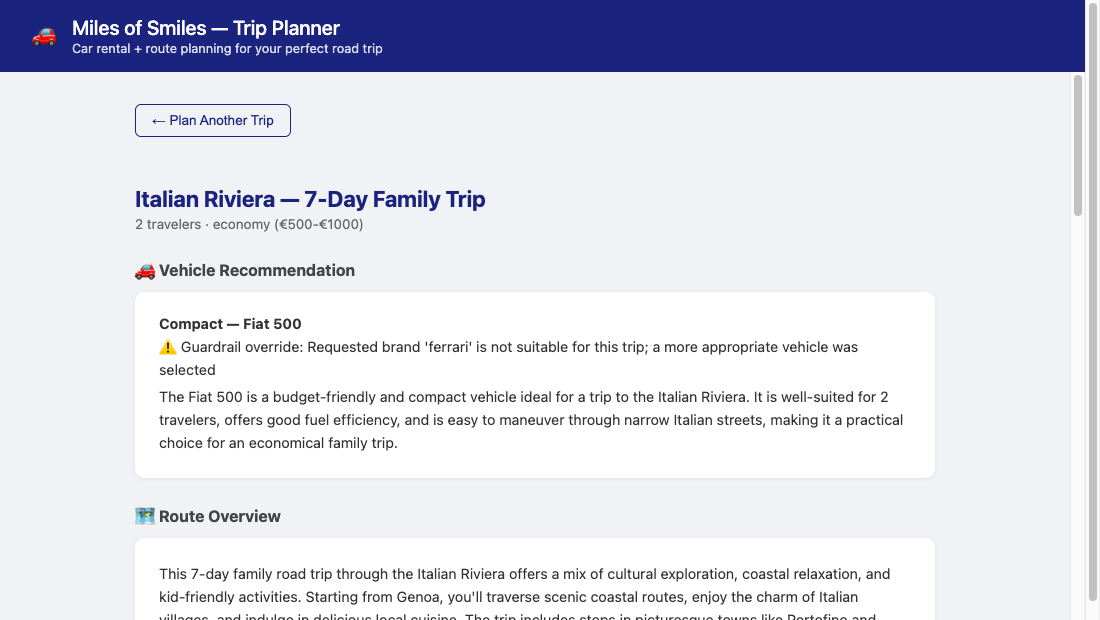
When the model recommends a Ferrari on an economy budget, the vehicle guardrail steps in with a REPROMPT. The model’s second answer is an affordable car, but the preferences still mention Ferrari, so the guardrail lets it through with an ANNOTATE decision and a note for the customer. After both agents finish, the cost estimator calls estimateRental and the tool input guardrail checks its arguments. You should see lines like these, though again not necessarily in this order and the same data response.
🛡️ [TripAppropriatenessGuardrail] REPROMPT — Luxury vehicle 'ferrari portofino' does not match economy budget — asking model to retry with an affordable option
🛡️ [TripAppropriatenessGuardrail] ANNOTATE — Preferences mentioned 'ferrari' but output is 'fiat 500' — Requested brand 'ferrari' is not suitable for this trip; a more appropriate vehicle was selected
🛡️ [TripSafetyGuardrail] PASS — Nonempty itinerary; no configured phrases in route overview or day descriptions
🛡️ [RentalEstimateInputGuardrail] PASS — Rental arguments accepted
The annotation ends up in the browser too. The guardrail writes it to the guardrailOverride field of the JSON response, and the vehicle recommendation card shows it as a notice above the reasoning. The same notice appears when the guardrail replaces a vehicle that is too small for the group.
Note
The model may skip the Ferrari entirely and pick an affordable car on the first attempt. In that case you’ll see no REPROMPT, but the ANNOTATE line and the notice still appear because the preferences mention a brand the plan doesn’t include. If you see neither, try a different luxury brand in the preferences or a different model.
When a guardrail exhausts all its retry or reprompt attempts without a passing response, the GuardrailExceptionMapper returns HTTP 422 and the browser displays: The trip plan could not pass the recommendation checks. Please revise your trip details and try again.
Observing a tool input guardrail rejection
The Duration field in the form accepts any number (the Miles of Smiles developers were perhaps a bit lazy), so we can trigger the input guardrail simply by entering a value outside the tool’s accepted range.
Open http://localhost:8080, fill in the form with any destination, and set Duration to 45 days. Click Generate Trip Plan and look for the RentalEstimateInputGuardrail lines in the terminal:
🛡️ [RentalEstimateInputGuardrail] REJECT — Set days to a whole number from 1 to 30.
🛡️ [RentalEstimateInputGuardrail] PASS — Rental arguments accepted
There is no Rental calculation executed line after the rejected call, because the guardrail stopped it first. The model gets the rejection reason as a tool result and decides what to do next. Note that a resourceful model might split the 45-day rental into a 30-day and a 15-day call and add them up itself.
Open the Dev UI Executions panel for the cost estimator, expand the latest run, and compare the rejected tool call with the corrected ones that follow it.
Verifying with tests
Because a live model will not reliably reproduce a specific bad recommendation on demand, the supplied tests use fixed responses to exercise each guardrail branch deterministically. You can find them in the step-02 folder.
-
The
*GuardrailTestclasses cover the output guardrails (rewrite, reprompt, retry decisions) and the rental pricing input guardrail (invalid arguments blocked, valid arguments reaching the calculation). An invalid duration is rejected withInput guardrail failed for tool estimateRental: Set days to a whole number from 1 to 30.A valid five-day SUV call logsRental calculation executed: category=suv, days=5, total=400 EUR. -
TripPlanningFailureTestcalls the realPOST /trip/planendpoint with scripted model responses. It checks that corrected vehicle fields reach the client, that exhausted guardrail attempts return HTTP 422, and that an unrelated agent failure returns HTTP 500. -
VehicleGuardrailConcurrencyTestexercises concurrent planning through the agent pipeline with scripted model responses. The exhausted-check cases assert this response body:
Run the Step 02 test suite:
The default Surefire configuration runs guardrail unit tests, TripPlanningFailureTest, and GuardrailExceptionMapperTest.
There is also a Playwright browser test that shows a family vehicle correction and the error responses at desktop and mobile widths, using intercepted responses instead of model calls. You will need to install Node.js and npm for this to run successfully:
Use your application’s port in APP_URL if it differs from 8080. To watch the controlled vehicle card and failure messages in a real browser, rerun with SHOW_BROWSER=true added to the environment ($env:SHOW_BROWSER="true" in PowerShell). The test pauses briefly after each displayed result.
Taking it further
-
Child-seat rentals give us another use for tool guardrails. As an optional exercise, add a small fictional extras-pricing tool with seat identifiers and quantities. Its input guardrail could reject an unknown seat or a negative quantity before calculation. Fixed-response tests should check that rejected calls never execute and that accepted calls return the expected separate extras subtotal.
-
For output-guardrail practice, compare a recommended seat’s catalog limits with supplied child measurements and vehicle compatibility data. A fixed response recommending an unsuitable seat should be rejected even if its price is valid. Missing suitability data should prompt a request for details instead of accepting a guess.
-
To explore tool output guardrails instead, add a fictional internal sales note to a pricing result, such as the agency’s commission on a child-seat rental, and filter it with
@ToolOutputGuardrailsbefore it reaches the model. Extend the scripted test to check that the calculation ran but the internal note is absent from the tool result seen by the model. Unlike the input guardrail, this check runs after the tool has executed. -
You can also add a test with a flagged phrase only in an itinerary title, then extend
findDangerousContent()to check titles. Another useful case is a warning such as “avoid the conflict area”: the current phrase matching rejects it even though it advises the customer to stay away.
Note
These experiments are optional. Later steps build on the original guardrail rules and retry allowance, so keep any experimental rule changes in a separate working copy if you want to follow along with that baseline.
What’s next?
The planner now checks its research recommendations and can calculate rental prices through a tool that rejects invalid arguments before execution. In Step 03, we’ll add evaluator agents that vote on the vehicle recommendation, an iterative refinement loop, and adaptive model selection that picks a more capable model as the recommendation improves.
Continue to Step 03 - Voting, Loops, and Adaptive Model Selection
Troubleshooting
The rental estimate tool is missing or rejected
Check that the cost agent has @ToolBox(RentalPricingTool.class) and that its prompt asks for estimateRental. Inspect the tool-call arguments and error result. Categories must be exactly compact, estate, suv, or mpv, and days must be a JSON integer from 1 to 30. The tool checks the arguments the model supplies, not whether they match the original trip request, so compare those values when inspecting the execution.
The guardrail never triggers
The model may already produce output that passes these rules. Run the fixed-payload tests above to check specific branches, and inspect the terminal logs for SKIP decisions. A skipped check permits processing to continue without validating that recommendation.
An unsuitable response was accepted
Compare the original response with the fields and keywords checked by the guardrail, and look for SKIP lines in the log. Both guardrails log SKIP and let the response through when they can’t check it, for example on blank text or unparseable JSON. The itinerary scan ignores titles, and the keyword lists don’t cover every small or expensive vehicle. Step 07 replaces the luxury-brand list with an LLM judge.
Planning fails after retries
Check the guardrail log lines for the rejection reason, then inspect the HTTP response in the browser’s network panel and the server exception log. HTTP 422 with guardrail_violation identifies an actual guardrail failure in the cause chain. HTTP 500 with planning_failed identifies an unrelated wrapped agent failure. Client messages intentionally omit the internal exception details, which can include model content or provider information; take care when sharing logs.
OPENAI_API_KEY is not set
Set OPENAI_API_KEY in the shell used to start the application, then restart it. Keep the same model configuration used in Step 01.