HTTP rate limit reference guide
experimental|
This technology is considered experimental. In experimental mode, early feedback is requested to mature the idea. There is no guarantee of stability nor long term presence in the platform until the solution matures. Feedback is welcome on our mailing list or as issues in our GitHub issue tracker. For a full list of possible statuses, check our FAQ entry. |
Rate limiting controls how frequently a client can access an application. It stops a single caller from using more than its share: a client stuck in a retry loop, someone guessing passwords on a login page, or a customer that goes beyond its plan.
The quarkus-http-rate-limit extension enforces rate limits in the Quarkus HTTP layer, before requests reach application endpoints.
You configure named rules that select HTTP paths and methods, identify which requests share a limit, and define the permitted request rate.
Requests that exceed a limit receive 429 Too Many Requests with a Retry-After header.
The extension rejects excess requests immediately; it does not queue them until capacity becomes available.
Start with Getting started to configure and try one rule. The next sections explain that rule, how its permits replenish, and how to count requests by client. Then use Common tasks to adapt it to your application.
1. Getting started
Add the extension to your project:
<dependency>
    <groupId>io.quarkus</groupId>
    <artifactId>quarkus-http-rate-limit</artifactId>
</dependency>implementation("io.quarkus:quarkus-http-rate-limit")The extension limits nothing until you configure a rule.
The following rule, named api, lets each client IP address make 100 requests per minute to the paths under /api:
quarkus.http.rate-limit.rules.api.paths=/api/*
quarkus.http.rate-limit.rules.api.phase=pre-authentication
quarkus.http.rate-limit.rules.api.request-key=ip
quarkus.http.rate-limit.rules.api.permits=100
quarkus.http.rate-limit.rules.api.window=1m-
pathsare the paths the rule limits. -
request-keysays who counts as one client, here the client IP address. See Choosing what to count for the other choices. -
phasesays whether the rule runs before or after the user is authenticated. A rule keyed by IP address needs no user, so it runs before. See Before or after authentication. -
permitsandwindoware the limit: 100 requests per minute. See Choosing the limit.
The rule name, api here, is your choice.
It appears in logs and metrics, never in responses.
To see the limit at work, provide an endpoint at /api/hello and start the application in dev mode with a smaller limit: permits=2 and window=1m.
Send three requests in quick succession from the same client:
curl -i localhost:8080/api/hello
curl -i localhost:8080/api/hello
curl -i localhost:8080/api/hello
The first two get the normal response. The third is refused, with a response like this:
HTTP/1.1 429 Too Many Requests
Retry-After: 30

Too Many Requests
Retry-After is the number of seconds until the client may try again.
In dev mode, the application log also shows every refusal, with the rule and the key that was refused.
To disable rate limiting when starting the application, set quarkus.http.rate-limit.enabled=false.
2. Understanding your first rule
The five properties in Getting started define one complete rule named api.
Read them as three decisions:
| Decision | In this example |
|---|---|
Which requests are limited? |
|
Which requests count together? |
|
How many requests are allowed? |
|
Requests from one IP address to /api/hello and /api/orders use the same allowance.
Another IP address has its own allowance.
All clients get the same permitted rate, but each uses its allowance independently.
In quarkus.http.rate-limit.rules.api.paths, rules holds the configured rules, api is the name you chose, and paths is one setting of that rule.
To protect another set of paths separately, add a rule with a different name.
The next section explains how the allowance replenishes over time. Then Choosing what to count explains how to count by authenticated user or another value instead of IP address.
3. Choosing the limit
Each allowed request consumes one permit from the client’s allowance.
Used permits replenish over time, so the client can make more requests later.
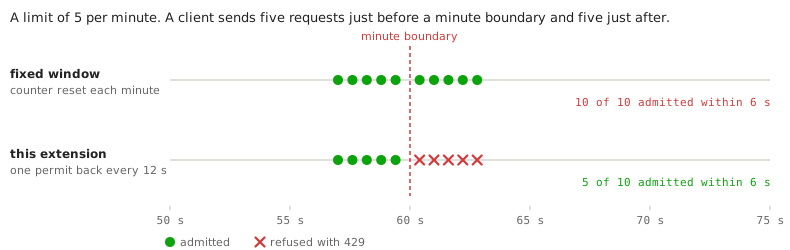
The allowance is not reset at fixed times.
Permits come back one at a time, evenly: with permits=60 and window=1m, a client gets one permit back every second, not 60 at the top of each minute.
That time between two permits, window / permits, is the rule’s interval.
burst says how many permits a client can save up while it is idle, and so how many requests it can make at once.
It defaults to permits.
The following table follows one client of a rule with permits=2 and window=10s, so one permit back every 5 seconds, for three values of burst.
The client starts idle, with as many permits as it can hold:
| Time | Requests | burst=1 |
burst=2 |
burst=4 |
|---|---|---|---|---|
0 s |
5 at once |
1 admitted, 4 refused with |
2 admitted, 3 refused with |
4 admitted, 1 refused with |
2 s |
1 |
refused with |
refused with |
refused with |
5 s |
1 |
admitted |
admitted |
admitted |
10 s |
1 |
admitted |
admitted |
admitted |
30 s |
3 at once |
1 admitted, 2 refused with |
2 admitted, 1 refused with |
3 admitted |
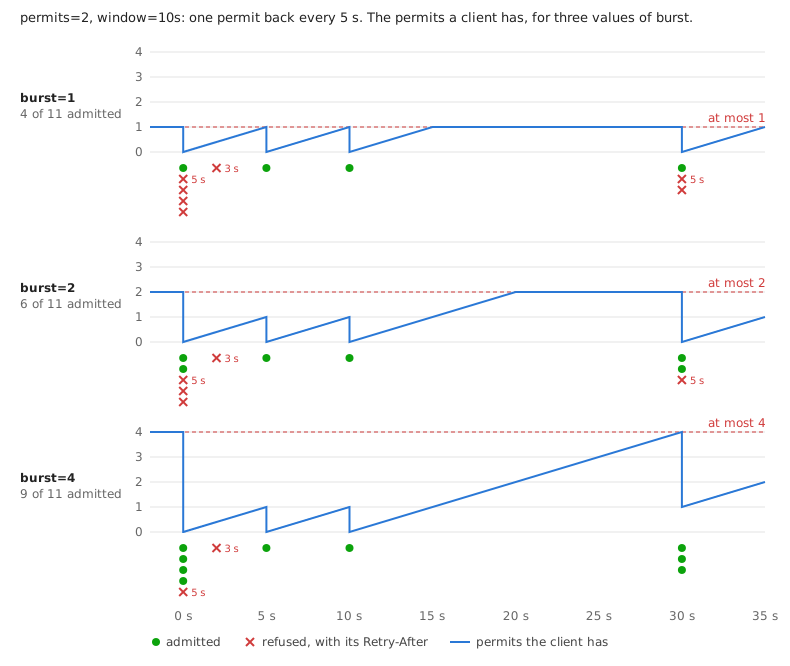
In all three columns, the client gets one request through every 5 seconds once its saved permits are spent.
burst only changes how many it can save: after the quiet 20 seconds, it has 1, 2 or 4.
-
Raise
burstabovepermitsto allow short spikes from clients that are mostly idle. -
Lower it below
permitsto spread each client’s requests out more evenly.
Retry-After is the wait until the next permit comes back, in whole seconds, at least 1.
A client that retries exactly then may still be refused, if another request with the same key used that permit first.
4. Choosing what to count
The request-key of a rule decides which requests share one limit:
| Key | Requests that share a limit |
|---|---|
|
Requests from the same client IP address. |
|
Requests of the same authenticated user. Requests without a user are counted by IP address. |
|
Requests with the same value of the header |
|
All requests of the rule, from any client. |
|
Requests that your own key resolver gives the same key, see Your own keys. |
Keys are scoped to a rule and phase: the same client has independent limits in two different rules.
Within one rule, requests with the same key share a limit across all of its paths and methods.
For example, an ip rule with paths=/orders/,/search/ gives each address one combined allowance for both sets of paths.
With global, all matching requests share one limit.
For example, a rule with paths=/items/* and request-key=global counts requests to /items/1 and /items/2 together, from every client.
One busy client can exhaust that allowance for everyone.
4.1. Before or after authentication
Each rule runs in one of two phases, set with phase:
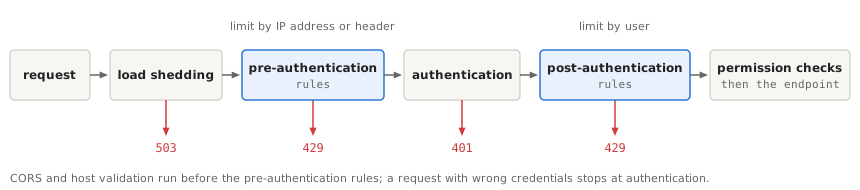
-
pre-authenticationruns before the user is known. Use it for keys that need no user, such asip. It also protects authentication itself: a login request with wrong credentials is answered401by authentication and never reaches a later phase, so limit password guessing with apre-authenticationrule keyed byip. -
post-authenticationruns once the user is known, before the permission checks.principalkeys need it.
To limit the same paths in both phases, for example by IP address before authentication and by user after it, write one rule for each.
A header key in the pre-authentication phase counts values that nothing has checked yet.
Use it only for values that are secret, such as API keys, together with an ip rule on the same paths.
For a value that is not secret, such as a tenant ID, validate that the authenticated caller may use that value before treating it as a trusted key.
Selecting post-authentication makes the identity available but does not validate a header’s relationship to that identity.
A custom resolver can derive the tenant from the identity instead.
4.2. Behind a proxy
The ip key uses the address that the request comes from.
Behind a reverse proxy or a load balancer, that is the proxy’s address, and all clients share one limit.
Set quarkus.http.proxy.proxy-address-forwarding=true and quarkus.http.proxy.trusted-proxies so that Quarkus takes the client’s address from the proxy’s forwarding headers, see Running behind a reverse proxy.
5. Common tasks
The examples below build on the rule from Getting started. Start with the task you need: restrict HTTP methods, combine rules, or reuse settings. The later examples introduce named quotas and Java code for choosing a quota by user.
5.1. Protecting a login page
The first rule applies to every HTTP method on its paths.
To limit only login submissions, add methods=POST to a rule for /login.
It counts attempts by IP address before authentication:
quarkus.http.rate-limit.rules.login.paths=/login
quarkus.http.rate-limit.rules.login.methods=POST
quarkus.http.rate-limit.rules.login.phase=pre-authentication
quarkus.http.rate-limit.rules.login.request-key=ip
quarkus.http.rate-limit.rules.login.permits=5
quarkus.http.rate-limit.rules.login.window=1m
5.2. Combining a short and a long limit
To allow a few requests per second but also cap the requests per day, write two rules on the same paths:
quarkus.http.rate-limit.rules.login-burst.paths=/login
quarkus.http.rate-limit.rules.login-burst.phase=pre-authentication
quarkus.http.rate-limit.rules.login-burst.request-key=ip
quarkus.http.rate-limit.rules.login-burst.permits=5
quarkus.http.rate-limit.rules.login-burst.window=10s

quarkus.http.rate-limit.rules.login-day.paths=/login
quarkus.http.rate-limit.rules.login-day.phase=pre-authentication
quarkus.http.rate-limit.rules.login-day.request-key=ip
quarkus.http.rate-limit.rules.login-day.permits=200
quarkus.http.rate-limit.rules.login-day.window=1d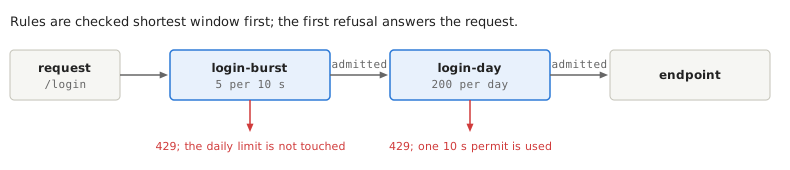
Within each phase, all matching rules apply, including overlapping paths; a more specific path does not replace a broader rule. In this example, the 10-second rule is checked before the daily rule. The first refusal stops evaluation and answers the request. A request that the short rule admits and the long rule refuses still uses a permit of the short rule.
5.3. Sharing settings between rules
When several rules use the same phase and request-key, set those values once under quarkus.http.rate-limit.
Each rule inherits them unless it sets its own value.
Keep each rule’s paths and permitted rate on the rule.
Here both rules count requests by IP address before authentication:
quarkus.http.rate-limit.phase=pre-authentication
quarkus.http.rate-limit.request-key=ip

quarkus.http.rate-limit.rules.orders.paths=/orders/*
quarkus.http.rate-limit.rules.orders.permits=100
quarkus.http.rate-limit.rules.orders.window=1m

quarkus.http.rate-limit.rules.search.paths=/search/*
quarkus.http.rate-limit.rules.search.permits=20
quarkus.http.rate-limit.rules.search.window=1m
5.4. Reusing a configured limit
If several rules need the same permitted rate, you can also give that quota a name and reuse it.
A named limit holds permits, window, and optionally burst under quarkus.http.rate-limit.limits.<name>.
Defining one alone does not limit any requests: a rule selects it with limit=<name>.
For example, define a quota named standard and select it from two rules:
quarkus.http.rate-limit.limits.standard.permits=100
quarkus.http.rate-limit.limits.standard.window=1m

quarkus.http.rate-limit.phase=pre-authentication
quarkus.http.rate-limit.request-key=ip

quarkus.http.rate-limit.rules.orders.paths=/orders/*
quarkus.http.rate-limit.rules.orders.limit=standard

quarkus.http.rate-limit.rules.search.paths=/search/*
quarkus.http.rate-limit.rules.search.limit=standard
Each IP address can make 100 requests per minute to /orders/ and another 100 to /search/.
The rules share the quota values, not the consumed permits.
Changing limits.standard.permits changes the rate for both rules on the next application startup.
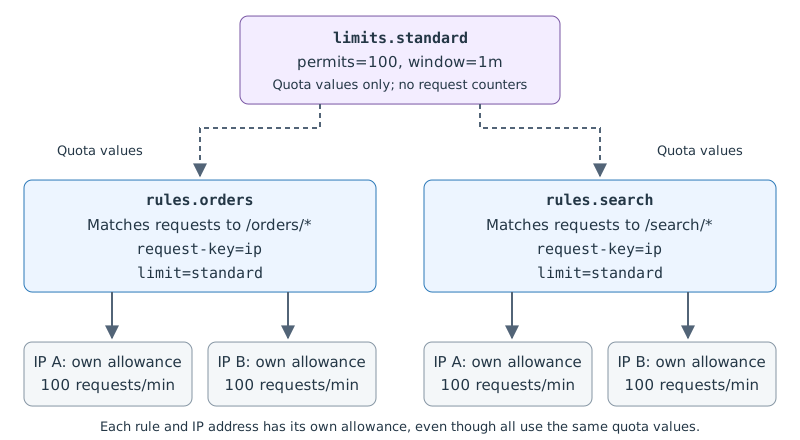
standard is an arbitrary quota name; orders and search are independent rule names.
The rules still choose which paths to protect and which requests count together.
Selecting it with limit=standard replaces the rule’s inline permits, window, and burst; do not configure both.
No Java code is needed for this use case.
5.5. Giving users different limits
So far, every client of a rule gets the same permitted rate.
For subscription plans, each user might need a different rate on the same paths.
A limit resolver is application code that chooses a quota for each request.
Implement RateLimitResolver and select it on the rule with limit-resolver.
The following example defines two named quotas, free and paid, and uses a resolver named subscription to choose between them.
Each free user gets 100 requests a minute and each paid user gets 1000:
quarkus.http.rate-limit.limits.free.permits=100
quarkus.http.rate-limit.limits.free.window=1m
quarkus.http.rate-limit.limits.paid.permits=1000
quarkus.http.rate-limit.limits.paid.window=1m

quarkus.http.rate-limit.rules.api.paths=/api/*
quarkus.http.rate-limit.rules.api.phase=post-authentication
quarkus.http.rate-limit.rules.api.request-key=principal
quarkus.http.rate-limit.rules.api.limit-resolver=subscription
limit-resolver=subscription selects the CDI bean annotated with @Identifier("subscription").
That bean selects a limit using the authenticated user’s roles:
import jakarta.inject.Inject;
import jakarta.inject.Singleton;

import io.quarkus.http.ratelimit.RateLimit;
import io.quarkus.http.ratelimit.RateLimitContext;
import io.quarkus.http.ratelimit.RateLimitResolver;
import io.quarkus.http.ratelimit.RateLimits;
import io.smallrye.common.annotation.Identifier;
import io.smallrye.mutiny.Uni;

@Singleton
@Identifier("subscription")
public class SubscriptionLimits implements RateLimitResolver {
    @Inject
    RateLimits limits;

    @Override
    public Uni<RateLimit> resolve(RateLimitContext context) {
        boolean paid = context.identity()
                .map(identity -> identity.hasRole("paid"))
                .orElse(false);
        return Uni.createFrom().item(limits.get(paid ? "paid" : "free"));
    }
}
Configure authentication separately so that the user’s identity and roles are available.
The names free and paid have no built-in meaning: the Java code explicitly maps the paid role to limits.paid, and all other users to limits.free.
An anonymous request gets the free limit and is counted by its client address.
Use an authenticated HTTP permission if anonymous access should be refused.
Each user has an independent allowance, even when several users select the same named limit.
The request-key decides who shares a counter; the selected limit decides its size and replenishment rate.
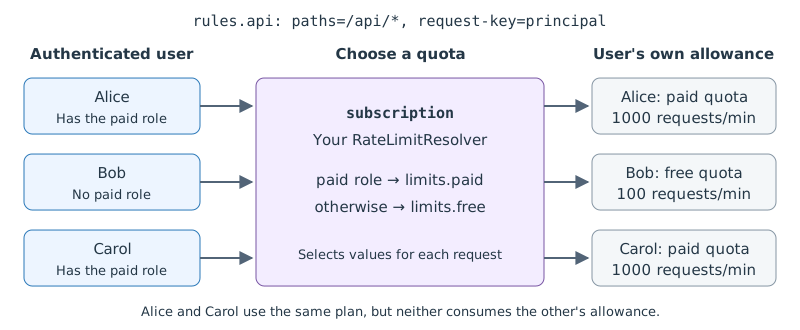
RateLimits is injectable application-wide and loads named limits at startup.
get(name) returns an immutable RateLimit; an unknown name throws IllegalArgumentException.
For quotas obtained from application data, a resolver can return RateLimit.of(permits, window) or
RateLimit.of(permits, window, burst) instead.
The factories validate their arguments immediately; the two-argument factory defaults the burst to the permits.
Resolvers run on the event loop and must not block; use a reactive client for subscription lookups.
Use context.identity() for the authenticated user rather than parsing storage keys.
A rule must select exactly one source of limits.
A static limit or inline limit takes precedence over the shared quarkus.http.rate-limit.limit-resolver.
An explicit rule-level limit-resolver cannot be combined with a static limit.
5.6. Handling a failed limit lookup
A resolver that fails, emits null, or exceeds quarkus.http.rate-limit.limit-resolver-timeout (default 250ms)
causes a 503 Service Unavailable response.
To use a configured limit during a lookup failure instead, select a named fallback.
For example, add this property to the subscription example to use its free quota if the resolver fails:
quarkus.http.rate-limit.rules.api.fallback-limit=freeThe fallback is used only on failure; the resolver selects the normal limit for every request. No fallback is required to use a resolver.
5.7. Changing a user’s limit
Each rule resolves its own limit. Selecting a different named limit keeps the counter for the same rule and request key.
The limit is a token bucket, implemented with the Generic Cell Rate Algorithm (GCRA), which keeps the counts of a key as time, not as a number of used permits: a key that used up its limit owes the time it takes to earn its permits back.
So raising permits without widening window does not unlock a key at once.
A key that used up 5 requests a minute and is raised to 10 a minute is still refused for 6 seconds, one interval of the new limit; raised to 10 per 2 minutes instead, it is admitted at once.
A key never owes more than its current burst: a key that moves from 1 request a day to 100 a minute waits at most one interval, not the rest of the day.
The same applies when a rolling update changes permits or window.
A rate limit must allow at least one permit; use authorization to deny access. Make a resolved limit depend on trusted user or tenant data, not on other request data that the client controls. If you use Fewer calls to Redis: lease mode, a key whose limit changes loses the permits its instance had leased.
6. Running several instances
By default, each instance of the application keeps its own counts in memory: the local store.
That needs no setup, but each instance applies the limit on its own.
On three instances behind a load balancer, a limit of 100 requests a minute lets a client make up to 300.
A restart also forgets every count, and all clients start again with a full burst.
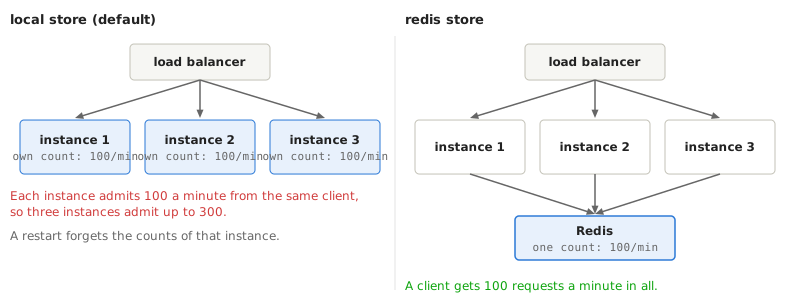
To share one limit across all instances, keep the counts in Redis instead, with the redis store.
A rule uses one store or the other, never both.
6.1. Using Redis
Add the quarkus-redis-client extension, and select the redis store for every rule, or with store for some rules only:
quarkus.http.rate-limit.store=redis
quarkus.redis.hosts=redis://localhost:6379
Redis 5 or later is needed, standalone or cluster. The time used for every decision is that of the Redis server, so the clocks of the instances don’t matter.
Give the rate limiter its own Redis client, so that it does not compete with the rest of the application for connections, and size it for the limiter:
quarkus.redis.limits.hosts=redis://redis:6379
quarkus.redis.limits.max-pool-size=32
quarkus.redis.limits.max-pool-waiting=0
quarkus.http.rate-limit.redis.client-name=limits-
max-pool-size: about the request rate times the round trip to Redis, plus headroom. For example, 2000 requests per second at a round trip of 5 ms keep about 10 connections busy. Every instance opens its own pool. -
max-pool-waiting=0: when every connection is busy, a request is decided at once, by the failure mode below, instead of waiting for one.
If several applications share one Redis database, give each its own quarkus.application.name, which keeps their keys apart.
6.2. When Redis is unavailable
A call to Redis that fails, or takes longer than quarkus.http.rate-limit.store-timeout (100ms by default), is decided by the failure mode, quarkus.http.rate-limit.store-failure-mode:
| Mode | Behaviour |
|---|---|
|
The instance decides alone, from its own counts in memory, until Redis is back. The limit is then per instance. |
|
The request is admitted. |
|
The request is refused with |
Choose closed when requests must be rejected if the shared store cannot decide, open when availability matters more than enforcing the limit during an outage, or local to keep enforcing a per-instance limit.
These modes govern store failures; they do not remove the precision tradeoffs of lease mode or Redis failover.
After repeated failures, the extension stops calling Redis for a few seconds, then tries again; while it waits, every request is decided by the failure mode. A WARN message is logged when that starts, and an INFO message when Redis is used again.
The Redis client extension adds a readiness check that fails while Redis is down, which takes every instance out of service whatever the failure mode.
If the application uses Redis only for rate limiting, disable that check with quarkus.redis.health.enabled=false, so that the failure mode decides instead.
6.3. Fewer calls to Redis: lease mode
With the redis store, every request makes one call to Redis.
For limits with many requests per key, lease mode lets each instance take several permits at once and hand them out locally:
quarkus.http.rate-limit.rules.api.store=redis
quarkus.http.rate-limit.rules.api.lease-size=10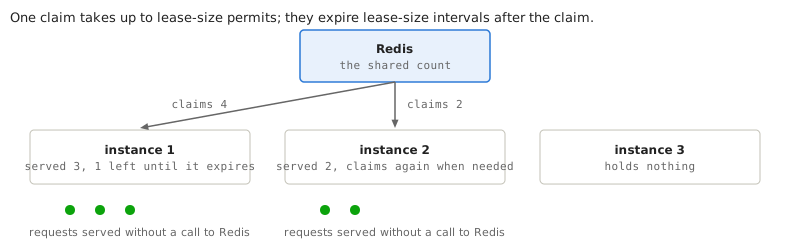
The price is precision: the instances together may admit up to lease-size requests more than the limit.
Keep lease-size small next to the limit, at most permits / 20; the extension warns otherwise.
Lease mode does not help when most requests come with a key that the instance has not seen recently.
By default, a request that finds no permit at hand waits for one call to Redis.
With max-overdraft=k, an instance instead admits up to k such requests without waiting, and pays for them with its next call; if Redis refuses, they got through over the limit.
Use it for limits where waiting costs more than an occasional extra request.
6.3.1. Lease guarantees and tradeoffs
A claim takes between 1 and lease-size permits from the store, depending on how many the instance used recently, and never more than half of what the store said was left.
The number of instances never needs to be configured.
An idle instance holds no permits, and a stopped instance loses at most the permits it held.
Leased permits may be handed out for a lease time of lease-size intervals (window / permits) from the claim, then expire.
For example, with permits=600 and window=1m, the interval is 100 ms, so lease-size=30 gives a lease time of 3 seconds.
For a key whose resolved limit has a burst below lease-size, that burst takes the place of lease-size.
-
Permits taken from the store: over any period, the instances together admit at most the limit plus
lease-size, whatever the number of instances, restarts or delays. -
With
max-overdraft=k: each instance may also admit up tokrequests per key that no claim pays for, in each interval, or in eachRetry-Afterof the store’s last refusal if that is longer, pluskmore after a restart, after the key was forgotten, or after the key’s limit changed. This grows with the number of instances: it is the price of never waiting.max-overdraftis at most the key’s burst, and needslease-size. -
While the store is unavailable, permits granted by the
localandopenfailure modes are per instance and not part of these bounds. Permits already leased keep being used during an outage, even withclosed, which only refuses new claims. -
Leased permits that expire, or whose claim reply was lost, are used up without being handed out: see
http.rate.limit.lease.stranded. Repeated lost replies on one instance can use up a key’s whole limit. -
After a refusal, the instance makes no new claim for the key until the store’s
Retry-Afterhas passed. -
A request waits for a claim at most
store-timeout; then the failure mode decides.
For example, take a limit of 120 requests per hour per API key on 3 instances.
The interval is 3600 s / 120 = 30 s.
With lease-size=6 and max-overdraft=1, the lease time is 3 minutes, the instances admit at most 6 requests more than the limit, plus at most one request per instance every 30 seconds while every claim is refused, and Redis sees one call per up to 6 requests.
6.4. Operating Redis
The following details explain how Redis stores counters and how the extension handles slow or failed store calls.
6.4.1. Key storage, expiry, and failover
-
Keys in Redis start with
quarkus.http.rate-limit.redis.key-prefix, by defaultquarkus:http-rate-limit:<application name>:. -
max-keysbounds the memory of an instance, not that of Redis. A key stays in Redis until its burst is full again. Set amaxmemorylimit with thevolatile-ttlpolicy: every key has an expiry, and those closest to it go first. Undernoeviction, a full Redis fails every call, and the failure mode decides every request. -
With asynchronous replication, a Redis failover can lose the latest updates, so keys start again from an older state: the limit errs lenient.
-
While Redis refuses a key, the instance refuses the key’s requests until the
Retry-Afterhas passed without calling Redis, so a client over its limit costs Redis nothing. -
quarkus.http.rate-limit.redis.timeoutandquarkus.http.rate-limit.redis.failure-modeoverridestore-timeoutandstore-failure-modefor theredisstore.
6.4.2. Store timeouts
A call to a non-local store has a time budget of quarkus.http.rate-limit.store-timeout (100ms by default).
For Redis, quarkus.http.rate-limit.redis.timeout overrides that value.
A call to Redis that times out may still be carried out by Redis: commands already sent, or waiting for a connection, still run.
After Redis hangs, up to max-pool-size plus max-pool-waiting permits can be used up for requests that the failure mode already decided, so the limit errs strict.
A long pause of the application, such as a garbage collection, can also make calls time out while Redis is healthy; with the closed failure mode, keep store-timeout well above such pauses.
6.4.3. Concurrency limits and circuit breaker
Calls to a store other than local are protected by the following values:
-
At most
256calls to the same store are in flight at once; a call beyond that fails at once. -
A circuit breaker looks at the last
20calls, opens when half of them failed, and stays open for5s. Then one trial call is made: a success closes it, a failure opens it again. The trial is made as soon as the delay ends, without waiting for a request. -
A call refused because the Redis connection pool is full falls back to the failure mode, but does not open the breaker: it means the pool is too small, not that Redis is down.
The calls that failed, timeouts included, are counted by the ft.circuitbreaker.* meters.
The circuit breaker can be tuned with a customizer, see Customizing store behaviour.
7. Observability
7.1. Metrics
With the quarkus-micrometer extension, the following meters are published.
Set quarkus.http.rate-limit.metrics.enabled=false to turn them off.
Meters describe rule evaluations: a request admitted by one rule and rejected by another contributes to both rules.
Rules that are skipped or never reached do not count as admitted requests.
Keys and client addresses are not metric tags.
| Meter | Type | Tags and meaning |
|---|---|---|
|
Counter |
|
|
Counter |
|
|
Distribution summary |
|
|
Gauge |
|
|
Counter |
|
|
Counter |
|
|
Counter |
|
|
Gauge |
|
|
Counter |
|
The health of the Redis store is visible through the ft.circuitbreaker.* meters of SmallRye Fault Tolerance, tagged http-rate-limit-store-redis.
See Micrometer for how to expose meters.
7.1.1. Interpreting overdraft results
http.rate.limit.lease.overdraft counts each request admitted on overdraft once as admitted, and once more under one of the other results once it is known how it was paid for:
result |
Meaning |
|---|---|
|
Admitted on overdraft, before any claim paid for it. |
|
Paid for by the next claim the store granted. |
|
Paid for by the local counts, while the store was unavailable and |
|
Paid for by a claim whose answer arrived after the instance had lost track of the request. |
|
Never paid for: the store refused the claim, the store was unavailable under |
|
The instance lost track of the request, because the key was forgotten or its limit changed, before the store answered the claim that carries it.
It is counted again as |
These counts do not measure by how much a limit was exceeded: forgiven counts only the requests known to be unpaid.
7.2. JFR events
With the quarkus-jfr extension, two JDK Flight Recorder events are recorded, in the Quarkus / HTTP category:
quarkus.RateLimitRejected-
One for every
429, with the rule, the phase, the HTTP method, the path, theRetry-After, and the trace and span IDs of the request. quarkus.RateLimitEvaluation-
One for each rule checked for a request, lasting from the start of the check to its outcome:
ALLOWED,REJECTED,UNAVAILABLE(the503of theclosedfailure mode) orSKIPPED(the rule did not apply). By default only checks slower than10 msare recorded, which shows slow calls to Redis. To record all of them, lower the threshold, for example withjfr configure --input default.jfc +quarkus.RateLimitEvaluation#threshold=0ms --output rate-limit.jfc.
Neither event records the key or the client address, since recordings are often shared. The trace and span IDs are those of the JFR extension; with OpenTelemetry, they are those of the request’s server span.
7.3. Logs
At startup, one INFO line lists the rules; the DEBUG level of the io.quarkus.http.ratelimit category shows the full configuration of each.
In dev mode every refusal is logged.
In other modes refusals are not logged; use the metrics or the JFR events.
A warning that could repeat on every request, such as a failing key resolver, is logged at most once per quarkus.http.rate-limit.warning-interval (one minute by default) for each rule.
8. Customizing rate limiting
Use these Java extension points when the built-in ways of identifying clients or responding to refused requests do not meet your needs.
8.1. Your own keys
To count requests some other way, for example by tenant, write a CDI bean that implements io.quarkus.http.ratelimit.RateLimitKeyResolver, annotate it with @Identifier, and select it with custom: followed by the identifier:
quarkus.http.rate-limit.rules.api.phase=post-authentication
quarkus.http.rate-limit.rules.api.request-key=custom:tenant
import java.util.Optional;
import jakarta.inject.Singleton;
import io.quarkus.http.ratelimit.RateLimitContext;
import io.quarkus.http.ratelimit.RateLimitKeyResolver;
import io.smallrye.common.annotation.Identifier;
import io.smallrye.mutiny.Uni;
@Singleton
@Identifier("tenant")
public class TenantKeyResolver implements RateLimitKeyResolver {
@Override
public Uni<Optional<String>> resolve(RateLimitContext context) {
Optional<String> tenant = context.identity()
.filter(identity -> !identity.isAnonymous())
.map(identity -> identity.<String> getAttribute("tenant-id"))
.filter(value -> !value.isBlank());
if (tenant.isEmpty()) {
return Uni.createFrom().failure(new IllegalStateException("Tenant identity is unavailable"));
}
return Uni.createFrom().item(Optional.of("tenant:" + tenant.get()));
}
}RateLimitContext exposes the routing context, rule name, phase, and, after authentication, the security identity.
In this example, authentication must populate the tenant-id identity attribute.
The example fails the lookup when the request is anonymous or the attribute is missing or blank.
With the default failure handling, these requests receive 503; they do not receive a fresh allowance under a different key.
Use HTTP permissions to require authentication when anonymous requests should receive an authentication challenge instead.
It runs on the event loop, so it must not block, and it must answer within quarkus.http.rate-limit.key-resolver-timeout (default 250ms).
If it fails or is too slow, key-resolver-failure=reject (the default) answers 503.
A resolver can deliberately return Optional.empty() to exclude a request from this rule entirely.
Use that only for intentional exemptions; a missing identity or failed lookup should be handled explicitly.
8.1.1. Resolver requirements
-
Key and limit resolvers are looked up once at startup, so they must be thread-safe.
-
A blocking call stalls every request on the event loop, and a timeout cannot interrupt it; cache any I/O instead.
-
Keep the number of distinct keys bounded, and keep personal data out of keys: they are stored, in Redis too, and logged in dev mode.
8.1.2. Resolver timeouts
For each rule, a request spends at most key-resolver-timeout in a custom key resolver and limit-resolver-timeout in a limit resolver.
Both default to 250ms.
Built-in key resolvers return immediately.
A resolver that does I/O should bound its own Uni with a shorter timeout and decide itself what a timeout means.
For calls to Redis or another non-local store, see Store timeouts.
8.1.3. Choosing a fallback key
The default is to refuse a request whose key cannot be resolved.
To count these requests by client address instead, explicitly set quarkus.http.rate-limit.key-resolver-failure=ip.
This changes who shares the allowance: a tenant with several client addresses can receive several independent IP-based allowances during a lookup failure.
To use one shared fallback allowance instead, catch failures and timeouts yourself and return a fixed key, so that all such requests share one limit:
@Singleton
@Identifier("tenant")
public class TenantKeyResolver implements RateLimitKeyResolver {

    @Override
    public Uni<Optional<String>> resolve(RateLimitContext context) {
        return lookUpTenant(context.routingContext())
                .map(tenant -> Optional.of("tenant:" + tenant))
                .ifNoItem().after(Duration.ofMillis(200)).fail()
                .onFailure().recoverWithItem(Optional.of("unresolved"));
    }

    private Uni<String> lookUpTenant(RoutingContext context) {
        ...
    }
}
8.2. Changing the response
To answer refused requests differently, write a CDI bean that implements io.quarkus.http.ratelimit.RateLimitRejectionWriter.
It replaces the default writer for all rules, for both exceeded limits (429) and lookup or store failures (503), and is called after Retry-After is set.
Use statusCode() for the response status and reason() to distinguish an exceeded limit from a key lookup failure, a limit lookup failure, or an unavailable store.
limit() contains the selected quota when one was resolved; it is empty when key or limit resolution failed.
It runs on the event loop, must not block, and must set the status and end the response.
For example:
import jakarta.inject.Singleton;

import io.quarkus.http.ratelimit.RateLimitRejectionInfo;
import io.quarkus.http.ratelimit.RateLimitRejectionWriter;
import io.vertx.core.http.HttpMethod;
import io.vertx.ext.web.RoutingContext;

@Singleton
public class CustomRejectionWriter implements RateLimitRejectionWriter {

    @Override
    public void write(RoutingContext context, RateLimitRejectionInfo rejection) {
        context.response().setStatusCode(rejection.statusCode())
                .putHeader("Content-Type", "text/plain; charset=utf-8");
        if (context.request().method() == HttpMethod.HEAD) {
            context.response().end();
        } else {
            context.response().end(rejection.statusCode() == 429
                    ? "Request limit reached. Try again later."
                    : "Unable to process the request. Try again later.");
        }
    }
}
Keep internal rule names, keys, and credentials out of public responses.
8.3. Reacting to refusals
Every 429 and 503 produced by the rate limiter is also fired as a CDI event of type io.quarkus.http.ratelimit.RateLimitRejectionInfo, with the rule, the key, the Retry-After and some details of the request.
Use it to act on a particular key; for counts and dashboards, use the Metrics instead.
Under attack the event can fire thousands of times per second, so an observer must be cheap.
A RateLimitRejectionInfo, which a RateLimitRejectionWriter also receives, holds the rule, the phase, the key, the Retry-After, the HTTP method, the path the rules were matched against, the client address the ip key uses (which may be null), and, in the post-authentication phase, the user name.
It also exposes the refusal reason, HTTP status, and selected quota when available.
key() is empty if key resolution failed; limit() is empty if key or limit resolution failed.
It is a snapshot that can be kept after the request ends.
-
A synchronous observer (
@Observes) runs on the event loop before the response is written: it must be fast and must not block. -
An asynchronous observer (
@ObservesAsync) runs on a worker thread and may block, but nothing limits how many deliveries are pending: sample or bound expensive work.
A failing observer does not affect the request. The key and the path come from the client: escape control characters before logging them, or a CR LF in them starts a forged log line. The following observer counts the refusals of each rule and logs one in a thousand:
@Singleton
public class RejectionSampler {

    private static final Logger LOG = Logger.getLogger(RejectionSampler.class);

    private final Map<String, LongAdder> rejections = new ConcurrentHashMap<>();
    private final AtomicLong seen = new AtomicLong();

    void onRejection(@Observes RateLimitRejectionInfo rejection) {
        rejections.computeIfAbsent(rejection.rule(), rule -> new LongAdder()).increment();
        if (seen.incrementAndGet() % 1000 == 0) {
            LOG.infof("Rule '%s' rejected key '%s'", rejection.rule(),
                    rejection.key().orElse("unresolved").replaceAll("\\p{Cntrl}", "?"));
        }
    }
}
8.4. Writing a store
A custom store is a CDI bean that implements io.quarkus.http.ratelimit.RateLimitStore, annotated with @Identifier("<name>"), and selected with store=<name>.
The names local and redis are reserved for the built-in stores.
A custom store gets the timeout, circuit breaker and failure mode configured for non-local stores, and can also use lease mode.
It must be thread-safe because multiple event loops can call it concurrently.
-
Never block:
tryConsumeruns on the event loop. -
Check and consume atomically: of many concurrent calls of cost
1for a new key, exactlyburstmust be allowed. A refusal leaves the state unchanged, except to cap a debt above the burst tolerance. -
Take the time from the backend, such as
TIMEin Redis orclock_timestamp()in PostgreSQL, not from each instance. -
Prefix the key with
policy.id(): a key is unique only within one rule and phase. -
Decide with the policy you are given, which a limit resolver may have selected for the key, and cap a key’s debt at
burstToleranceMicros(). -
Return
RateLimitDecision.allowed(remaining)orRateLimitDecision.rejected(retryAfter), and signal a failure with a failedUni. The factories reject negative remaining permits and nonpositive or unrepresentable retry delays. A null result is treated as a failed call. -
Treat cost
0as a read-only check that reports what a cost1call would decide. -
Keep the state bounded, for example by expiring each key once its burst is full again.
-
Don’t touch the backend at startup: the store bean exists even when no rule uses it. Connect, create schemas or resolve clients, for example through an
Instance<Pool>, on the first call.
The decision script of the Redis store, META-INF/http-rate-limit/try-consume.lua in the quarkus-http-rate-limit-redis jar, is a reference for the arithmetic.
8.5. Customizing store behaviour
Most applications never need these.
They run after the extension’s own settings, in priority order: a lower priority() runs later and has the last word.
8.5.1. Tuning the circuit breaker
A io.quarkus.http.ratelimit.RateLimitStoreGuardCustomizer bean tunes the circuit breaker of each store other than local, through the breaker builder of SmallRye Fault Tolerance:
@Singleton
public class FlakyStoreBreaker implements RateLimitStoreGuardCustomizer {

    @Override
    public void customize(String storeName, Guard.Builder.CircuitBreakerBuilder breaker) {
        if (storeName.equals("flaky")) {
            breaker.requestVolumeThreshold(5).delay(2, ChronoUnit.SECONDS);
        }
    }
}
The breaker’s delay also sets when the trial call is made and the Retry-After of the closed failure mode.
Pool refusals never count as failures, whatever the customizer sets.
done() must not be called.
The store timeout and the limit of calls in flight cannot be changed, and the smallrye.faulttolerance.* configuration does not apply.
8.5.2. Observing cache activity
A io.quarkus.http.ratelimit.RateLimitLocalStoreCustomizer bean is called once for each in-memory cache of a rule, the local store or the lease cache, and can register statistics of the cache’s activity: lookups, updates, and keys forgotten or expired:
@Singleton
public class LocalStoreEvictions implements RateLimitLocalStoreCustomizer {

    private final LongAdder evicted = new LongAdder(); // keys that started again with a full burst

    @Override
    public void customize(String rule, Settings settings) {
        settings.statistics(new Statistics() {
            @Override
            public void evicted() {
                evicted.increment();
            }
        });
    }
}
9. Request processing details
The sections below follow a request through path matching, identification, rule evaluation, and the HTTP response. For an introduction to counting clients and choosing an authentication phase, see Choosing what to count.
To limit calls to a Java method rather than HTTP requests, see @RateLimit of SmallRye Fault Tolerance, which has no separate limits per client, or the Quarkiverse bucket4j extension.
9.1. Path and method matching
paths and methods accept comma-separated lists.
If methods is omitted, the rule applies to all HTTP methods; method names are normalized to uppercase.
Unmatched requests proceed without being counted by that rule.
A request that matches several paths of the same rule is counted only once by that rule.
A path starting with / is absolute; a path without a leading / is relative to quarkus.http.root-path.
A must be a whole path segment, as in /a//b or a trailing /, or the build fails.
With a root path of /app, both api/ and /app/api/ match the application API.
Relative paths let the same rule work under different root paths.
Paths are matched as for HTTP permissions.
A trailing / matches the path itself and its descendants; for example, /api/* covers /api and /api/items.
Matching uses normalized paths, including removal of matrix parameters, as HTTP permissions do.
When the router path and the canonical path differ, rules matching either path apply.
A rule that lists GET also applies to HEAD.
9.2. Exempt paths
The health probes of SmallRye Health (by default /q/health/live, /q/health/ready and /q/health/started) and the Prometheus endpoint of Micrometer (by default /q/metrics) are never limited, so that probes and scrapers are never answered 429.
Only these exact paths are exempt; /q/health itself and health groups are limited like any other path.
The same paths are exempt from load shedding.
9.3. Authentication and permissions
With lazy authentication (quarkus.http.auth.proactive=false), a post-authentication rule authenticates the request for all of its paths, using the mechanisms configured for those paths with quarkus.http.auth.permission.*; mechanisms selected by annotations on REST methods are not known yet.
The build logs a warning for such a rule, and for a principal key when the application has no HttpAuthenticationMechanism bean, since every request would then be anonymous.
A custom resolver in the post-authentication phase is called for anonymous requests too: RateLimitContext.identity() tells whether the request is anonymous.
The post-authentication phase runs before the permission checks, so an anonymous request to a protected path is counted by its IP address before it is answered 401.
To refuse anonymous access, use an authenticated permission, not a rate limit.
9.4. Request key representation and memory limits
-
header:<name>matches the header name case-insensitively and trims the value. The value can be a credential, so the key holds its SHA-256 hash,header:sha256:<hex>, never the value; a resolver that needs the value reads the header fromRateLimitContext.routingContext(). A hash protects only values that are hard to guess. Requests that send the header more than once share one key,header:repeated. -
principaluses the user name, which is not qualified by tenant or realm. When several authentication mechanisms or OIDC tenants can have users of the same name, use a key resolver that adds the tenant. With cookie-based authentication, protect limited paths against cross-site requests, since another site can make a user’s browser send them. -
A key longer than 256 characters, one that starts with
sha256:, or one that contains{or}is replaced bysha256:and the hex SHA-256 of the key.
Each rule keeps at most max-keys keys in the memory of an instance.
When there are more, some are forgotten, and a forgotten key starts again with a full burst.
Header and principal keys are cheap to vary, so pair such a rule with an ip rule.
A warning is logged when a rule reaches its max-keys; raise it unless the cause is a flood.
9.5. Rule evaluation order
Within each phase, all matching rules apply, including overlapping paths.
Rules with inline or named limits are checked by ascending window, with ties ordered by rule name.
Rules using a limit resolver follow, ordered by rule name; their limits are selected only when each rule is evaluated.
The first refusal stops evaluation.
Permits consumed by earlier rules are not restored.
9.5.1. Combining with load shedding
Rate limiting is not overload protection.
It limits each client separately, however idle the application is.
To protect the application as a whole when it cannot keep up, use load shedding, which answers 503 Service Unavailable.
The two extensions can be used together; load shedding then runs first.
9.6. Responses
A client that accepts application/problem+json, application/json or text/json gets an RFC 9457 problem instead of the plain text: {"type":"about:blank","title":"Too Many Requests","status":429}.
Any other client, including one that sends Accept: /, gets the plain text, and a HEAD request gets no body.
The response never says which rule refused the request, or which key was counted.
9.6.1. Other status codes
Besides the 429 described in Getting started, the extension can answer:
-
503 Service UnavailablewithRetry-After: a non-local store could not decide and the failure mode isclosed.Retry-Afteris chosen at random between one and two circuit breaker delays (5 to 10 seconds by default), so that refused clients don’t all come back at once. A failed limit lookup without a fallback, or a failed key lookup with the defaultkey-resolver-failure=reject, also returns503, with a shortRetry-After. The default response uses the same content negotiation as429, with the titleService Unavailableand status503. All these refusals use the configured writer and fire a CDI event. -
500 Internal Server Error: a customRateLimitRejectionWriterfailed before ending the response.
The extension sends no headers about the remaining quota on admitted requests: with Redis and lease mode, the remaining quota is only an estimate.
9.6.2. CORS and request bodies
Because the rules run after CORS, a 429 carries the CORS headers, and a valid CORS preflight request is answered without being counted.
For a script to read Retry-After from a cross-origin response, list it with quarkus.http.cors.exposed-headers=Retry-After.
A refused request’s unread body is discarded, so that the connection can serve the next request.
The server reads no more of it than an accepted request may send (quarkus.http.limits.max-body-size): a larger body is cut off once the response is sent, which over HTTP/1.1 closes the connection, and over HTTP/2 and HTTP/3 ends only the stream of that request.
If your application installs a body handler for every route, the whole body is read before the limiter runs.
10. Configuration reference
Start with Getting started for a complete rule, or Common tasks for examples of adding to it. This section explains when configuration changes take effect, how values are validated, and lists every supported property.
10.1. When configuration takes effect
The shared defaults phase, request-key, store, limit-resolver, and max-keys apply to every rule that does not set its own value.
Set shared defaults directly under quarkus.http.rate-limit.
An enabled rule needs paths, phase, request-key, and a limit source; phase and request-key can come from the shared defaults.
paths, methods, phase, request-key, store and limit-resolver are fixed at build time.
The others, including the limit itself, are runtime settings: they can be changed when starting the built application, without rebuilding it, but not while it runs.
Use limit resolvers for limits that depend on application data and can change between requests.
See All configuration properties for every setting and its default.
10.2. Configuration validation
A rule that is invalid, for example one with a key resolver, limit resolver or store that does not exist, fails the build.
Header-based keys require a valid HTTP header name.
Ambiguous component selections also fail the build with the configuration property and matching beans; CDI alternatives and default beans follow normal CDI resolution.
Selections involving runtime lookup conditions (@LookupIfProperty or @LookupUnlessProperty) are resolved at startup.
permits, burst, and max-keys must be at least 1, and window must be positive.
The replenishment interval (window / permits) must be at least one microsecond, and interval * burst must not exceed 30 days.
lease-size requires a non-local store and must be at least 1; max-overdraft requires lease-size and must be nonnegative.
For static limits, neither may exceed the burst. For resolved limits, chunks and overdrafts are capped to the selected burst.
An invalid limit fails startup, and so does a limit for a rule that does not exist, such as a misspelled rule name.
10.3. Disabling rules
With quarkus.http.rate-limit.enabled=false, the runtime settings are not checked.
To disable one rule at startup, set quarkus.http.rate-limit.rules."rule".enabled=false; it then needs no runtime limit.
To enable it again, supply a limit source for its build-time paths.
10.4. All configuration properties
Configuration property fixed at build time - All other configuration properties are overridable at runtime
Configuration property |
Type |
Default |
|---|---|---|
Where every rule that does not set its own Environment variable: Show more |
string |
|
What every rule that does not set its own
Environment variable: Show more |
string |
|
When every rule that does not set its own Environment variable: Show more |
|
|
The limit resolver inherited by rules that do not select a resolver or a static limit of their own. Environment variable: Show more |
string |
|
Whether HTTP rate limiting is enabled. Environment variable: Show more |
boolean |
|
Maximum time a custom request key resolver may take. Must be positive. Environment variable: Show more |
|
|
Maximum time a limit resolver may take. Must be positive. Environment variable: Show more |
|
|
What happens when a custom request key resolver fails or times out: Environment variable: Show more |
|
|
How often a warning that can recur on every request, such as a rule that reaches its Environment variable: Show more |
|
|
The maximum number of keys a rule holds in the memory of a replica, unless it sets its own Environment variable: Show more |
long |
|
The time budget of one call to a store other than Environment variable: Show more |
|
|
What happens to a request when a call to a store other than Environment variable: Show more |
|
|
The prefix of every key the built-in Redis store writes. It isolates applications that share one database. A custom Environment variable: Show more |
string |
|
The time budget of one call to the built-in Environment variable: Show more |
||
What happens when the built-in Environment variable: Show more |
|
|
Type |
Default |
|
URI paths this rule applies to. A leading slash makes a path absolute; otherwise it is relative to Environment variable: Show more |
list of string |
required |
HTTP methods to limit. When absent all methods match. Names are upper-cased; GET also covers HEAD. Environment variable: Show more |
list of string |
|
When this rule is evaluated: Environment variable: Show more |
|
|
What the rule counts requests per: every distinct key gets its own
Defaults to Environment variable: Show more |
string |
|
Where this rule keeps its state: Environment variable: Show more |
string |
|
The Environment variable: Show more |
string |
|
Whether this rule is enabled. Can be changed when starting the built application. Environment variable: Show more |
boolean |
|
Name of a quota defined under Environment variable: Show more |
string |
|
Name of a quota under Environment variable: Show more |
string |
|
For an inline limit, the number of permits replenished per Environment variable: Show more |
long |
|
For an inline limit, the window over which Environment variable: Show more |
||
The most permits that can be consumed at once, at least 1. Defaults to Environment variable: Show more |
long |
|
The maximum number of keys this rule holds in the memory of a replica: in the Environment variable: Show more |
long |
|
When set, the rule uses lease mode: it claims chunks of up to this many permits from the store and serves requests from the chunk, trading admission precision for fewer store calls. The actual chunk adapts to the demand of this replica, and a chunk may be served for Environment variable: Show more |
long |
|
The number of requests per key that a replica may admit without holding permits, per emission interval ( Environment variable: Show more |
long |
|
Type |
Default |
|
Number of permits replenished per window for this named quota, at least one. The quota only takes effect when selected by a rule’s Environment variable: Show more |
long |
|
Replenishment window for this named quota, for example Environment variable: Show more |
required |
|
Maximum permits available at once. Defaults to permits. Refilling a burst must take at most 30 days. Environment variable: Show more |
long |
|
About the Duration format
To write duration values, use the standard You can also use a simplified format, starting with a number:
In other cases, the simplified format is translated to the
|
10.4.1. With the Redis client extension
The runtime settings of the redis store (quarkus.http.rate-limit.redis.*) are listed with the main configuration above.
Configuration property fixed at build time - All other configuration properties are overridable at runtime
Configuration property |
Type |
Default |
|---|---|---|
The name of the Environment variable: Show more |
string |
10.4.2. With the Micrometer extension
Configuration property fixed at build time - All other configuration properties are overridable at runtime
Configuration property |
Type |
Default |
|---|---|---|
Whether metrics about rate limiting should be published to Micrometer. Environment variable: Show more |
boolean |
|

