Custom ASCII-art startup banners for Quarkus

You know the feeling. Three terminals open, a dozen services, and a wall of logs scrolling past. Which one just restarted? Was that orders or order-history? You scroll back up, squint, and hunt for the line that tells you.
Quarkus already prints a banner at start-up — but it is the same banner for every application. So I built a small Quarkiverse extension that fixes that: Quarkus Banner turns your application name into a big, unmissable piece of ASCII art.
 _________________ ___________  _____
|  _  | ___ \  _  \  ___| ___ \/  ___|
| | | | |_/ / | | | |__ | |_/ /\ `--.
| | | |    /| | | |  __||    /  `--. \
\ \_/ / |\ \| |/ /| |___| |\ \ /\__/ /
 \___/\_| \_|___/ \____/\_| \_|\____/
Now when that service scrolls past, you know exactly what you are looking at — no squinting required.
Try it in 30 seconds
Add the extension:
<dependency>
    <groupId>io.quarkiverse.banner</groupId>
    <artifactId>quarkus-banner</artifactId>
    <version>1.1.0</version>
</dependency>
Start your app. That is it — you already have a banner built from your application name. Want to make it your
own? Pick some text with quarkus.banner-generator.text and a font with quarkus.banner-generator.font:
quarkus.banner-generator.text=Orders
quarkus.banner-generator.font=doom
246 fonts, one of them is yours
This is where it gets fun. The extension ships with 246 FIGlet fonts, so you are never stuck with one look.
Want something clean and readable? Reach for standard, slant or big. Want to make a statement? doom,
colossal and 3d_diagonal are waiting. There is everything from tidy and corporate to gloriously,
unapologetically over-the-top — the same word rendered in standard:
   ___  ____  ____  _____ ____  ____
  / _ \|  _ \|  _ \| ____|  _ \/ ___|
 | | | | |_) | | | |  _| | |_) \___ \
 | |_| |  _ <| |_| | |___|  _ < ___) |
\___/|_| \_\____/|_____|_| \_\____/…becomes this in doom, just by changing one property:
 _________________ ___________  _____
|  _  | ___ \  _  \  ___| ___ \/  ___|
| | | | |_/ / | | | |__ | |_/ /\ `--.
| | | |    /| | | |  __||    /  `--. \
\ \_/ / |\ \| |/ /| |___| |\ \ /\__/ /
 \___/\_| \_|___/ \____/\_| \_|\____/
The full catalogue, with author credits, is in the
FIGLET-FONTS.md file in the
repository.
A playground in the Dev UI
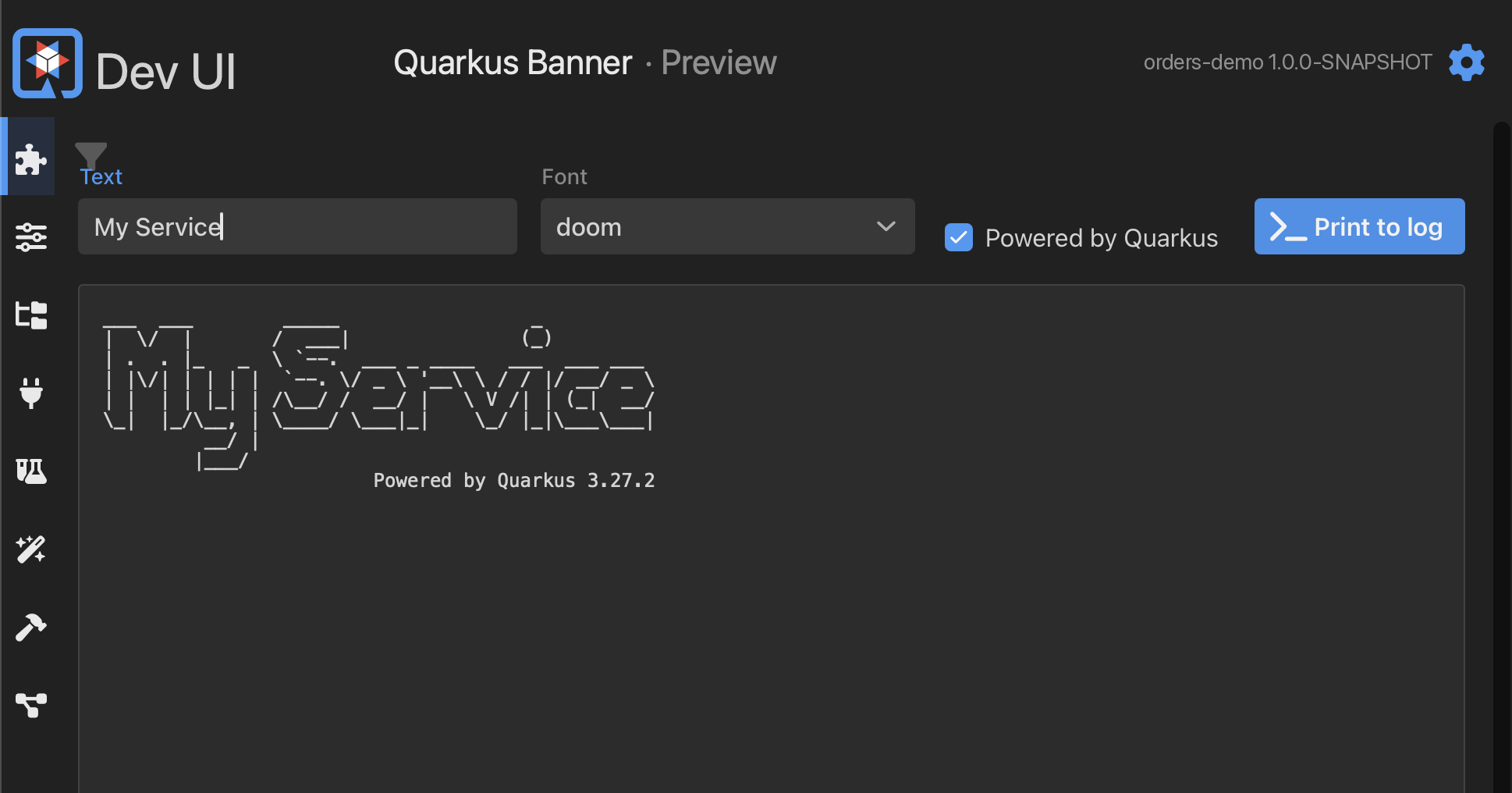
Trawling 246 fonts sounds like a chore — so it is not one. In dev mode the extension adds a Quarkus Banner card to the Quarkus Dev UI with a Preview page built for exactly this.
Type any text, pick any font from the list, toggle the Powered by Quarkus tagline, and the rendered banner updates live in front of you — no restart, no HTTP request, no rebuild. When you find the one, a Print to log button drops it straight into your application console so you can see it in context. Cycling through fonts until one clicks becomes the genuinely fun five minutes it should be.
The good bits
-
The banner is rendered at build time, so there is zero runtime cost — it is baked in, not computed on every start-up.
-
It slots in exactly where Quarkus' own banner goes, honouring your console colours and format, and it shows up when you run your tests too.
-
Nothing to disable and nothing to break: if you turn it off, or the text will not render, you simply get the default Quarkus banner back.
Everything else — the config options and dev-mode tips — lives in the extension documentation.
Give it a go
Quarkus Banner is deliberately tiny. It does one thing: it makes your application instantly recognisable, and it makes start-up a little more fun.
I would love to hear what you think — which fonts you land on, where it is useful, and especially what you would like it to do next. Drop your thoughts, ideas and feature requests on the GitHub repository.
Happy bannering!

