Introducing Quarkus Agent MCP: teaching AI agents to speak Quarkus

AI coding agents like Claude Code, GitHub Copilot, Cursor, Windsurf, and JetBrains AI are already capable of generating code, fixing bugs, and refactoring entire modules.
But they become much more effective when they have context about the framework you are using: that Quarkus dev mode hot-reloads on the next request rather than on file save, that Panache entities need @Transactional for writes, that REST clients should be injected via CDI rather than instantiated manually.
Quarkus Agent MCP gives agents exactly that context. It is a standalone MCP (Model Context Protocol) server that lets any compatible AI agent create, manage, and work effectively with Quarkus applications by providing Quarkus-specific tools, documentation, and extension-level coding patterns.
What is MCP?
The Model Context Protocol is an open standard that lets AI agents discover and use tools exposed by external servers. Instead of hard-coding integrations for every framework, an agent connects to MCP servers that provide domain-specific capabilities. The agent discovers available tools at runtime and calls them as needed.
It’s a plugin system for AI agents: connect to a server and the agent gains new capabilities.
Why a standalone server?
Quarkus already has a built-in Dev MCP server that exposes tools from inside a running application: endpoints, configuration, dev services, testing, and more. So why add another server?
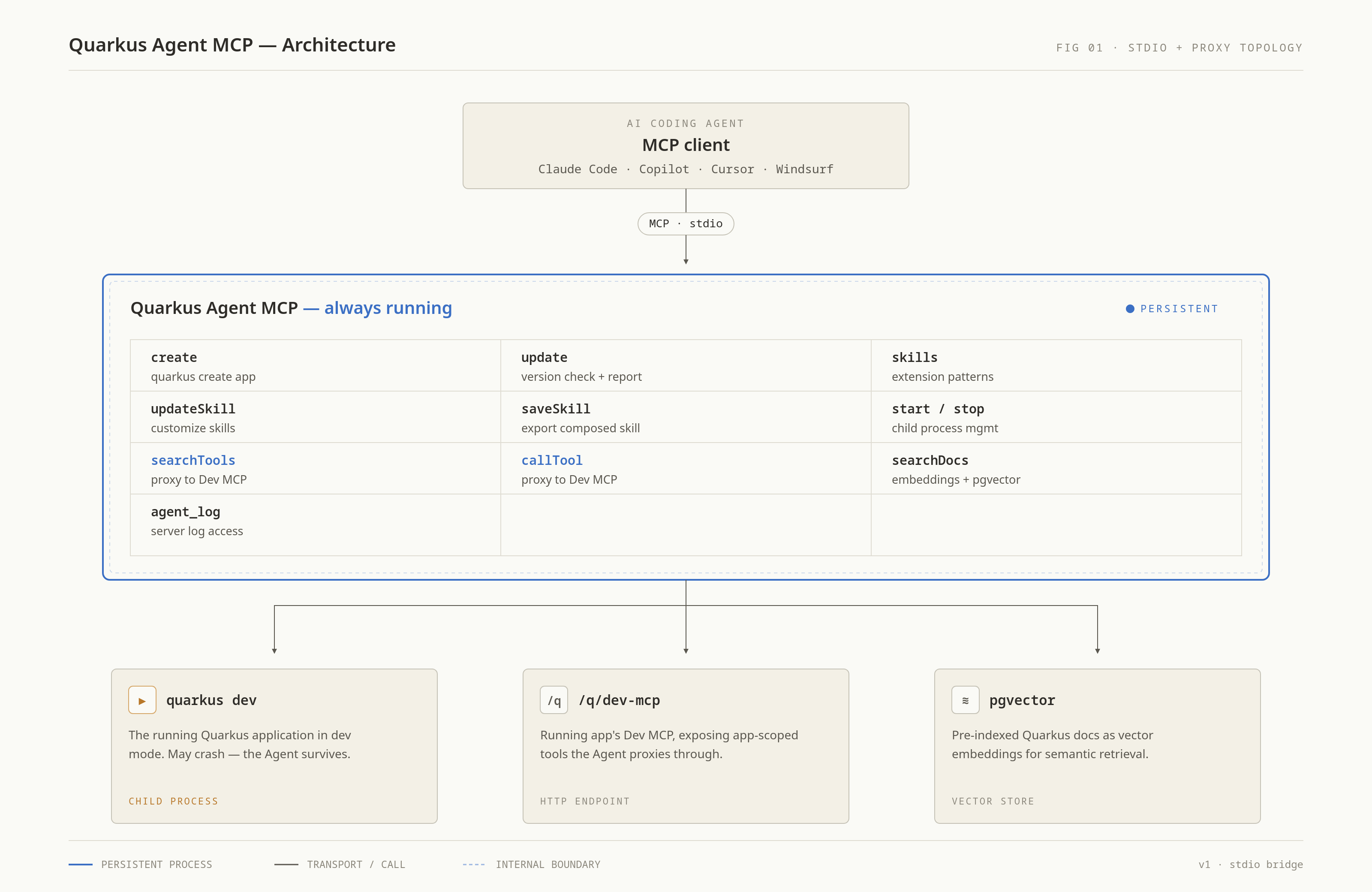
The answer is lifecycle. The built-in Dev MCP server lives inside the Quarkus process. When the app crashes (a compilation error, a missing bean, a bad migration), that MCP server dies with it. The agent loses its connection and cannot inspect what went wrong.
Quarkus Agent MCP runs as a separate process.
It wraps quarkus dev as a child process and stays alive when the application crashes.
The agent can read the logs, get structured exception details, fix the code, and watch the app recover on its own.
Getting started
Install via JBang with a single command. For Claude Code:
claude mcp add quarkus-agent -- jbang quarkus-agent-mcp@quarkusioOr as a Claude Code plugin:
claude plugin marketplace add quarkusio/quarkus-agent-mcp
claude plugin install quarkus-agent@quarkus-tools
The README covers configuration for VS Code, Cursor, Windsurf, JetBrains, and other MCP-compatible tools.
Once installed, you can verify it works by asking your agent:
Search the Quarkus docs for how to create a REST endpoint
The agent will use the quarkus_searchDocs tool and return documentation results.
What the agent can do
Quarkus Agent MCP exposes tools organized into five areas.
Create applications
The quarkus_create tool scaffolds a new Quarkus project from natural language.
Ask your agent to "create a Quarkus REST API with PostgreSQL and Panache" and it will pick the right extensions, create the project, start it in dev mode, and generate a AGENTS.md — a convention file that AI agents read for project-specific instructions.
Learn before coding: extension skills
Before writing a single line of code, the agent calls quarkus_skills to load coding patterns for the application’s extensions.
These skills contain the kind of knowledge that usually lives in a senior developer’s head: which annotations to use, how to write tests, what the common pitfalls are, and troubleshooting guidance.
For example, the Hibernate Validator skill teaches the agent that constraint violations on REST endpoint parameters automatically return HTTP 400, that @Valid is required for cascading validation on nested objects, and that method validation only works on CDI-managed beans.
Without skills, the agent might still produce working code, especially with larger models, but the results become less predictable. Skills level the playing field: even smaller, cheaper models produce correct idiomatic Quarkus code when they have the right patterns to follow.
More on how skills work, and how you can write your own, later in this post.
Search documentation
The quarkus_searchDocs tool performs semantic search over the full Quarkus documentation.
On first use, a Docker/Podman container with pre-indexed documentation starts automatically.
| The search implementation (currently using BGE embeddings and pgvector) is still being iterated on and may change in future versions. The documentation version matches the project’s Quarkus version, so the agent never gives advice based on a different release. |
Manage the application lifecycle
The agent can start, stop, and restart the application.
It can check the application status, read logs, and list all managed instances.
When the app crashes, the agent uses the Dev MCP proxy to call devui-exceptions_getLastException, which returns the exception class, message, stack trace, and exact source location.
It then fixes the code and lets hot reload do the rest.
Proxy to Dev MCP tools
Once the application is running, the agent can discover and call any tool exposed by the built-in Dev MCP server. This includes running tests, listing endpoints, inspecting dev services, changing configuration, and managing extensions, all through a single proxy layer. The tool list is dynamic: when you add or remove extensions, the agent re-discovers the available tools automatically.
The development workflow
Here is what an agent-driven development session looks like in practice:
For a new project:
-
quarkus_create: scaffold the project, auto-start dev mode -
quarkus_skills: learn extension patterns before writing code -
quarkus_searchDocs: look up APIs and configuration -
Write code and tests
-
Run tests via
quarkus_callTool -
If the app crashes, read the exception, fix, and iterate
For an existing project:
-
quarkus_update: check if the Quarkus version is current -
quarkus_start: start dev mode -
quarkus_skills: learn extension patterns -
Develop, test, iterate
The key insight is skills before code. The agent does not guess at patterns. It reads the skills, then writes code that follows them.
For extension authors: shipping skills with your extension
If you maintain a Quarkus extension, whether in core, Quarkiverse, or your own organization, you can ship a skill file that teaches every AI agent how to use your extension correctly. The agent picks up the skill automatically when a developer adds your extension to their project.
What goes into an extension skill?
A skill file is a Markdown document at META-INF/quarkus-skill.md in your extension’s deployment JAR.
It should contain the practical knowledge an agent needs to write correct code with your extension:
-
Coding patterns: the right way to use your APIs, with brief examples
-
Testing guidelines: how to write tests that work with your extension
-
Common pitfalls: mistakes the agent should avoid
-
Configuration: key properties and their effect
Here is an abbreviated example from the Hibernate Validator extension:
### Bean Validation Annotations

- Use constraints from `jakarta.validation.constraints` packages,
  e.g. `@NotNull`, `@NotBlank`, `@Size`, `@Min`, `@Max`, `@Email`, `@Pattern`
  on class fields and getters or on method parameters of CDI beans.
- Use `@Valid` for cascading validation on nested types.

### REST Integration

- Constraint violations on REST endpoint **parameters** automatically return
  HTTP 400 with validation details.
- Return value validation results in HTTP 500, not 400. Handle
  `ConstraintViolationException` explicitly if you need custom error responses.

### Common Pitfalls

- Do NOT forget `@Valid` on nested object parameters. Without it, constraints
  on nested object fields are silently ignored.
- Method validation only works on CDI-managed beans. Calls on plain `new`
  objects are not validated.
Where to put it
Place the file at:
your-extension/
  deployment/
    src/main/resources/
      META-INF/
        quarkus-skill.md
That is it.
When the extension is published and a developer adds it to their project, quarkus_skills will discover the skill from the deployment JAR in the local Maven repository, compose it with metadata from quarkus-extension.yaml, and include any Dev MCP tools your extension exposes.
Per-extension skill discovery from deployment JARs requires Quarkus 3.35.0+. For older versions, the agent will rely on quarkus_searchDocs for guidance instead.
|
Writing effective skills
Keep these principles in mind:
Be prescriptive, not descriptive.
The agent does not need a tour of your API surface; it can read Javadoc for that.
It needs to know the right pattern to use and the mistakes to avoid.
Instead of "the @Transactional annotation can be used on methods," write "always annotate write operations with @Transactional."
Focus on what surprises people. If every new developer hits the same three issues with your extension, those belong in the skill. If something works exactly as expected, you probably do not need to mention it.
Keep it concise.
A skill that is 50 lines of actionable guidance beats 500 lines of documentation rehash.
The agent will search the full documentation via quarkus_searchDocs when it needs details.
The skill is for the patterns and pitfalls that documentation alone does not prevent.
Include testing patterns. How should tests be written for your extension? What test infrastructure does it provide? This is one of the areas where agents struggle most without guidance.
Test with a cheap model. A large frontier model might produce correct code even without your skill. The real test is whether a smaller, cheaper model (like Haiku or GPT-4o mini) gets it right when following your skill. If it does, your skill is doing its job.
The three-layer composition system
Different teams have different conventions, and sometimes the built-in skill does not cover a specific use case. To handle this, skills use a three-layer composition system:
-
Extension skill: ships with the extension itself (
META-INF/quarkus-skill.md) -
User-level skill: stored at
~/.quarkus/skills/<extension-name>/SKILL.md, applies to all projects for that developer -
Project-level skill: stored at
.agent/skills/<extension-name>/SKILL.md, applies to one project only
Layers 1 and 2 support enhance (append additional guidance) and override (fully replace) composition, controlled by the mode field in the SKILL.md frontmatter:
---
mode: enhance
---

### Our team conventions

- Always use constructor injection, never field injection.
- Name REST resource classes with the `Resource` suffix, not `Controller`.
Project-level skills (layer 3) are standalone files read as-is, with no composition against the base layers.
This means any agent can read them directly from the filesystem without needing to understand the composition chain.
Use the quarkus_saveSkill tool to materialize a fully composed skill into .agent/skills/, then edit the file directly to customize it for your project.
For global customizations that apply across all projects, the agent can use quarkus_updateSkill to write to ~/.quarkus/skills/.
Privacy
Quarkus Agent MCP runs entirely on your machine. It does not collect telemetry or send data to any third party. Outbound network requests are limited to downloading extension JARs from Maven Central, pulling pre-indexed documentation containers, and checking for Quarkus version updates. Everything is cached locally after the first use.
What is next
Quarkus Agent MCP is part of the DevStar working group and we are actively developing new capabilities. If you are an extension author interested in shipping skills, or a developer with feedback on the workflow, we want to hear from you.
Try it out:
claude mcp add quarkus-agent -- jbang quarkus-agent-mcp@quarkusio| This example uses Claude Code, but any coding agent that supports the MCP protocol (Cursor, Windsurf, GitHub Copilot, JetBrains AI, and others) can connect to Quarkus Agent MCP. See the README for configuration instructions for each agent. |
Then ask your agent to build something.

