Extending Your Quarkus Application with Apache Camel

Introduction
You built a standard Quarkus application: REST endpoints, a service layer, a database. Then you are given a new requirement: "When an order is placed, send an event to Kafka so the analytics team can track it." A week later another one: "Also notify the partner loyalty system via their REST API and make sure to handle it properly when their API is down." And another one: "The partner is going to start sending us CSV order files."…
Each of these requirements is an integration task, and Quarkus already gives you building blocks for all of them: Reactive Messaging for Kafka, the REST client with fault tolerance for the loyalty API, a scheduled job for file polling.
But you could also hand all three to Apache Camel, which covers them with a single model. Retry with backoff, error policies, JSON and CSV conversion, file polling that moves handled files aside: each one is a built-in step you declare on a route, a line at a time, in the same vocabulary whichever system you are talking to.
And it runs inside the application you already have. Camel Quarkus packages over 300 of Camel’s components as Quarkus extensions, as natural to use as any other CDI bean.
In this post we start from a working Quarkus REST application and progressively extend it with three integration capabilities using Camel. You’ll see exactly what changes in your existing code and what stays untouched.
The starting point
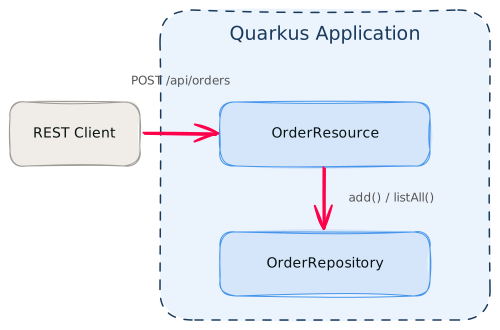
Here’s what we’re starting with: a simple order management REST API.
@Path("/api/orders")
@Produces(MediaType.APPLICATION_JSON)
@Consumes(MediaType.APPLICATION_JSON)
public class OrderResource {

    @Inject
    OrderRepository repository;

    @GET
    public List<Order> list() {
        return repository.listAll();
    }

    @POST
    public Response create(Order order) {
        repository.add(order);
        return Response.status(Response.Status.CREATED).entity(order).build();
    }
}
Order is a POJO with four fields (id, customer, type, amount), a no-arg constructor and an all-args one. OrderRepository is an @ApplicationScoped CDI bean that stores orders in memory.
Start it up and make sure it works:
mvn quarkus:dev# Create an order
curl -s -X POST http://localhost:8080/api/orders \
-H 'Content-Type: application/json' \
-d '{"id":"ORD-001","customer":"Acme Corp","type":"priority","amount":1500.00}'
# List orders
curl -s http://localhost:8080/api/ordersYou should get:
[
    {
        "id": "ORD-001",
        "customer": "Acme Corp",
        "type": "priority",
        "amount": 1500.0
    }
]
Now let’s extend it.
Adding Camel to the project

Add the Camel Quarkus extensions we’ll need:
quarkus ext add camel-quarkus-kafka camel-quarkus-jackson \
    camel-quarkus-http camel-quarkus-file camel-quarkus-bean \
    camel-quarkus-direct camel-quarkus-csv
If you don’t have the Quarkus CLI you can add directly in your pom.xml:
-
the
quarkus-camel-bomto<dependencyManagement>so versions are managed:
<dependencyManagement>
...
  <dependency>
      <groupId>io.quarkus.platform</groupId>
      <artifactId>quarkus-camel-bom</artifactId>
      <version>${quarkus.platform.version}</version>
      <type>pom</type>
      <scope>import</scope>
  </dependency>
...
</dependencyManagement>-
the dependencies:
  <dependency>
      <groupId>org.apache.camel.quarkus</groupId>
      <artifactId>camel-quarkus-direct</artifactId>
  </dependency>
  <dependency>
      <groupId>org.apache.camel.quarkus</groupId>
      <artifactId>camel-quarkus-bean</artifactId>
  </dependency>
  <dependency>
      <groupId>org.apache.camel.quarkus</groupId>
      <artifactId>camel-quarkus-file</artifactId>
  </dependency>
  <dependency>
      <groupId>org.apache.camel.quarkus</groupId>
      <artifactId>camel-quarkus-kafka</artifactId>
  </dependency>
  <dependency>
      <groupId>org.apache.camel.quarkus</groupId>
      <artifactId>camel-quarkus-http</artifactId>
  </dependency>
  <dependency>
      <groupId>org.apache.camel.quarkus</groupId>
      <artifactId>camel-quarkus-jackson</artifactId>
  </dependency>
  <dependency>
      <groupId>org.apache.camel.quarkus</groupId>
      <artifactId>camel-quarkus-csv</artifactId>
  </dependency>
If you have Podman or Docker running, Quarkus Dev Services will start a Kafka broker automatically. Camel Quarkus extensions are built like any other Quarkus extension, so dev mode, Dev Services, configuration and native image all work the way you already expect.
Camel routes are CDI beans that extend RouteBuilder. Quarkus discovers them like any other bean:
@ApplicationScoped
public class MyRoutes extends RouteBuilder {
    @Override
    public void configure() {
        // routes go here
    }
}
At this point, nothing has changed in your existing code. Your REST endpoints, services, and beans are unaffected.
Sending order events to Kafka
The first requirement: every time an order is placed, publish an event to a Kafka topic so downstream systems (analytics, warehouse, notifications) can react to it.
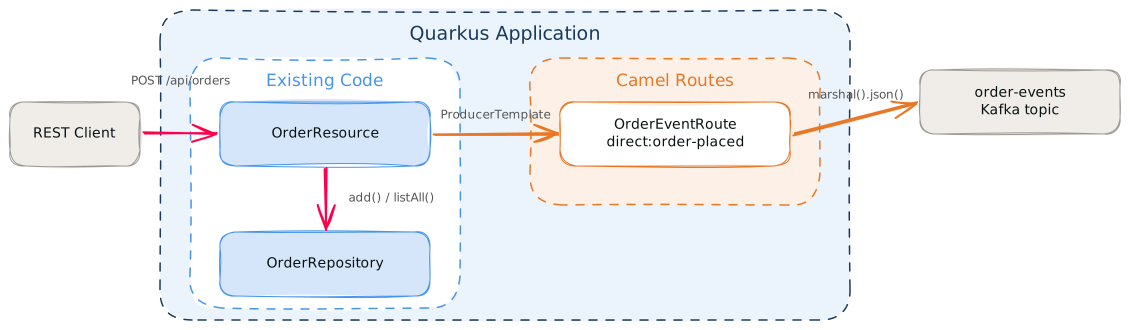
Using Camel, the change to your existing code is two lines:
@Path("/api/orders")
@Produces(MediaType.APPLICATION_JSON)
@Consumes(MediaType.APPLICATION_JSON)
public class OrderResource {

    @Inject
    OrderRepository repository;

    @Inject
    ProducerTemplate producerTemplate;

    @GET
    public List<Order> list() {
        return repository.listAll();
    }

    @POST
    public Response create(Order order) {
        repository.add(order);
        producerTemplate.sendBody("direct:order-placed", order);
        return Response.status(Response.Status.CREATED).entity(order).build();
    }
}
ProducerTemplate is Camel’s bridge from your existing code into a Camel route. A route in Camel is a processing pipeline: it starts from an input (a URI like direct:, kafka:, or file:), applies a chain of steps (transformation, filtering, logging) and then sends the result to one or more outputs. Think of it as a method chain that wires I/O and processing together in one place. In Camel Quarkus, ProducerTemplate is automatically available as a CDI bean. You just need to @Inject it. The sendBody call pushes the order object into the direct:order-placed endpoint, which is the entry point of your Camel route.
Here’s that Camel route we need to add:
@ApplicationScoped
public class OrderEventRoute extends RouteBuilder {

    @Override
    public void configure() {
        from("direct:order-placed")
            .routeId("order-event")
            .marshal().json()
            .to("kafka:order-events")
            .log("Order event sent to Kafka");
    }
}
The Camel route does three steps: receive the order, serialize it to JSON, send it to Kafka.
And the Kafka configuration to add in application.properties:
quarkus.kafka.devservices.provider=strimzi
camel.component.kafka.brokers=${kafka.bootstrap.servers:localhost:9092}
Dev Services injects the broker address it started into kafka.bootstrap.servers, and camel.component.kafka.brokers passes it on to the Camel Kafka component, falling back to localhost:9092 against an external broker.
Try it, create an order and watch the console:
curl -s -X POST http://localhost:8080/api/orders \
  -H 'Content-Type: application/json' \
  -d '{"id":"ORD-002","customer":"Daily Planet","type":"standard","amount":250.00}'
In the logs:
... OrderEventRoute ... Order event sent to KafkaYour order is persisted and published to Kafka.
Extensions used: camel-quarkus-kafka, camel-quarkus-jackson, camel-quarkus-direct
Notifying the loyalty system
The second requirement: also call the partner’s loyalty API over HTTP so customers earn points when they place an order. The partner’s API is unreliable, so you need to handle retries with backoff.
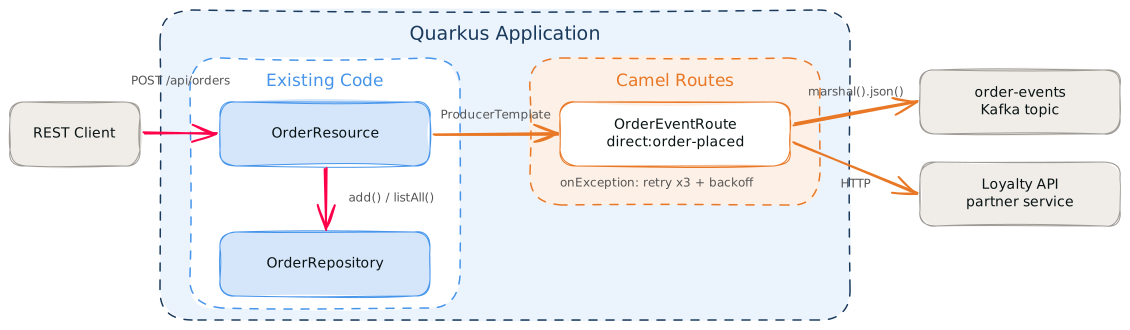
The order event Camel route already handles the Kafka step. Let’s add the loyalty notification: three more lines in the same route, plus an error policy:
@ApplicationScoped
public class OrderEventRoute extends RouteBuilder {

    @ConfigProperty(name = "loyalty.api.url")
    String loyaltyApiUrl;

    @Override
    public void configure() {
        onException(Exception.class)
            .maximumRedeliveries(3)
            .redeliveryDelay(1000)
            .useExponentialBackOff()
            .backOffMultiplier(2)
            .handled(true)
            .log(LoggingLevel.ERROR,
                    "Order event processing failed: ${exception.message}");

        from("direct:order-placed")
            .routeId("order-event")
            .marshal().json()
            .to("kafka:order-events")
            .log("Order event sent to Kafka")
            .setHeader("Content-Type", constant("application/json"))
            .to("http://" + loyaltyApiUrl + "/api/loyalty/notify")
            .log("Loyalty service notified");
    }
}
The body is still the JSON produced by marshal().json() for Kafka, so setHeader tags the outgoing request as application/json for the partner API.
The onException block retries any failed step up to 3 times with exponential backoff (1s, 2s, 4s). If the loyalty API returns a 500 or the connection times out, Camel retries automatically. handled(true) means that if all attempts fail, the error is logged and the route moves on. The order is still safely persisted, since that happened before the Camel call. Note that the policy covers every step in the route, the Kafka send included, not just the HTTP call.
The route injects the partner’s host from configuration with @ConfigProperty:
# Loyalty API (mock endpoint running inside this app)
loyalty.api.url=localhost:${quarkus.http.port}
The companion project includes a MockLoyaltyResource that simulates the partner API inside the same application, and loyalty.api.url points at it by default. In a real deployment, point the property at the partner’s host instead.
|
If you want to integrate another external service later, you can add one more .to("http://…") line.
Try it, create another order and watch both integrations fire:
curl -s -X POST http://localhost:8080/api/orders \
  -H 'Content-Type: application/json' \
  -d '{"id":"ORD-003","customer":"Stark Industries","type":"priority","amount":8900.00}'
In the logs:
... OrderEventRoute ... Order event sent to Kafka
... OrderEventRoute ... Loyalty service notified
The two integrations are triggered from a single sendBody call.
Extension used: camel-quarkus-http
Ingesting files from a partner
The third requirement: a partner drops CSV order files into a directory. The application should parse each file, ingest the orders, and move the original to a done directory. The failed files go to a failed directory.
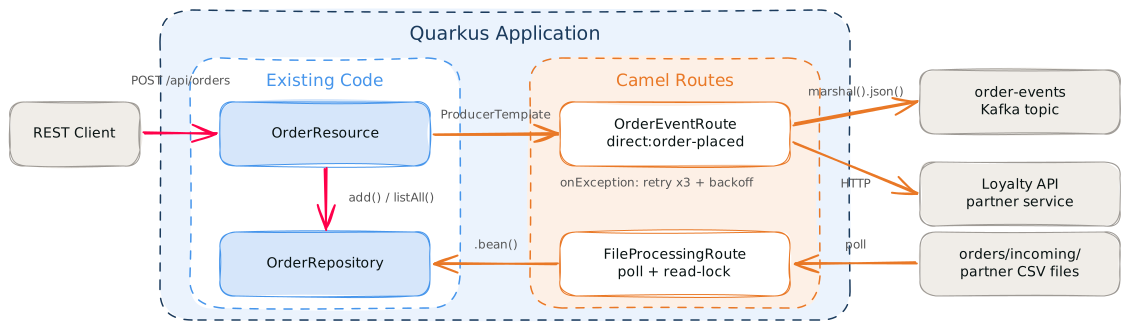
File ingestion has a lot of small details: polling, partial writes, moving handled files aside, keeping failures separate.
The whole thing is one self-contained route:
@ApplicationScoped
public class FileProcessingRoute extends RouteBuilder {

    @Override
    public void configure() {
        CsvDataFormat csv = new CsvDataFormat();
        csv.setSkipHeaderRecord(true);

        from("file:orders/incoming?include=.*\\.csv"
                + "&move=../done&moveFailed=../failed"
                + "&readLock=changed")
            .routeId("file-ingestion")
            .log("Processing file: ${header.CamelFileName}")
            .unmarshal(csv)
            .split(body())
                .bean("orderConverter")
                .bean("orderRepository", "add")
            .end()
            .log("File processed: ${header.CamelFileName}");
    }
}
The consumer polls the directory; readLock, move and moveFailed on the URI cover the other three. Camel’s built-in CsvDataFormat parses the file content into rows, skipping the header. After split(body()), each exchange carries one row as a List<String>. orderConverter is a small bean that maps each row to an Order:
@ApplicationScoped
@Named("orderConverter")
@RegisterForReflection
public class OrderConverter {

    public Order fromCsvRow(List<String> row) {
        return new Order(
                row.get(0).trim(),
                row.get(1).trim(),
                row.get(2).trim(),
                new BigDecimal(row.get(3).trim()));
    }
}
orderRepository is your existing CDI bean, referenced by name. For Camel to look up the bean by name, add @Named("orderRepository") to OrderRepository. Since .bean("name") resolves the method reflectively, also add @RegisterForReflection so the lookup keeps working in native mode.
Try it, from the directory where you started mvn quarkus:dev, drop a CSV file and verify:
mkdir -p orders/incoming
cat > orders/incoming/orders.csv << 'EOF'
id,customer,type,amount
ORD-010,Acme Corp,priority,1500.00
ORD-011,Wayne Enterprises,standard,250.00
ORD-012,Stark Industries,priority,8900.00
EOF
In the logs:
... FileProcessingRoute ... Processing file: orders.csv
... FileProcessingRoute ... File processed: orders.csv
curl -s http://localhost:8080/api/ordersYou’ll see the orders from the CSV file alongside any you created via the REST API. The original file has been moved to orders/done/. A malformed file would go to orders/failed/ instead.
Extensions used: camel-quarkus-file, camel-quarkus-csv, camel-quarkus-bean
How the two fit together
In the code you already had, this is all that changed:
-
@Inject ProducerTemplate producerTemplateinOrderResource -
producerTemplate.sendBody("direct:order-placed", order)inOrderResource -
@Named("orderRepository")and@RegisterForReflectiononOrderRepository
Everything else is new classes sitting alongside the old ones.
Beyond that, the two sides share one runtime. Any bean annotated @Named or @Identifier is reachable from a route with .bean("beanName"), or by type with .bean(MyService.class). Your JAX-RS endpoints keep being served by Quarkus HTTP, and routes using platform-http can share that same server. Camel settings go in the same application.properties under the camel.* namespace, and quarkus dev hot-reloads a route like any other class.
In the end, the goal of this blog post was to show that Camel is easy to pick up and integrates seamlessly with Quarkus. Additionally it gets more valuable as the number of systems you integrate with grows. For a single Kafka topic, Reactive Messaging is enough. By the third integration, having the Camel route model and DSL is what makes the difference.
Going further
This post covered three patterns, but the 300+ components available as Camel Quarkus extensions cover databases, cloud services, messaging systems, SaaS APIs, and protocols from FTP to AS2. Each follows the same model: add the camel-quarkus-* extension, use its URI in a route.
Camel implements the Enterprise Integration Patterns. Here are a few that would naturally extend this example:
-
Content-Based Router: use
.choice().when()to route priority orders to a fast-track queue and standard orders to the normal flow. -
Wire Tap: use
.wireTap("seda:audit")to send a copy of the order event to an audit log without slowing down the main route. -
Throttle: use
.throttle(10)to rate-limit calls to the partner loyalty API. -
Dead Letter Channel: replace the
onExceptionlog-and-swallow witherrorHandler(deadLetterChannel("file:orders/errors"))to persist failed order events to disk for later inspection or reprocessing. -
More protocols: need to call a SOAP service, send to an AMQP broker, or drop files on an SFTP server? Each has a Camel Quarkus extension.
To explore more:
The companion sample project for this post is available on GitHub. It has two modules: quarkus-orders (the starting point) and camel-quarkus-orders (the result). Clone it, then cd camel-quarkus-orders && mvn quarkus:dev to see both routes in action.

