AI Root Cause Analysis: LLM-Powered Root-Cause Analysis for Distributed Systems

When something goes wrong in a distributed system, engineers face the same ritual: open Grafana, dig through traces in Tempo, correlate logs in Loki, check Prometheus metrics, and mentally piece together a causal chain across services. What if an LLM could do that for you — pulling telemetry from the same tools you already use and producing a structured root-cause analysis in seconds?
That’s what AI Root Cause Analysis does. It’s an open-source Quarkus application that connects to your existing Grafana LGTM stack via MCP (Model Context Protocol), feeds correlated traces, logs, and metrics to an LLM, and returns actionable analysis — complete with root causes, severity assessments, and remediation suggestions.
Who Is This For?
AI Root Cause Analysis is built for developers who work with distributed systems but don’t want to become observability experts. You know your LGTM stack is collecting traces, logs, and metrics — but correlating them across services, spotting the root cause in a wall of spans, and distinguishing symptoms from causes takes experience and time. The AI handles that for you: it knows how to query Tempo, Loki, and Prometheus, understands what the telemetry means in context, and draws correlations that would take manual investigation to piece together.
If you’re comfortable with AI but not with the details of trace propagation, span hierarchies, or PromQL — this tool bridges that gap.
What It Does
AI Root Cause Analysis is a standalone analysis engine. Point it at your LGTM stack and your running applications, and it will:
-
Retrieve recent traces from Tempo via MCP and identify the interesting ones (errors, high latency, unusual patterns)
-
Correlate logs for each trace from Loki, linking log entries to specific spans
-
Pull Prometheus metrics at the time window of each trace to add system-level context
-
Analyze everything together using an LLM, producing a structured report that distinguishes root causes from symptoms, identifies cascading failures, and suggests next steps
Optionally, it can also:
-
Examine source code of monitored applications via Quarkus Dev MCP, correlating analysis findings back to specific code paths
-
Generate Grafana dashboards tailored to the issues it found, saved directly into each application’s workspace
The key insight is the data pipeline. Raw telemetry from MCP is noisy and can easily overwhelm an LLM’s context window. A StripMcpClient decorator sits between MCP and the LLM, applying per-tool filtering functions that strip the noise while preserving signal:
-
Traces: Removes SDK metadata (
telemetry.sdk.,otel.), localhost attributes, and instrumentation library details -
Logs: Strips SDK metadata, redundant fields, and duplicate information already present in trace spans
-
Metrics: Removes Netty internals, static/constant values, histogram bucket breakdowns, and per-region metric breakdowns — reducing 586 entries to ~35 (a 94% reduction)
This keeps the context window focused on signals that matter for root-cause analysis.
A Quick Example
Imagine you have two microservices — a gateway and a backend — and users are reporting slow responses. You start AI Root Cause Analysis, point it at your LGTM stack, and ask it to analyze the last 5 traces. Here’s what happens:
-
The AI retrieves 5 recent traces from Tempo and spots that 3 of them took over 3 seconds
-
It pulls the correlated logs from Loki and finds
Connection pool exhaustedwarnings on the backend service -
It checks Prometheus metrics and sees JVM heap at 92% with frequent GC pauses
-
It produces a report: "Root cause: database connection pool exhaustion on the backend service, caused by slow queries under memory pressure. The gateway’s 3s latency is a downstream symptom, not a cause. Remediation: increase connection pool size and investigate the heap usage."
That’s the kind of multi-signal correlation that normally takes 30 minutes of dashboard-hopping — done in seconds.
How to Try It
Quick Start (Maven Central)
If you already have an LGTM stack running, you don’t need to clone the repo — just download the uber-jar from Maven Central and run it:
export OPENAI_API_KEY=sk-...   # or GROK_API_KEY for Grok

# Option 1: Download via Maven
mvn dependency:copy -Dartifact=io.quarkiverse.ai.rca:quarkus-ai-rca-core:RELEASE:jar:runner -DoutputDirectory=.

# Option 2: Download via curl (find the latest VERSION at https://central.sonatype.com/search?q=quarkus-ai-rca-core)
curl -O https://repo1.maven.org/maven2/io/quarkiverse/ai/rca/quarkus-ai-rca-core/VERSION/quarkus-ai-rca-core-VERSION-runner.jar

# Run against your LGTM stack
# - Grafana (port 3000): provides the API for Loki logs and Prometheus metrics
# - Tempo (port 3200): provides the trace query API
# - App ports (8081,8082): your Quarkus apps running in dev mode (optional)
java -Dgrafana.endpoint=http://localhost:3000 \
     -Dtempo-mcp.endpoint=http://localhost:3200 \
     -Dapp.ports=8081,8082 \
     -jar quarkus-ai-rca-core-*-runner.jar
Open http://localhost:8080, pick how many traces to analyze, and hit Analyze. That’s it — no build, no clone, no setup.
Developer Mode
For development with Quarkus Dev Services (auto-starts an LGTM stack for you):
git clone https://github.com/quarkiverse/quarkus-ai-rca.git
cd quarkus-ai-rca

export OPENAI_API_KEY=sk-...   # or GROK_API_KEY for Grok

# Start the AI module — Dev Services auto-starts an LGTM stack
./dev-ai.sh 8081,8082
Connecting to Your Applications
The -Dapp.ports argument (shown as 8081,8082 in the examples above) is optional — it lists the ports of your running Quarkus applications. When provided, the AI module connects to them via Dev MCP, enabling source code examination and writing generated Grafana dashboards directly into your application sources. This requires the target applications to be running in Quarkus dev mode with quarkus.dev-mcp.enabled=true set (which exposes the Dev MCP endpoint). Without it, the core analysis (traces, logs, metrics) works the same — the Examine Source button is simply disabled in the UI.
To run without application ports, simply omit -Dapp.ports from the java command or the ports argument from ./dev-ai.sh.
LLM Provider Selection
AI Root Cause Analysis supports multiple LLM providers via Maven/Quarkus profiles:
./mvn.ai.sh quarkus:dev              # OpenAI (default, gpt-4o-mini)
./mvn.ai.sh quarkus:dev -Pgrok       # Grok/xAI (grok-3-mini)
./mvn.ai.sh quarkus:dev -Pgemini     # Gemini
./mvn.ai.sh quarkus:dev -Pwatsonx    # WatsonX (Granite)
Each profile activates the corresponding LangChain4j extension and Quarkus configuration. Grok uses the OpenAI-compatible API at https://api.x.ai/v1.
The Web UI
Open http://localhost:8080 to access the analysis UI:
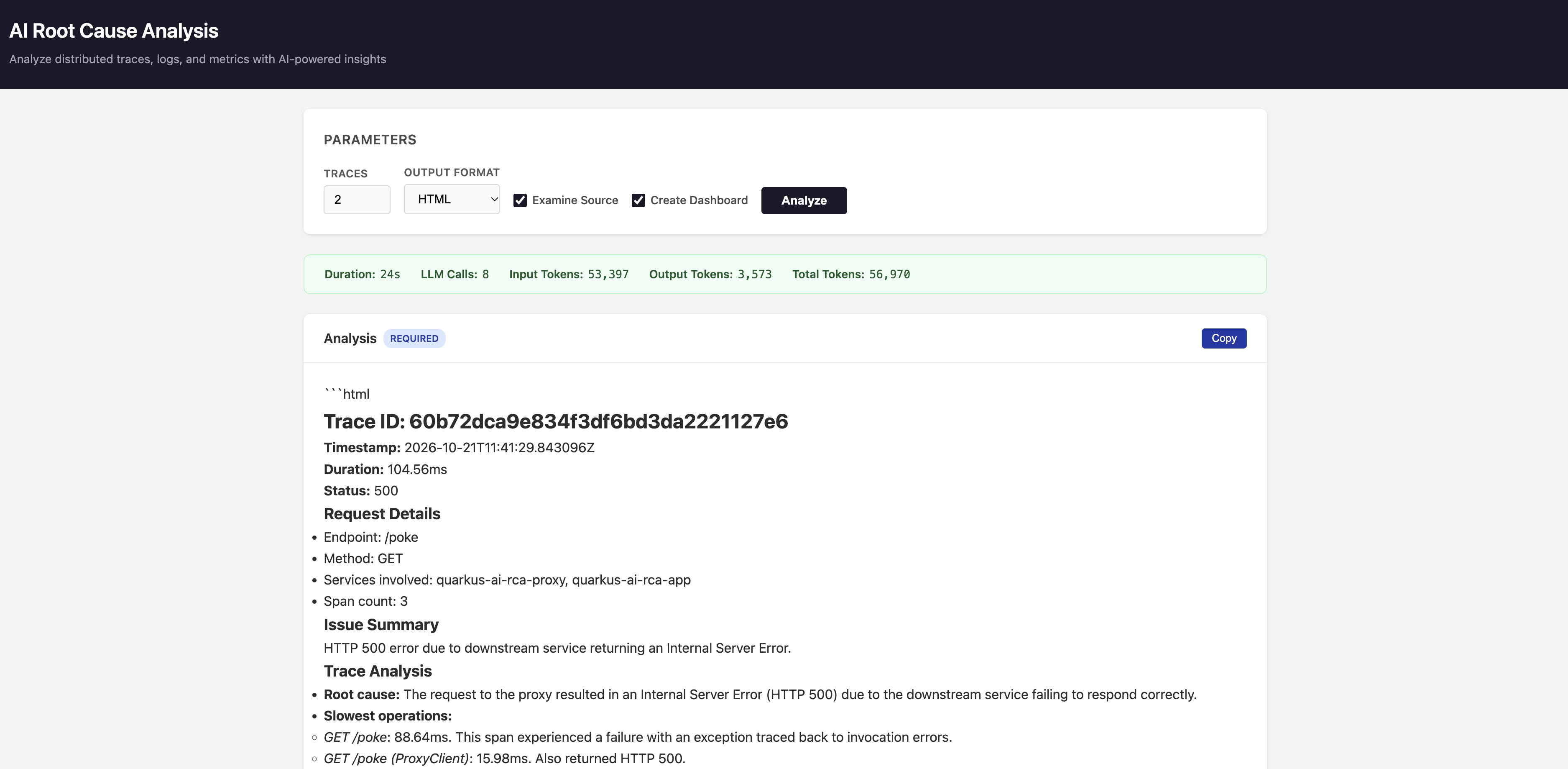
The interface provides:
-
Traces — number of recent traces to analyze (1-20)
-
Output Format — HTML, Markdown, Plain Text, or AsciiDoc
-
Examine Source — include source code examination via Dev MCP
-
Create Dashboard — generate a Grafana dashboard tailored to the issues found
After clicking Analyze, the UI shows a performance stats bar (duration, LLM calls, input/output tokens) and three collapsible result sections:
-
Analysis — the main telemetry analysis with per-trace root cause, error patterns, latency breakdown, and cross-trace correlation
-
Examined Sources — when enabled, the AI reads the source code of your monitored applications (via Quarkus Dev MCP) and maps the problems it found back to specific code locations. For example, if the analysis identifies a slow database query as the root cause, this section shows the relevant repository method and explains why it’s problematic
-
Dashboard — a ready-to-import Grafana dashboard definition (JSON) with panels tailored to the issues found — you can import it directly into Grafana to monitor for recurrence of the detected problems
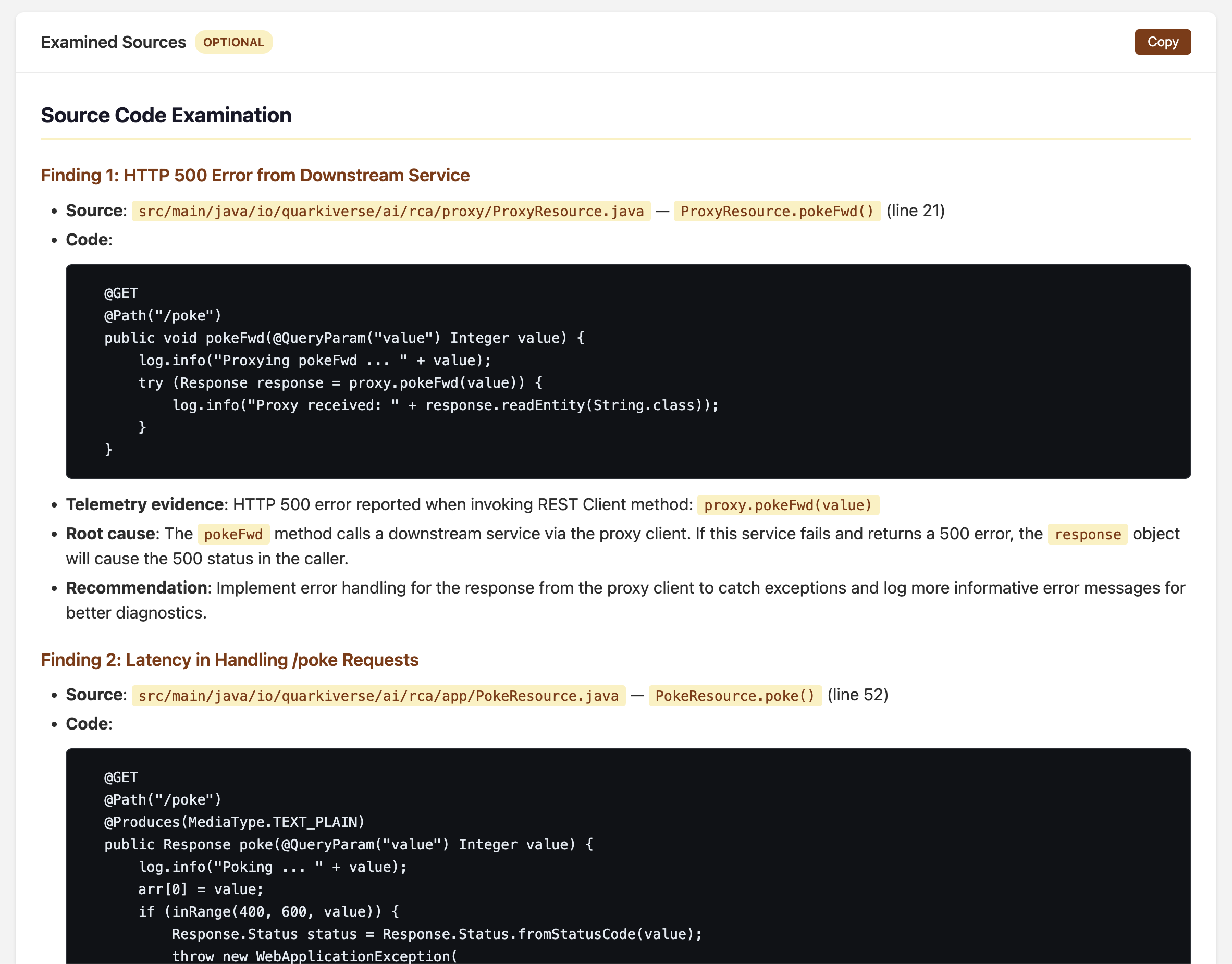
Source examination maps analysis findings back to specific code locations in your application
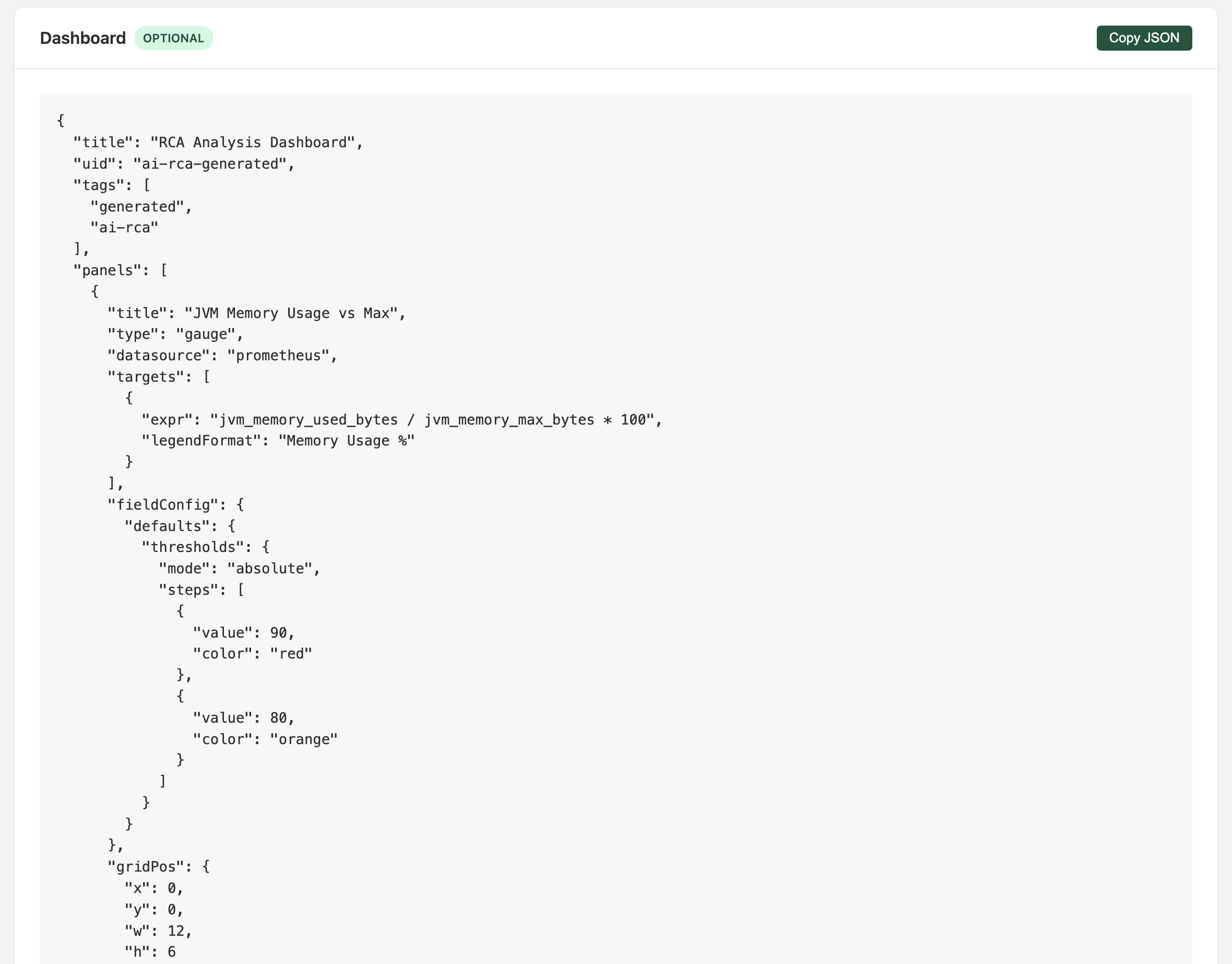
Generated Grafana dashboard JSON — import it into Grafana to monitor the issues found
Each section has a Copy button for clipboard export.
Dashboard Generation
When you enable Create Dashboard, the AI module generates a Grafana dashboard with panels tailored to the issues it found (JVM memory, CPU usage, HTTP latency, error rates, etc.).
In dev mode (with app.ports configured), the AI module writes the dashboard JSON directly into your application’s source tree via Dev MCP — into src/main/resources/META-INF/dashboards/. Just restart your application, and Quarkus automatically provisions the dashboard into your Grafana instance. No manual import needed — the dashboard appears in Grafana’s dashboard list, pre-configured with the panels most relevant to your application’s telemetry patterns.
In production mode (uber-jar without app.ports), the dashboard JSON is still generated and displayed in the UI’s Dashboard section, where you can copy it and import it into Grafana manually.
Documentation
Full documentation is available at docs.quarkiverse.io/quarkus-ai-rca, covering getting started, configuration, and the integration testing framework.
What’s Next
AI Root Cause Analysis is a Quarkiverse project with the AI module uber-jar published to Maven Central. Current priorities:
-
Anthropic provider integration
-
Native image compilation support
-
Additional LLM providers (Gemini and WatsonX integration testing)
-
Additional observability backends — currently the project connects to Grafana LGTM via MCP, but the analysis pipeline, system prompt, and evaluation framework are backend-agnostic. Supporting platforms like Datadog, Elastic, or New Relic is primarily a matter of introducing new MCP tool providers for their APIs; the core analysis logic and test harness stay the same
-
Community feedback on analysis quality and usefulness across different application architectures
Try it out: grab the uber-jar from Maven Central (or clone the repo for dev mode), set an API key, point it at your LGTM stack, and see what the AI finds.
For a deep dive into the architecture, analysis pipeline, and how we test this with chaos engineering and LLM-as-judge evaluation, see the companion post.

