# Validation with Hibernate Validator
This guide covers how to use Hibernate Validator/Bean Validation for:
\* validating the input/output of your REST services; \* validating the parameters and return values of the methods of your business services.
## Prerequisites
To complete this guide, you need:
- Roughly 15 minutes
- An IDE
- JDK 21+ installed with `JAVA_HOME` configured appropriately
- Apache Maven 3.9.16
- Optionally the [Quarkus CLI](/guides/cli-tooling/index.md) if you want to use it
- Optionally Mandrel or GraalVM installed and [configured appropriately](/guides/building-native-image/index.md#configuring-graalvm) if you want to build a native executable (or Docker if you use a native container build)
## Architecture
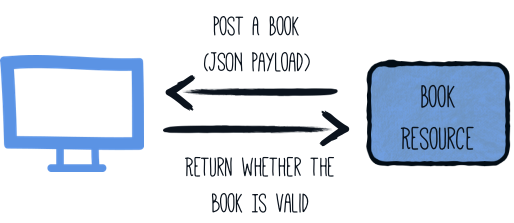
The application built in this guide is quite simple. The user fills a form on a web page. The web page sends the form content to the `BookResource` as JSON (using Ajax). The `BookResource` validates the user input and returns the *result* as JSON.
## Solution
We recommend that you follow the instructions in the next sections and create the application step by step. However, you can go right to the completed example.
Clone the Git repository: `git clone https://github.com/quarkusio/quarkus-quickstarts.git`, or download an [archive](https://github.com/quarkusio/quarkus-quickstarts/archive/main.zip).
The solution is located in the `validation-quickstart` [directory](https://github.com/quarkusio/quarkus-quickstarts/tree/main/validation-quickstart).
## Creating the Maven project
First, we need a new project. Create a new project with the following command:
**CLI**
```bash
quarkus create app org.acme:validation-quickstart \
--extension='rest-jackson,hibernate-validator' \
--no-code
cd validation-quickstart
```
To create a Gradle project, add the `--gradle` or `--gradle-kotlin-dsl` option.
For more information about how to install and use the Quarkus CLI, see the [Quarkus CLI](/guides/cli-tooling/index.md) guide.
**Maven**
```bash
mvn io.quarkus.platform:quarkus-maven-plugin:4.0.1:create \
-DprojectGroupId=org.acme \
-DprojectArtifactId=validation-quickstart \
-Dextensions='rest-jackson,hibernate-validator' \
-DnoCode
cd validation-quickstart
```
To create a Gradle project, add the `-DbuildTool=gradle` or `-DbuildTool=gradle-kotlin-dsl` option.
For Windows users:
- If using Powershell, wrap `-D` parameters in double quotes e.g. `"-DprojectArtifactId=validation-quickstart"`
This command generates a Maven structure importing the Quarkus REST (formerly RESTEasy Reactive)/Jakarta REST, Jackson and Hibernate Validator/Bean Validation extensions.
If you already have your Quarkus project configured, you can add the `hibernate-validator` extension to your project by running the following command in your project base directory:
**CLI**
```bash
quarkus extension add hibernate-validator
```
**Maven**
```bash
./mvnw quarkus:add-extension -Dextensions='hibernate-validator'
```
**Gradle**
```bash
./gradlew addExtension --extensions='hibernate-validator'
```
This will add the following to your build file:
**pom.xml**
```xml
io.quarkus
quarkus-hibernate-validator
```
**build.gradle**
```gradle
implementation("io.quarkus:quarkus-hibernate-validator")
```
## Constraints
In this application, we are going to test an elementary object, but we support complicated constraints and can validate graphs of objects. Create the `org.acme.validation.Book` class with the following content:
```java
package org.acme.validation;
import jakarta.validation.constraints.NotBlank;
import jakarta.validation.constraints.Min;
public class Book {
@NotBlank(message="Title may not be blank")
public String title;
@NotBlank(message="Author may not be blank")
public String author;
@Min(message="Author has been very lazy", value=1)
public double pages;
}
```
Constraints are added on fields, and when an object is validated, the values are checked. The getter and setter methods are also used for JSON mapping.
## JSON mapping and validation
Create the following REST resource as `org.acme.validation.BookResource`:
```java
package org.acme.validation;
import jakarta.ws.rs.GET;
import jakarta.ws.rs.Path;
import jakarta.ws.rs.Produces;
import jakarta.ws.rs.core.MediaType;
@Path("/books")
public class BookResource {
@Inject
Validator validator; <1>
@Path("/manual-validation")
@POST
public Result tryMeManualValidation(Book book) {
Set> violations = validator.validate(book);
if (violations.isEmpty()) {
return new Result("Book is valid! It was validated by manual validation.");
} else {
return new Result(violations);
}
}
}
```
1. The `Validator` instance is injected via CDI.
Yes it does not compile, `Result` is missing, but we will add it very soon.
The method parameter (`book`) is created from the JSON payload automatically.
The method uses the `Validator` instance to check the payload. It returns a set of violations. If this set is empty, it means the object is valid. In case of failures, the messages are concatenated and sent back to the browser.
Let's now create the `Result` class as an inner class:
```java
public static class Result {
Result(String message) {
this.success = true;
this.message = message;
}
Result(Set> violations) {
this.success = false;
this.message = violations.stream()
.map(cv -> cv.getMessage())
.collect(Collectors.joining(", "));
}
private String message;
private boolean success;
public String getMessage() {
return message;
}
public boolean isSuccess() {
return success;
}
}
```
The class is very simple and only contains 2 fields and the associated getters and setters. Because we indicate that we produce JSON, the mapping to JSON is made automatically.
## REST end point validation
While using the `Validator` manually might be useful for some advanced usage, if you simply want to validate the parameters or the return value or your REST end point, you can annotate it directly, either with constraints (`@NotNull`, `@Digits`...) or with `@Valid` (which will cascade the validation to the bean).
Let's create an end point validating the `Book` provided in the request:
```java
@Path("/end-point-method-validation")
@POST
@Produces(MediaType.APPLICATION_JSON)
@Consumes(MediaType.APPLICATION_JSON)
public Result tryMeEndPointMethodValidation(@Valid Book book) {
return new Result("Book is valid! It was validated by end point method validation.");
}
```
As you can see, we don't have to manually validate the provided `Book` anymore as it is automatically validated.
If a validation error is triggered, a violation report is generated and serialized as JSON as our end point produces a JSON output. It can be extracted and manipulated to display a proper error message.
An example of such a report could be:
```json
{
"title": "Constraint Violation",
"status": 400,
"violations": [
{
"field": "tryMeEndPointMethodValidation.book.title",
"message": "Title cannot be blank"
}
]
}
```
This response is produced by Quarkus via a builtin implementation of `jakarta.ws.rs.ext.ExceptionMapper`. If the application code needs to handle `ValidationException` in some custom way, it can provide an implementation of `jakarta.ws.rs.ext.ExceptionMapper` like so:
```java
import jakarta.validation.ValidationException;
import jakarta.ws.rs.core.Response;
import jakarta.ws.rs.ext.ExceptionMapper;
import jakarta.ws.rs.ext.Provider;
@Provider
public class ResteasyReactiveViolationExceptionMapper implements ExceptionMapper {
@Override
public Response toResponse(ValidationException exception) {
// TODO: implement
}
}
```
## Service method validation
It might not always be handy to have the validation rules declared at the end point level as it could duplicate some business validation.
The best option is then to annotate a method of your business service with your constraints (or in our particular case with `@Valid`):
```java
package org.acme.validation;
import jakarta.enterprise.context.ApplicationScoped;
import jakarta.validation.Valid;
@ApplicationScoped
public class BookService {
public void validateBook(@Valid Book book) {
// your business logic here
}
}
```
Calling such service method, e.g. in your rest end point, triggers the `Book` validation automatically:
```java
@Inject BookService bookService;
@Path("/service-method-validation")
@POST
public Result tryMeServiceMethodValidation(Book book) {
try {
bookService.validateBook(book);
return new Result("Book is valid! It was validated by service method validation.");
} catch (ConstraintViolationException e) {
return new Result(e.getConstraintViolations());
}
}
```
Note that, if you want to push the validation errors to the frontend, you have to catch the exception and push the information yourselves as they will not be automatically pushed to the JSON output and will be treated as any other internal server errors.
Keep in mind that you usually don't want to expose to the public the internals of your services -- and especially not the validated value contained in the violation object.
> [!IMPORTANT]
> By default, only failing the validation of the constraints defined for the parameters of the REST endpoints will result in bad request responses with a validation report as a part of the response body. In any other case, e.g. validation of service methods (be it parameters or return values), validation of the return value of a REST endpoint, etc., will result in an internal server error (response status code `5xx`), unless the application code explicitly catches and handles the `ConstraintViolationException` (or a custom `ExceptionMapper` is implemented). The reasoning behind such behaviour is that only REST endpoint parameters are considered as the user input and hence can be treated as a bad request (response status code `4xx`), At the same time, constraint violations in other places result from the application logic execution and, hence, are treated as internal errors.
## A frontend
Now let's add the simple web page to interact with our `BookResource`. Quarkus automatically serves static resources contained in the `META-INF/resources` directory. In the `src/main/resources/META-INF/resources` directory, replace the `index.html` file with the content from this [index.html](https://github.com/quarkusio/quarkus-quickstarts/blob/main/validation-quickstart/src/main/resources/META-INF/resources/index.html) file in it.
## Run the application
Now, let's see our application in action. Run it with:
**CLI**
```bash
quarkus dev
```
**Maven**
```bash
./mvnw quarkus:dev
```
**Gradle**
```bash
./gradlew --console=plain quarkusDev
```
Then, open your browser to :
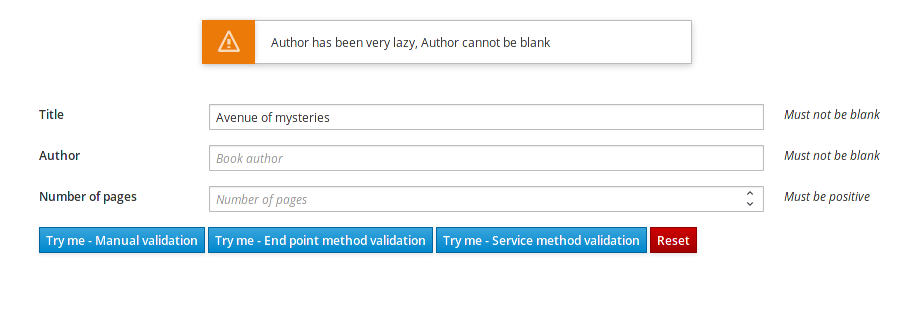
1. Enter the book details (valid or invalid)
2. Click on the *Try me...* buttons to check if your data is valid using one of the methods we presented above.
The application can be packaged using:
**CLI**
```bash
quarkus build
```
**Maven**
```bash
./mvnw install
```
**Gradle**
```bash
./gradlew build
```
and executed using `java -jar target/quarkus-app/quarkus-run.jar`.
You can also build the native executable using:
**CLI**
```bash
quarkus build --native
```
**Maven**
```bash
./mvnw install -Dnative
```
**Gradle**
```bash
./gradlew build -Dquarkus.native.enabled=true
```
## Going further
### Hibernate Validator extension and CDI
The Hibernate Validator extension is tightly integrated with CDI.
#### Configuring the ValidatorFactory
Sometimes, you might need to configure the behavior of the `ValidatorFactory`, for instance to use a specific `ParameterNameProvider`.
While the `ValidatorFactory` is instantiated by Quarkus itself, you can very easily tweak it by declaring replacement beans that will be injected in the configuration.
If you create a bean of the following types in your application, it will automatically be injected into the `ValidatorFactory` configuration:
\* `jakarta.validation.ClockProvider` \* `jakarta.validation.ConstraintValidator` \* `jakarta.validation.ConstraintValidatorFactory` \* `jakarta.validation.MessageInterpolator` \* `jakarta.validation.ParameterNameProvider` \* `jakarta.validation.TraversableResolver` \* `org.hibernate.validator.spi.properties.GetterPropertySelectionStrategy` \* `org.hibernate.validator.spi.nodenameprovider.PropertyNodeNameProvider` \* `org.hibernate.validator.spi.scripting.ScriptEvaluatorFactory`
You don't have to wire anything.
> [!WARNING]
> Obviously, for each listed type, you can declare only one bean.
>
> Most of the time, these beans should be declared as `@ApplicationScoped`.
>
> However, in the case of ``ConstraintValidator``s that are dependent of attributes of the constraint annotation (typically when implementing the `initialize(A constraintAnnotation)` method), use the `@Dependent` scope to make sure each annotation context has a separate instance of the `ConstraintValidator` bean.
If customizing the `ValidatorFactory` through the available configuration properties and the CDI beans above doesn't cover your requirements, you can customize it further by registering `ValidatorFactoryCustomizer` beans.
For instance, you could override the built-in validator enforcing the `@Email` constraint and use `MyEmailValidator` instead with the following class:
```java
@ApplicationScoped
public class MyEmailValidatorFactoryCustomizer implements ValidatorFactoryCustomizer {
@Override
public void customize(BaseHibernateValidatorConfiguration configuration) {
ConstraintMapping constraintMapping = configuration.createConstraintMapping();
constraintMapping
.constraintDefinition(Email.class)
.includeExistingValidators(false)
.validatedBy(MyEmailValidator.class);
configuration.addMapping(constraintMapping);
}
}
```
All beans implementing `ValidatorFactoryCustomizer` are applied, meaning you can have several of them. If you need to enforce some ordering, you can use the usual `@jakarta.annotation.Priority` annotation - beans with higher priority are applied first.
#### Constraint validators as beans
You can declare your constraint validators as CDI beans:
```java
@ApplicationScoped
public class MyConstraintValidator implements ConstraintValidator {
@Inject
MyService service;
@Override
public boolean isValid(String value, ConstraintValidatorContext context) {
if (value == null) {
return true;
}
return service.validate(value);
}
}
```
When initializing a constraint validator of a given type, Quarkus will check if a bean of this type is available and, if so, it will use it instead of instantiating a `ConstraintValidator`.
Thus, as demonstrated in our example, you can fully use injection in your constraint validator beans.
> [!WARNING]
> The scope you choose for your `ConstraintValidator` bean is important:
>
> - If the same instance of the `ConstraintValidator` bean can be used across the whole application, use the `@ApplicationScoped` scope.
> - If the `ConstraintValidator` bean implements the `initialize(A constraintAnnotation)` method and depends on the state of the constraint annotation, use the `@Dependent` scope to make sure each annotation context has a separate and properly configured instance of the `ConstraintValidator` bean.
When injecting beans relying on the runtime configuration, use `@Inject Instance<..>`. Since constraints are initialized at build time, it is not possible to completely preconfigure the constraint in the `initialize(..)` method, as the runtime information will be missing at that point. The `initialize(..)` method in such scenarios can still be used to read the constraint annotation parameters, and perform any work not relying on the runtime configuration. Hence, it is recommended that any heavy configuration work happens as part of the injected bean initialization and methods used in the `ConstraintValidator#isValid(..)` implementation are as fast as possible:
```java
@ApplicationScoped
public class MyConstraintValidator implements ConstraintValidator {
@Inject
Instance service;
@Override
public boolean isValid(String value, ConstraintValidatorContext context) {
if (value == null) {
return true;
}
return service.get().validate(value);
}
}
@ApplicationScoped
public class MyService {
private final Predicate validationFunction;
@Inject
public MyService(MyRuntimeConfig config) {
// perform all possible "initialization" work, e.g.:
if (config.complexValidationEnabled()) {
validationFunction = s -> ...
} else {
validationFunction = String::isBlank;
}
}
public boolean validate(String value) {
// perform the validation
return validationFunction.test(value);
}
}
```
### Validation and localization
By default, constraint violation messages will be returned in the build system locale.
You can configure this behavior by adding the following configuration in your `application.properties`:
```properties
# The default locale to use
quarkus.default-locale=fr-FR
```
If you are using Quarkus REST or RESTEasy Classic, in the context of a Jakarta REST endpoint, Hibernate Validator will automatically resolve the optimal locale to use from the `Accept-Language` HTTP header, provided the supported locales have been properly specified in the `application.properties`:
```properties
# The list of all the supported locales
quarkus.locales=en-US,es-ES,fr-FR
```
Alternatively, you can use `all` to make native-image executable to include all available locales. It inflate the size of the executable substantially though. The difference between including just two or three locales and including all locales is at least 23 MB.
A similar mechanism exists for GraphQL services based on the `quarkus-smallrye-graphql` extension.
If this default mechanism is not sufficient and you need a custom locale resolution, you can add additional ``org.hibernate.validator.spi.messageinterpolation.LocaleResolver``s:
- Any CDI bean implementing `org.hibernate.validator.spi.messageinterpolation.LocaleResolver` will be taken into account.
- The ``LocaleResolver``s are consulted in the order of `@Priority` (higher priority goes first).
- A `LocaleResolver` may return null if it cannot resolve the locale, it will then be ignored.
- The first non-null locale returned by a `LocaleResolver` is the one resolved.
### Validation groups for REST endpoint or service method validation
It is sometimes necessary to enable different validation constraints for the same class when it's passed to a different method.
For example, a `Book` may need to have a `null` identifier when passed to the `post` method (because the identifier will be generated), but a non-`null` identifier when passed to the `put` method (because the method needs the identifier to know what to update).
To address this, you can take advantage of validation groups. Validation groups are markers that you put on your constraints in order to enable or disable them at will.
First, define the `Post` and `Put` groups, which are just Java interfaces.
```java
public interface ValidationGroups {
interface Post extends Default { // <1>
}
interface Put extends Default { // <1>
}
}
```
1. Make the custom groups extend the `Default` group. This means that whenever these groups are enabled, the `Default` group is also enabled. This is useful if you have constraints that you want validated in both the `Post` and `Put` method: you can simply use the default group on those constraints, like on the `title` property below.
Then add the relevant constraints to `Book`, assigning the right group to each constraint:
```java
public class Book {
@Null(groups = ValidationGroups.Post.class)
@NotNull(groups = ValidationGroups.Put.class)
public Long id;
@NotBlank
public String title;
}
```
Finally, add a `@ConvertGroup` annotation next to your `@Valid` annotation in your validated method.
```java
@Path("/")
@POST
@Consumes(MediaType.APPLICATION_JSON)
public void post(@Valid @ConvertGroup(to = ValidationGroups.Post.class) Book book) { // <1>
// ...
}
@Path("/")
@PUT
@Consumes(MediaType.APPLICATION_JSON)
public void put(@Valid @ConvertGroup(to = ValidationGroups.Put.class) Book book) { // <2>
// ...
}
```
1. Enable the `Post` group, meaning only constraints assigned to the `Post` (and `Default`) groups will be validated for the `book` parameter of the `post` method. In this case, it means `Book.id` must be `null` and `Book.title` must not be blank.
2. Enable the `Put` group, meaning only constraints assigned to the `Put` (and `Default`) groups will be validated for the `book` parameter of the `put` method. In this case, it means `Book.id` must not be `null` and `Book.title` must not be blank.
## Limitations
### META-INF/validation.xml
Configuring the `ValidatorFactory` using a `META-INF/validation.xml` file is **NOT** supported in Quarkus.
At the moment, Hibernate Validator does not expose an API to extract the information from this file so that we could register the appropriate classes for reflection.
To configure the `ValidatorFactory`, use the exposed configuration properties and the CDI integration.
While configuration of the validator factory is not possible through XML, constraint declaration is. Quarkus accepts constraints defined by annotations in your classes or in the `validation.xml`.
### ValidatorFactory and native executables
Quarkus provides a default `ValidatorFactory` that you can customize using configuration properties. This `ValidatorFactory` is carefully initialized to support native executables using a bootstrap that is Quarkus-specific.
Creating a `ValidatorFactory` by yourself it not supported in native executables and if you try to do so, you will get an error similar to `jakarta.validation.NoProviderFoundException: Unable to create a Configuration, because no Jakarta Bean Validation provider could be found. Add a provider like Hibernate Validator (RI) to your classpath.` when running your native executable.
Thus why you should always use the Quarkus-managed `ValidatorFactory` by injecting an instance of `ValidatorFactory` or directly an instance of `Validator` using CDI injection.
To support some external libraries that are creating a `ValidatorFactory` using the default bootstrap, Quarkus returns the `ValidatorFactory` managed by Quarkus when `Validation.buildDefaultValidatorFactory()` is called.
## Hibernate Validator Configuration Reference
[lock] Configuration property fixed at build time - All other configuration properties are overridable at runtime
| | | |
| --- | --- | --- |
| Configuration property | Type | Default |
| [lock] [`quarkus.hibernate-validator.fail-fast`](#quarkus-hibernate-validator_quarkus-hibernate-validator-fail-fast) config_property_copy_button:+++quarkus.hibernate-validator.fail-fast+++[]
Enable the fail fast mode. When fail fast is enabled the validation will stop on the first constraint violation detected.
Environment variable: env_var_with_copy_button:+++QUARKUS_HIBERNATE_VALIDATOR_FAIL_FAST+++[] | boolean | `false` |
| [Method validation](#quarkus-hibernate-validator_section_quarkus-hibernate-validator-method-validation) | Type | Default |
| [lock] [`quarkus.hibernate-validator.method-validation.allow-overriding-parameter-constraints`](#quarkus-hibernate-validator_quarkus-hibernate-validator-method-validation-allow-overriding-parameter-constraints) config_property_copy_button:+++quarkus.hibernate-validator.method-validation.allow-overriding-parameter-constraints+++[]
Define whether overriding methods that override constraints should throw a `ConstraintDefinitionException`. The default value is `false`, i.e. do not allow.
See Section 4.5.5 of the JSR 380 specification, specifically
> In sub types (be it sub classes/interfaces or interface implementations), no parameter constraints may be declared on overridden or implemented methods, nor may parameters be marked for cascaded validation. This would pose a strengthening of preconditions to be fulfilled by the caller.
Environment variable: env_var_with_copy_button:+++QUARKUS_HIBERNATE_VALIDATOR_METHOD_VALIDATION_ALLOW_OVERRIDING_PARAMETER_CONSTRAINTS+++[] | boolean | `false` |
| [lock] [`quarkus.hibernate-validator.method-validation.allow-parameter-constraints-on-parallel-methods`](#quarkus-hibernate-validator_quarkus-hibernate-validator-method-validation-allow-parameter-constraints-on-parallel-methods) config_property_copy_button:+++quarkus.hibernate-validator.method-validation.allow-parameter-constraints-on-parallel-methods+++[]
Define whether parallel methods that define constraints should throw a `ConstraintDefinitionException`. The default value is `false`, i.e. do not allow.
See Section 4.5.5 of the JSR 380 specification, specifically
> If a sub type overrides/implements a method originally defined in several parallel types of the hierarchy (e.g. two interfaces not extending each other, or a class and an interface not implemented by said class), no parameter constraints may be declared for that method at all nor parameters be marked for cascaded validation. This again is to avoid an unexpected strengthening of preconditions to be fulfilled by the caller.
Environment variable: env_var_with_copy_button:+++QUARKUS_HIBERNATE_VALIDATOR_METHOD_VALIDATION_ALLOW_PARAMETER_CONSTRAINTS_ON_PARALLEL_METHODS+++[] | boolean | `false` |
| [lock] [`quarkus.hibernate-validator.method-validation.allow-multiple-cascaded-validation-on-return-values`](#quarkus-hibernate-validator_quarkus-hibernate-validator-method-validation-allow-multiple-cascaded-validation-on-return-values) config_property_copy_button:+++quarkus.hibernate-validator.method-validation.allow-multiple-cascaded-validation-on-return-values+++[]
Define whether more than one constraint on a return value may be marked for cascading validation are allowed. The default value is `false`, i.e. do not allow.
See Section 4.5.5 of the JSR 380 specification, specifically
> One must not mark a method return value for cascaded validation more than once in a line of a class hierarchy. In other words, overriding methods on sub types (be it sub classes/interfaces or interface implementations) cannot mark the return value for cascaded validation if the return value has already been marked on the overridden method of the super type or interface.
Environment variable: env_var_with_copy_button:+++QUARKUS_HIBERNATE_VALIDATOR_METHOD_VALIDATION_ALLOW_MULTIPLE_CASCADED_VALIDATION_ON_RETURN_VALUES+++[] | boolean | `false` |
| [Expression Language](#quarkus-hibernate-validator_section_quarkus-hibernate-validator-expression-language) | Type | Default |
| [lock] [`quarkus.hibernate-validator.expression-language.constraint-expression-feature-level`](#quarkus-hibernate-validator_quarkus-hibernate-validator-expression-language-constraint-expression-feature-level) config_property_copy_button:+++quarkus.hibernate-validator.expression-language.constraint-expression-feature-level+++[]
Configure the Expression Language feature level for constraints, allowing the selection of Expression Language features available for message interpolation.
This property only affects the EL feature level of "static" constraint violation messages set through the `message` attribute of constraint annotations.
In particular, it doesn't affect the default EL feature level for custom violations created programmatically in validator implementations. The feature level for those can only be configured directly in the validator implementation.
Environment variable: env_var_with_copy_button:+++QUARKUS_HIBERNATE_VALIDATOR_EXPRESSION_LANGUAGE_CONSTRAINT_EXPRESSION_FEATURE_LEVEL+++[] | `default`, `none`, `variables`, `bean-properties`, `bean-methods` | `bean-properties` |