# SmallRye GraphQL
This guide demonstrates how your Quarkus application can use [SmallRye GraphQL](https://github.com/smallrye/smallrye-graphql/), an implementation of the [MicroProfile GraphQL](https://github.com/eclipse/microprofile-graphql/) specification.
As the [GraphQL](https://www.graphql.org/) specification website states:
GraphQL is a query language for APIs and a runtime for fulfilling those queries with your existing data. GraphQL provides a complete and understandable description of the data in your API, gives clients the power to ask for exactly what they need and nothing more, makes it easier to evolve APIs over time, and enables powerful developer tools.
**GraphQL** was originally developed by **Facebook** in 2012 and has been an open standard since 2015.
GraphQL is not a replacement for REST API specification but merely an alternative. Unlike REST, GraphQL API's have the ability to benefit the client by:
**Preventing Over-fetching and Under-fetching**\
REST APIs are server-driven fixed data responses that cannot be determined by the client. Although the client does not require all the fields the client must retrieve all the data hence `Over-fetching`. A client may also require multiple REST API calls according to the first call (HATEOAS) to retrieve all the data that is required thereby `Under-fetching`.
**API Evolution**\
Since GraphQL API's returns data that are requested by the client adding additional fields and capabilities to existing API will not create breaking changes to existing clients.
## Prerequisites
To complete this guide, you need:
- Roughly 15 minutes
- An IDE
- JDK 17+ installed with `JAVA_HOME` configured appropriately
- Apache Maven 3.9.16
- Optionally the [Quarkus CLI](/guides/cli-tooling/index.md) if you want to use it
- Optionally Mandrel or GraalVM installed and [configured appropriately](/guides/building-native-image/index.md#configuring-graalvm) if you want to build a native executable (or Docker if you use a native container build)
## Architecture
In this guide, we build a simple GraphQL application that exposes a GraphQL API at `/graphql`.
This example was inspired by a popular GraphQL API.
## Solution
We recommend that you follow the instructions in the next sections and create the application step by step. However, you can go right to the completed example.
Clone the Git repository: `git clone https://github.com/quarkusio/quarkus-quickstarts.git`, or download an [archive](https://github.com/quarkusio/quarkus-quickstarts/archive/main.zip).
The solution is located in the `microprofile-graphql-quickstart` [directory](https://github.com/quarkusio/quarkus-quickstarts/tree/main/microprofile-graphql-quickstart).
## Creating the Maven Project
First, we need a new project. Create a new project with the following command:
**CLI**
```bash
quarkus create app org.acme:microprofile-graphql-quickstart \
--extension='quarkus-smallrye-graphql' \
--no-code
cd microprofile-graphql-quickstart
```
To create a Gradle project, add the `--gradle` or `--gradle-kotlin-dsl` option.
For more information about how to install and use the Quarkus CLI, see the [Quarkus CLI](/guides/cli-tooling/index.md) guide.
**Maven**
```bash
mvn io.quarkus.platform:quarkus-maven-plugin:3.40.1.2:create \
-DprojectGroupId=org.acme \
-DprojectArtifactId=microprofile-graphql-quickstart \
-Dextensions='quarkus-smallrye-graphql' \
-DnoCode
cd microprofile-graphql-quickstart
```
To create a Gradle project, add the `-DbuildTool=gradle` or `-DbuildTool=gradle-kotlin-dsl` option.
For Windows users:
- If using Powershell, wrap `-D` parameters in double quotes e.g. `"-DprojectArtifactId=microprofile-graphql-quickstart"`
This command generates a project, importing the `smallrye-graphql` extension.
If you already have your Quarkus project configured, you can add the `smallrye-graphql` extension to your project by running the following command in your project base directory:
**CLI**
```bash
quarkus extension add quarkus-smallrye-graphql
```
**Maven**
```bash
./mvnw quarkus:add-extension -Dextensions='quarkus-smallrye-graphql'
```
**Gradle**
```bash
./gradlew addExtension --extensions='quarkus-smallrye-graphql'
```
This will add the following to your build file:
**pom.xml**
```xml
io.quarkus
quarkus-smallrye-graphql
```
**build.gradle**
```gradle
implementation("io.quarkus:quarkus-smallrye-graphql")
```
## Preparing an Application: GraphQL API
In this section we will start creating the GraphQL API.
First, create the following entities representing a film from a galaxy far, far away:
```java
package org.acme.microprofile.graphql;
public class Film {
public String title;
public Integer episodeID;
public String director;
public LocalDate releaseDate;
}
public class Hero {
public String name;
public String surname;
public Double height;
public Integer mass;
public Boolean darkSide;
public LightSaber lightSaber;
public List episodeIds = new ArrayList<>();
}
enum LightSaber {
RED, BLUE, GREEN
}
```
> [!NOTE]
> For readability we use classes with public fields, but classes with private fields with public getters and setters will also work.
The classes we have just created describe the GraphQL schema which is a set of possible data (objects, fields, relationships) that a client can access.
Let's continue with an example CDI bean, that would work as a repository:
```java
@ApplicationScoped
public class GalaxyService {
private List heroes = new ArrayList<>();
private List films = new ArrayList<>();
public GalaxyService() {
Film aNewHope = new Film();
aNewHope.title = "A New Hope";
aNewHope.releaseDate = LocalDate.of(1977, Month.MAY, 25);
aNewHope.episodeID = 4;
aNewHope.director = "George Lucas";
Film theEmpireStrikesBack = new Film();
theEmpireStrikesBack.title = "The Empire Strikes Back";
theEmpireStrikesBack.releaseDate = LocalDate.of(1980, Month.MAY, 21);
theEmpireStrikesBack.episodeID = 5;
theEmpireStrikesBack.director = "George Lucas";
Film returnOfTheJedi = new Film();
returnOfTheJedi.title = "Return Of The Jedi";
returnOfTheJedi.releaseDate = LocalDate.of(1983, Month.MAY, 25);
returnOfTheJedi.episodeID = 6;
returnOfTheJedi.director = "George Lucas";
films.add(aNewHope);
films.add(theEmpireStrikesBack);
films.add(returnOfTheJedi);
Hero luke = new Hero();
luke.name = "Luke";
luke.surname = "Skywalker";
luke.height = 1.7;
luke.mass = 73;
luke.lightSaber = LightSaber.GREEN;
luke.darkSide = false;
luke.episodeIds.addAll(Arrays.asList(4, 5, 6));
Hero leia = new Hero();
leia.name = "Leia";
leia.surname = "Organa";
leia.height = 1.5;
leia.mass = 51;
leia.darkSide = false;
leia.episodeIds.addAll(Arrays.asList(4, 5, 6));
Hero vader = new Hero();
vader.name = "Darth";
vader.surname = "Vader";
vader.height = 1.9;
vader.mass = 89;
vader.darkSide = true;
vader.lightSaber = LightSaber.RED;
vader.episodeIds.addAll(Arrays.asList(4, 5, 6));
heroes.add(luke);
heroes.add(leia);
heroes.add(vader);
}
public List getAllFilms() {
return films;
}
public Film getFilm(int id) {
return films.get(id);
}
public List getHeroesByFilm(Film film) {
return heroes.stream()
.filter(hero -> hero.episodeIds.contains(film.episodeID))
.collect(Collectors.toList());
}
public void addHero(Hero hero) {
heroes.add(hero);
}
public Hero deleteHero(int id) {
return heroes.remove(id);
}
public List getHeroesBySurname(String surname) {
return heroes.stream()
.filter(hero -> hero.surname.equals(surname))
.collect(Collectors.toList());
}
}
```
Now, let's create our first GraphQL API.
Edit the `org.acme.microprofile.graphql.FilmResource` class as following:
```java
@GraphQLApi // <1>
public class FilmResource {
@Inject
GalaxyService service;
@Query("allFilms") // <2>
@Description("Get all Films from a galaxy far far away") // <3>
public List getAllFilms() {
return service.getAllFilms();
}
}
```
1. `@GraphQLApi` annotation indicates that the CDI bean will be a GraphQL endpoint
2. `@Query` annotation defines that this method will be queryable with the name `allFilms`
3. Documentation of the queryable method
> [!TIP]
> The value of the `@Query` annotation is optional and would implicitly be defaulted to the method name if absent.
This way we have created our first queryable API which we will later expand.
## Launch
Launch the quarkus application in dev mode:
**CLI**
```bash
quarkus dev
```
**Maven**
```bash
./mvnw quarkus:dev
```
**Gradle**
```bash
./gradlew --console=plain quarkusDev
```
## Introspect
The full schema of the GraphQL API can be retrieved by calling the following:
```bash
curl http://localhost:8080/graphql/schema.graphql
```
The server will return the complete schema of the GraphQL API.
## GraphQL UI
> [!NOTE]
> Experimental - not included in the MicroProfile specification
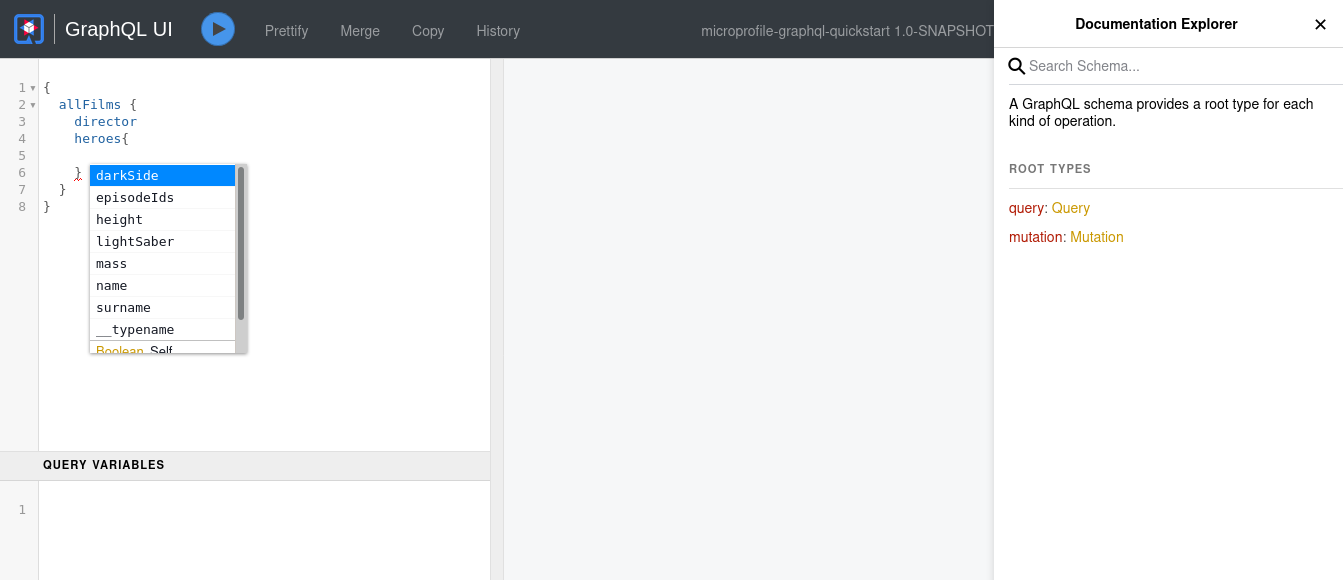
GraphQL UI is a great tool permitting easy interaction with your GraphQL APIs.
The Quarkus `smallrye-graphql` extension ships with [GraphiQL](https://github.com/graphql/graphiql/blob/main/packages/graphiql/README.md) and enables it by default in `dev` and `test` modes, but it can also be explicitly configured for `production` mode as well, by setting the `quarkus.smallrye-graphql.ui.always-include` configuration property to `true`.
The GraphQL UI can be accessed from .
Have a look at the [Authorization of Web Endpoints](/guides/security-authorize-web-endpoints-reference/index.md) Guide on how to add/remove security for the GraphQL UI.
## Query the GraphQL API
Now visit the GraphQL UI page that has been deployed in `dev` mode.
Enter the following query to the GraphQL UI and press the `play` button:
```graphql
query allFilms {
allFilms {
title
director
releaseDate
episodeID
}
}
```
Since our query contains all the fields in the `Film` class we will retrieve all the fields in our response. Since GraphQL API responses are client determined, the client can choose which fields it will require.
Let's assume that our client only requires `title` and `releaseDate` making the previous call to the API `Over-fetching` of unnecessary data.
Enter the following query into the GraphQL UI and hit the `play` button:
```graphql
query allFilms {
allFilms {
title
releaseDate
}
}
```
Notice in the response we have only retrieved the required fields. Therefore, we have prevented `Over-fetching`.
Let's continue to expand our GraphQL API by adding the following to the `FilmResource` class.
```java
@Query
@Description("Get a Films from a galaxy far far away")
public Film getFilm(@Name("filmId") int id) {
return service.getFilm(id);
}
```
> [!WARNING]
> Notice how we have excluded the value in the `@Query` annotation. Therefore, the name of the query is implicitly set as the method name excluding the `get`.
This query will allow the client to retrieve the film by id, and the `@Name` annotation on the parameter changes the parameter name to `filmId` rather than the default `id` that it would be if you omit the `@Name` annotation.
Enter the following into the `GraphQL UI` and make a request.
```graphql
query getFilm {
film(filmId: 1) {
title
director
releaseDate
episodeID
}
}
```
The `film` query method requested fields can be determined as such in our previous example. This way we can retrieve individual film information.
However, say our client requires both films with filmId `0` and `1`. In a REST API the client would have to make two calls to the API. Therefore, the client would be `Under-fetching`.
In GraphQL, it is possible to make multiple queries at once.
Enter the following into the `GraphQL UI` to retrieve two films:
```graphql
query getFilms {
film0: film(filmId: 0) {
title
director
releaseDate
episodeID
}
film1: film(filmId: 1) {
title
director
releaseDate
episodeID
}
}
```
This enabled the client to fetch the required data in a single request.
## Expanding the API
Until now, we have created a GraphQL API to retrieve film data. We now want to enable the clients to retrieve the `Hero` data of the `Film`.
Add the following to our `FilmResource` class:
```java
public List heroes(@Source Film film) { // <1>
return service.getHeroesByFilm(film);
}
```
1. Enable `List` data to be added to queries that respond with `Film`
By adding this method we have effectively changed the schema of the GraphQL API. Although the schema has changed the previous queries will still work. Since we only expanded the API to be able to retrieve the `Hero` data of the `Film`.
Enter the following into the `GraphQL UI` to retrieve the film and hero data.
```graphql
query getFilmHeroes {
film(filmId: 1) {
title
director
releaseDate
episodeID
heroes {
name
height
mass
darkSide
lightSaber
}
}
}
```
The response now includes the heroes of the film.
### Batching
When you are exposing a `Collection` return like our `getAllFilms`, you might want to use the batch form of the above, to more efficiently fetch the heroes:
```java
public List> heroes(@Source List films) { // <1>
// Here fetch all hero lists
}
```
1. Here receive the films as a batch, allowing you to fetch the corresponding heroes.
### Non blocking
Queries can be made reactive by using `Uni` as a return type, or adding `@NonBlocking` to the method:
```java
@Query
@Description("Get a Films from a galaxy far far away")
public Uni getFilm(int filmId) {
// ...
}
```
Or you can use `@NonBlocking`:
```java
@Query
@Description("Get a Films from a galaxy far far away")
@NonBlocking
public Film getFilm(int filmId) {
// ...
}
```
Using `Uni` or `@NonBlocking` means that the request will be executed on Event-loop threads rather than Worker threads.
You can mix Blocking and Non-blocking in one request,
```java
@Query
@Description("Get a Films from a galaxy far far away")
@NonBlocking
public Film getFilm(int filmId) {
// ...
}
public List heroes(@Source Film film) {
return service.getHeroesByFilm(film);
}
```
Above will fetch the film on the event-loop threads, but switch to the worker thread to fetch the heroes.
### RunOnVirtualThread
Queries can be run on a virtual thread by adding `@RunOnVirtualThread` to the method:
```java
@Query
@Description("Get a Films from a galaxy far far away")
@RunOnVirtualThread
public Film getFilm(int filmId) {
// ...
}
```
Please note the general guidelines for using [virtual threads](/guides/virtual-threads/index.md)
### Transactions
When a JTA transaction manager is available (for example when you use [Hibernate ORM](/guides/hibernate-orm/index.md) or the `quarkus-narayana-jta` extension), the extension automatically makes blocking GraphQL operations transactional, as if they were annotated with `@Transactional`. This is a convenient default for resolvers that read from or write to a database.
A method receives this implicit `@Transactional` only when all of the following are true:
- The `TRANSACTIONS` capability is present (a JTA extension is on the classpath).
- Hibernate Reactive is **not** present (reactive session management handles transactions itself, so nothing is added).
- The method is a GraphQL operation (`@Query`, `@Mutation`, `@Subscription`, `@Name`, `@Resolver` or a `@Source` method) on a `@GraphQLApi` class.
- The method returns a blocking type. Reactive return types (`Uni`, `Multi`, `CompletionStage`, `CompletableFuture` or `Publisher`) are never made transactional.
- The method is not annotated with `@NonBlocking`.
- The method is not already annotated with `@Transactional` (an explicit annotation always wins).
To opt a specific operation out of this behavior - for example when the resolver calls a library that manages its own JDBC transactions - annotate it with `@Transactional(Transactional.TxType.NOT_SUPPORTED)`:
```java
@Query("aiGenerationQuota")
@Transactional(Transactional.TxType.NOT_SUPPORTED)
public AiQuota getRemainingQuota() {
// ...
}
```
You can also use any other `TxType` (such as `REQUIRES_NEW`) to control how the operation participates in transactions, since an explicit `@Transactional` takes precedence over the implicit one.
## Abstract Types
The current schema is simple with only two concrete types, `Hero` and `Film`. Now we want to expand our API with additional types and add some abstractions that make interacting with them easy for clients.
### Interfaces
Let's give our heroes some allies.
First, create a new entity to represent our `Ally`.
```java
public class Ally {
public String name;
public String surname;
public Hero partner;
}
```
Update the `GalaxyService` to have some allies.
```java
private List allies = new ArrayList();
public GalaxyService() {
// ...
Ally jarjar = new Ally();
jarjar.name = "Jar Jar";
jarjar.surname = "Binks";
allies.add(jarjar);
}
public List getAllAllies() {
return allies;
}
```
Let's also update `FilmResource` to allow clients to query for all allies:
```java
@Query
public List allies() {
return service.getAllAllies();
}
```
Enter the following into the `GraphQL UI` and make a request.
```graphql
query getAllies {
allies {
name
surname
}
}
```
Notice that `Ally` has a some of the same fields as a `Hero`. To better make queries easier for clients, let's create an abstraction for any character.
Create a new Java interface that defines our common character traits.
```java
public interface Character {
// <1>
String getName();
String getSurname();
}
```
1. Getters defined in an interface will define the GraphQL fields that it contains
Now, update our `Hero` and `Ally` entities to implement this interface.
```java
public class Hero implements Character {
// ...
// <1>
public String getName() {
return name;
}
// <1>
public String getSurname() {
return surname;
}
}
public class Ally implements Character {
// ...
// <1>
public String getName() {
return name;
}
// <1>
public String getSurname() {
return surname;
}
}
```
1. Because interfaces can't define fields, we have to implement the getters
By adding an interface and updating existing entities to implement it, we have effectively changed the schema. The updated schema will now include the new `Ally` type and `Character` interface.
```graphql
# <1>
interface Character {
name: String
surname: String
}
# <2>
type Ally implements Character {
name: String
surname: String
partner: Hero
}
# <3>
type Hero implements Character {
name: String
surname: String
# ...
}
```
1. The `Character` interface was defined with the getters as fields
2. The `Ally` type was added and it implements `Character`
3. The `Hero` type was updated to implement `Character`
Update our `GalaxyService` to provide all characters.
```java
public List getAllCharacters() {
List characters = new ArrayList<>();
characters.addAll(heroes);
characters.addAll(allies);
return characters;
}
```
Now we can allow clients to query for all characters, not just heroes.
Add the following to our `FilmResource` class:
```java
@Query
@Description("Get all characters from a galaxy far far away")
public List characters() {
return service.getAllCharacters();
}
```
Enter the following into the `GraphQL UI` and make a request.
```graphql
query getCharacters {
characters {
name
surname
}
}
```
### Unions
> [!NOTE]
> Experimental - not included in the MicroProfile specification
So far, our API has only allowed us to query directly for an entity or list of entities. Now we want to allow clients to search all of our entities. While `Hero` and `Ally` have a shared abstract type of `Character`, there is no abstraction that also includes `Film`.
First, create this new abstract type representing the possible return types for a search result.
```java
package org.acme.microprofile.graphql;
import io.smallrye.graphql.api.Union;
@Union // <1>
public interface SearchResult {
}
```
1. `@Union` is required to indicate this Java interface represents a GraphQL union, not a GraphQL interface
> [!TIP]
> The Java interface representing the GraphQL union does not have to be empty, but any getters defined will not explicitly change the GraphQL schema.
Update our entities to implement `SearchResult`:
```java
public class Film implements SearchResult {
// ...
}
public interface Character extends SearchResult {
// ...
}
public class Hero implements Character {
// ...
}
public class Ally implements Character {
// ...
}
```
Update `GalaxyService` to provide search:
```java
public List search(String query) {
List results = new ArrayList<>();
List matchingFilms = films.stream()
.filter(film -> film.title.contains(query)
|| film.director.contains(query))
.collect(Collectors.toList());
results.addAll(matchingFilms);
List matchingCharacters = getAllCharacters().stream()
.filter(character -> character.getName().contains(query)
|| character.getSurname().contains(query))
.collect(Collectors.toList());
results.addAll(matchingCharacters);
return results;
}
```
Add the following to our `FilmResource` class:
```java
@Query
@Description("Search for heroes or films")
public List search(String query) {
return service.search(query);
}
```
Enter the following into the `GraphQL UI` and make a request.
```graphql
query searchTheGalaxy {
search(query: "a") {
... on Film {
title
director
}
... on Character {
name
surname
}
}
}
```
> [!NOTE]
> We are able to use the `Character` interface because the `SearchResult` union contains members that implement it.
## Mutations
Mutations are used when data is created, updated or deleted.
Let's now add the ability to add and delete heroes to our GraphQL API.
Add the following to our `FilmResource` class:
```java
@Mutation
public Hero createHero(Hero hero) {
service.addHero(hero);
return hero;
}
@Mutation
public Hero deleteHero(int id) {
return service.deleteHero(id);
}
```
Enter the following into the `GraphQL UI` to insert a `Hero`:
```graphql
mutation addHero {
createHero(hero: {
name: "Han",
surname: "Solo"
height: 1.85
mass: 80
darkSide: false
episodeIds: [4, 5, 6]
}
)
{
name
surname
}
}
```
By using this mutation we have created a `Hero` entity in our service.
Notice how in the response we have retrieved the `name` and `surname` of the created Hero. This is because we selected to retrieve these fields in the response within the `{ }` in the mutation query. This can easily be a server side generated field that the client may require.
Let's now try deleting an entry:
```graphql
mutation DeleteHero {
deleteHero(id :3){
name
surname
}
}
```
Similar to the `createHero` mutation method we also retrieve the `name` and `surname` of the hero we have deleted which is defined in `{ }`.
## Subscriptions
Subscriptions allow you to subscribe to a query. It allows you to receive events and is using web sockets. See the [GraphQL over WebSocket Protocol](https://github.com/enisdenjo/graphql-ws/blob/master/PROTOCOL.md) spec for more details.
Example: We want to know when new Heroes are being created:
```java
BroadcastProcessor processor = BroadcastProcessor.create(); // <1>
@Mutation
public Hero createHero(Hero hero) {
service.addHero(hero);
processor.onNext(hero); // <2>
return hero;
}
@Subscription
public Multi heroCreated(){
return processor; // <3>
}
```
1. The `Multi` processor that will broadcast any new ``Hero``es
2. When adding a new `Hero`, also broadcast it
3. Make the stream available in the schema and as a WebSocket during runtime
Any client that now connect to the `/graphql` WebSocket connection will receive events on new Heroes being created:
```graphql
subscription ListenForNewHeroes {
heroCreated {
name
surname
}
}
```
## Creating Queries by fields
Queries can also be done on individual fields. For example, let's create a method to query heroes by their last name.
Add the following to our `FilmResource` class:
```java
@Query
public List getHeroesWithSurname(@DefaultValue("Skywalker") String surname) {
return service.getHeroesBySurname(surname);
}
```
By using the `@DefaultValue` annotation we have determined that the surname value will be `Skywalker` when the parameter is not provided.
Test the following queries with the `GraphQL UI`:
```graphql
query heroWithDefaultSurname {
heroesWithSurname{
name
surname
lightSaber
}
}
query heroWithSurnames {
heroesWithSurname(surname: "Vader") {
name
surname
lightSaber
}
}
```
## Context
You can get information about the GraphQL request anywhere in your code, using this experimental, SmallRye specific feature:
```java
@Inject
Context context;
```
or as a parameter in your method if you are in the `GraphQLApi` class, for instance:
```java
@Query
@Description("Get a Films from a galaxy far far away")
public Film getFilm(Context context, int filmId) {
// ...
}
```
The context object allows you to get:
- the original request (Query/Mutation)
- the arguments
- the path
- the selected fields
- any variables
This allows you to optimize the downstream queries to the datastore.
See the [JavaDoc](https://javadoc.io/doc/io.smallrye/smallrye-graphql-api/latest/io/smallrye/graphql/api/Context.html) for more details.
### GraphQL-Java
This context object also allows you to fall down to the underlying [graphql-java](https://www.graphql-java.com/) features by using the leaky abstraction:
```java
DataFetchingEnvironment dfe = context.unwrap(DataFetchingEnvironment.class);
```
You can also get access to the underlying `graphql-java` during schema generation, to add your own features directly:
```java
public GraphQLSchema.Builder addMyOwnEnum(@Observes GraphQLSchema.Builder builder) {
// Here add your own features directly, example adding an Enum
GraphQLEnumType myOwnEnum = GraphQLEnumType.newEnum()
.name("SomeEnum")
.description("Adding some enum type")
.value("value1")
.value("value2").build();
return builder.additionalType(myOwnEnum);
}
```
By using the `@Observer` you can add anything to the Schema builder.
> [!NOTE]
> For the Observer to work, you need to enable events. In `application.properties`, add the following: `quarkus.smallrye-graphql.events.enabled=true`.
## Adapting
### Adapt to Scalar
Another SmallRye specific experimental feature, allows you to map an existing scalar (that is mapped by the implementation to a certain Java type) to another type, or to map complex object, that would typically create a `Type` or `Input` in GraphQL, to an existing scalar.
#### Adapting an existing Scalar to another type:
```java
public class Movie {
@AdaptToScalar(Scalar.Int.class)
Long idLongThatShouldChangeToInt;
// ....
}
```
Above will adapt the `Long` java type to an `Int` Scalar type, rather than the [default](https://download.eclipse.org/microprofile/microprofile-graphql-1.0/microprofile-graphql.html#scalars) `BigInteger`.
#### Adapting a complex object to a Scalar type:
```java
public class Person {
@AdaptToScalar(Scalar.String.class)
Phone phone;
// ....
}
```
This will, rather than creating a `Type` or `Input` in GraphQL, map to a String scalar.
To be able to do the above, the `Phone` object needs to have a constructor that takes a String (or `Int` / `Date` / etc.), or have a setter method for the String (or `Int` / `Date` / etc.), or have a `fromString` (or `fromInt` / `fromDate` - depending on the Scalar type) static method.
For example:
```java
public class Phone {
private String number;
// Getters and setters....
public static Phone fromString(String number) {
Phone phone = new Phone();
phone.setNumber(number);
return phone;
}
}
```
See more about the `@AdaptToScalar` feature in the [JavaDoc](https://javadoc.io/static/io.smallrye/smallrye-graphql-api/1.5.0/io/smallrye/graphql/api/AdaptToScalar.html).
### Adapt with
Another option for more complex cases is to provide an Adapter. You can then do the mapping yourself in the adapter.
See more about the `AdaptWith` feature in the [JavaDoc](https://javadoc.io/static/io.smallrye/smallrye-graphql-api/1.5.0/io/smallrye/graphql/api/AdaptWith.html).
For example:
```java
public class Profile {
// Map this to an email address
@AdaptWith(AddressAdapter.class)
public Address address;
// other getters/setters...
}
public class AddressAdapter implements Adapter {
@Override
public Address from(EmailAddress email) {
Address a = new Address();
a.addressType = AddressType.email;
a.addLine(email.getValue());
return a;
}
@Override
public EmailAddress to(Address address) {
if (address != null && address.addressType != null && address.addressType.equals(AddressType.email)) {
return new EmailAddress(address.lines.get(0));
}
return null;
}
}
```
> [!NOTE]
> `@JsonbTypeAdapter` is also supported.
### Built-in support for Maps
By default, due to the fact that maps are hard to model in a schema (as the keys and values can be dynamic at runtime) GraphQL does not support maps by default. Using the above adaption, `Map` support is added for Quarkus and are mapped to an `Entry` with an optional key parameter. This allows you to return a map, and optionally query it by key.
Example:
```java
@Query
public Map language() {
return languageService.getLanguages();
}
public enum ISO6391 {
af,
en,
de,
fr
}
public class Language {
private ISO6391 iso6391;
private String nativeName;
private String enName;
private String please;
private String thankyou;
// Getters & Setters
}
```
> [!NOTE]
> The key and value object can be any of Enum, Scalar or Complex object
You can now query the whole map with all the fields:
```graphql
{
language{
key
value {
enName
iso6391
nativeName
please
thankyou
}
}
}
```
This will return a result like this for example:
```json
{
"data": {
"language": [
{
"key": "fr",
"value": {
"enName": "french",
"iso6391": "fr",
"nativeName": "français",
"please": "s'il te plaît",
"thankyou": "merci"
}
},
{
"key": "af",
"value": {
"enName": "afrikaans",
"iso6391": "af",
"nativeName": "afrikaans",
"please": "asseblief",
"thankyou": "dankie"
}
},
{
"key": "de",
"value": {
"enName": "german",
"iso6391": "de",
"nativeName": "deutsch",
"please": "bitte",
"thankyou": "danke dir"
}
},
{
"key": "en",
"value": {
"enName": "english",
"iso6391": "en",
"nativeName": "english",
"please": "please",
"thankyou": "thank you"
}
}
]
}
}
```
You can also query by key
```graphql
{
language (key:af){
value {
please
thankyou
}
}
}
```
That will return only that value in the map:
```json
{
"data": {
"language": [
{
"value": {
"please": "asseblief",
"thankyou": "dankie"
}
}
]
}
}
```
> [!NOTE]
> The default map adapter can to overridden with our own implementation.
## Error code
You can add an error code on the error output in the GraphQL response by using the (SmallRye specific) `@ErrorCode`:
```java
@ErrorCode("some-business-error-code")
public class SomeBusinessException extends RuntimeException {
// ...
}
```
When `SomeBusinessException` occurs, the error output will contain the Error code:
```graphql
{
"errors": [
{
"message": "Unexpected failure in the system. Jarvis is working to fix it.",
"locations": [
{
"line": 2,
"column": 3
}
],
"path": [
"annotatedCustomBusinessException"
],
"extensions": {
"exception": "io.smallrye.graphql.test.apps.error.api.ErrorApi$AnnotatedCustomBusinessException",
"classification": "DataFetchingException",
"code": "some-business-error-code" <1>
}
}
],
"data": {
...
}
}
```
1. The error code
## JavaScript Client
When `quarkus.smallrye-graphql.js-client.enabled` is set to `true`, the extension generates a JavaScript client library and a typed proxy module as web resources at build time. These can be imported via the standard [import map](https://developer.mozilla.org/en-US/docs/Web/HTML/Element/script/type/importmap) convention when using [Web Dependency Locator](https://quarkus.io/guides/web-dependency-locator).
### Enabling the Client
Add to `application.properties`:
```properties
quarkus.smallrye-graphql.js-client.enabled=true
```
This generates two resources:
| Resource | Purpose |
| --- | --- |
| `@quarkus/graphql` | Reusable `GraphQLClient` class with `query()`, `mutate()`, and `subscribe()` methods |
| `@quarkus/graphql-api` | Typed proxy with exports for each GraphQL query, mutation, and subscription |
### Using the Typed Proxy
The generated proxy exports `Queries`, `Mutations`, and `Subscriptions` objects, plus the underlying `client` instance:
```javascript
import { client, Queries, Mutations } from '@quarkus/graphql-api';
// Call a query
const data = await Queries.allBooks();
// Call a query with variables
const result = await Queries.book({ id: 42 });
// Call a mutation
const created = await Mutations.createBook({ title: 'Quarkus in Action' });
```
Each function accepts a `variables` object matching the GraphQL operation's arguments. The GraphQL query string, including the selection set, is generated automatically at build time.
### Subscriptions
Subscription operations return a `Subscription` object:
```javascript
import { Subscriptions } from '@quarkus/graphql-api';
const sub = Subscriptions.onBookCreated()
.onData(data => console.log('New book:', data))
.onError(err => console.error('Error:', err))
.onComplete(() => console.log('Stream completed'));
// Cancel later
await sub.cancel();
```
Subscriptions use the `graphql-transport-ws` WebSocket subprotocol.
### Using the Client Library Directly
For more control, import the `GraphQLClient` class directly:
```javascript
import { GraphQLClient } from '@quarkus/graphql';
const client = new GraphQLClient({ endpoint: '/graphql' });
// Custom query
const data = await client.query(`
query {
allBooks {
title
author { name }
}
}
`);
```
## Conclusion
SmallRye GraphQL enables clients to retrieve the exact data that is required preventing `Over-fetching` and `Under-fetching`.
The GraphQL API can be expanded without breaking previous queries enabling easy API `evolution`.
## Configuration Reference
[lock] Configuration property fixed at build time - All other configuration properties are overridable at runtime
| | | |
| --- | --- | --- |
| Configuration property | Type | Default |
| [lock] [`quarkus.smallrye-graphql.root-path`](#quarkus-smallrye-graphql_quarkus-smallrye-graphql-root-path) config_property_copy_button:+++quarkus.smallrye-graphql.root-path+++[]
The rootPath under which queries will be served. Default to graphql By default, this value will be resolved as a path relative to `${quarkus.http.root-path}`.
Environment variable: env_var_with_copy_button:+++QUARKUS_SMALLRYE_GRAPHQL_ROOT_PATH+++[] | string | `graphql` |
| [lock] [`quarkus.smallrye-graphql.federation.enabled`](#quarkus-smallrye-graphql_quarkus-smallrye-graphql-federation-enabled) config_property_copy_button:+++quarkus.smallrye-graphql.federation.enabled+++[]
Enable Apollo Federation. If this value is unspecified, then federation will be enabled automatically if any GraphQL Federation annotations are detected in the application.
Environment variable: env_var_with_copy_button:+++QUARKUS_SMALLRYE_GRAPHQL_FEDERATION_ENABLED+++[] | boolean | |
| [lock] [`quarkus.smallrye-graphql.federation.batch-resolving-enabled`](#quarkus-smallrye-graphql_quarkus-smallrye-graphql-federation-batch-resolving-enabled) config_property_copy_button:+++quarkus.smallrye-graphql.federation.batch-resolving-enabled+++[]
Enable batch resolving for federation. Disabled by default.
Environment variable: env_var_with_copy_button:+++QUARKUS_SMALLRYE_GRAPHQL_FEDERATION_BATCH_RESOLVING_ENABLED+++[] | boolean | |
| [lock] [`quarkus.smallrye-graphql.metrics.enabled`](#quarkus-smallrye-graphql_quarkus-smallrye-graphql-metrics-enabled) config_property_copy_button:+++quarkus.smallrye-graphql.metrics.enabled+++[]
Enable metrics. By default, this is false. If set to true, a metrics extension is required.
Environment variable: env_var_with_copy_button:+++QUARKUS_SMALLRYE_GRAPHQL_METRICS_ENABLED+++[] | boolean | |
| [lock] [`quarkus.smallrye-graphql.tracing.enabled`](#quarkus-smallrye-graphql_quarkus-smallrye-graphql-tracing-enabled) config_property_copy_button:+++quarkus.smallrye-graphql.tracing.enabled+++[]
Enable tracing. By default, this will be enabled if the tracing extension is added.
Environment variable: env_var_with_copy_button:+++QUARKUS_SMALLRYE_GRAPHQL_TRACING_ENABLED+++[] | boolean | |
| [lock] [`quarkus.smallrye-graphql.events.enabled`](#quarkus-smallrye-graphql_quarkus-smallrye-graphql-events-enabled) config_property_copy_button:+++quarkus.smallrye-graphql.events.enabled+++[]
Enable eventing. Allow you to receive events on bootstrap and execution.
Environment variable: env_var_with_copy_button:+++QUARKUS_SMALLRYE_GRAPHQL_EVENTS_ENABLED+++[] | boolean | `false` |
| [lock] [`quarkus.smallrye-graphql.nonblocking.enabled`](#quarkus-smallrye-graphql_quarkus-smallrye-graphql-nonblocking-enabled) config_property_copy_button:+++quarkus.smallrye-graphql.nonblocking.enabled+++[]
Enable non-blocking support. Default is true.
Environment variable: env_var_with_copy_button:+++QUARKUS_SMALLRYE_GRAPHQL_NONBLOCKING_ENABLED+++[] | boolean | |
| [lock] [`quarkus.smallrye-graphql.auto-name-strategy`](#quarkus-smallrye-graphql_quarkus-smallrye-graphql-auto-name-strategy) config_property_copy_button:+++quarkus.smallrye-graphql.auto-name-strategy+++[]
Change the type naming strategy. All possible strategies are: default, merge-inner-class, full
Environment variable: env_var_with_copy_button:+++QUARKUS_SMALLRYE_GRAPHQL_AUTO_NAME_STRATEGY+++[] | string | `Default` |
| [lock] [`quarkus.smallrye-graphql.print-data-fetcher-exception`](#quarkus-smallrye-graphql_quarkus-smallrye-graphql-print-data-fetcher-exception) config_property_copy_button:+++quarkus.smallrye-graphql.print-data-fetcher-exception+++[]
Print the data fetcher exception to the log file. Default `true` in dev and test mode, default `false` in prod.
Environment variable: env_var_with_copy_button:+++QUARKUS_SMALLRYE_GRAPHQL_PRINT_DATA_FETCHER_EXCEPTION+++[] | boolean | |
| [lock] [`quarkus.smallrye-graphql.schema-available`](#quarkus-smallrye-graphql_quarkus-smallrye-graphql-schema-available) config_property_copy_button:+++quarkus.smallrye-graphql.schema-available+++[]
Make the schema available over HTTP.
Environment variable: env_var_with_copy_button:+++QUARKUS_SMALLRYE_GRAPHQL_SCHEMA_AVAILABLE+++[] | boolean | `true` |
| [lock] [`quarkus.smallrye-graphql.websocket-subprotocols`](#quarkus-smallrye-graphql_quarkus-smallrye-graphql-websocket-subprotocols) config_property_copy_button:+++quarkus.smallrye-graphql.websocket-subprotocols+++[]
Subprotocols that should be supported by the server for graphql-over-websocket use cases. Allowed subprotocols are "graphql-ws" and "graphql-transport-ws". By default, both are enabled.
Environment variable: env_var_with_copy_button:+++QUARKUS_SMALLRYE_GRAPHQL_WEBSOCKET_SUBPROTOCOLS+++[] | list of string | |
| [lock] [`quarkus.smallrye-graphql.js-client.enabled`](#quarkus-smallrye-graphql_quarkus-smallrye-graphql-js-client-enabled) config_property_copy_button:+++quarkus.smallrye-graphql.js-client.enabled+++[]
Generate a JavaScript client proxy for all GraphQL operations. When enabled, a static client library and a typed proxy module are generated as web resources, along with an import map for bare module imports.
Environment variable: env_var_with_copy_button:+++QUARKUS_SMALLRYE_GRAPHQL_JS_CLIENT_ENABLED+++[] | boolean | `false` |
| [lock] [`quarkus.smallrye-graphql.extra-scalars`](#quarkus-smallrye-graphql_quarkus-smallrye-graphql-extra-scalars) config_property_copy_button:+++quarkus.smallrye-graphql.extra-scalars+++[]
Additional scalars to register in the schema. These are taken from the `graphql-java-extended-scalars` library.
Environment variable: env_var_with_copy_button:+++QUARKUS_SMALLRYE_GRAPHQL_EXTRA_SCALARS+++[] | list of tooltip:uuid[The UUID GraphQL type,opts=represented as a java.util.UUID], tooltip:object[The Object GraphQL type,opts=represented as a general java.lang.Object], tooltip:json[The JSON GraphQL type,opts=represented as a jakarta.json.JsonObject] | |
| [lock] [`quarkus.smallrye-graphql.authorization-client-init-payload-name`](#quarkus-smallrye-graphql_quarkus-smallrye-graphql-authorization-client-init-payload-name) config_property_copy_button:+++quarkus.smallrye-graphql.authorization-client-init-payload-name+++[]
The name of the key inside the client init payload which contains Authorization information. The associated value of this is treated in the same way as sent over as a Authorization header. Using headers is the preferred way, however in some languages, such as JavaScript, it is not possible to send headers over websockets. \
If sending headers are not an option, another viable option is [Bearer Token Authentication](https://quarkus.io/guides/websockets-next-reference#bearer-token-authentication) which might be preferable over this in some cases as it's able to inject headers before the WebSocket is opened. \
Default is undefined, which means the client init payload will not be checked for Authorization information.
Environment variable: env_var_with_copy_button:+++QUARKUS_SMALLRYE_GRAPHQL_AUTHORIZATION_CLIENT_INIT_PAYLOAD_NAME+++[] | string | |
| [`quarkus.smallrye-graphql.ui.enabled`](#quarkus-smallrye-graphql_quarkus-smallrye-graphql-ui-enabled) config_property_copy_button:+++quarkus.smallrye-graphql.ui.enabled+++[]
If GraphQL UI should be enabled. By default, GraphQL UI is enabled if it is included (see `always-include`).
Environment variable: env_var_with_copy_button:+++QUARKUS_SMALLRYE_GRAPHQL_UI_ENABLED+++[] | boolean | `true` |
| [`quarkus.smallrye-graphql.field-visibility`](#quarkus-smallrye-graphql_quarkus-smallrye-graphql-field-visibility) config_property_copy_button:+++quarkus.smallrye-graphql.field-visibility+++[]
Specifies the field visibility for the GraphQL schema. This configuration item allows you to define comma-separated list of patterns (GraphQLType.GraphQLField). These patterns are used to determine which fields should be excluded from the schema. Special value `no-introspection` will disable introspection fields. For more info see [graphql-java documentation](https://smallrye.io/smallrye-graphql/docs/schema/field-visibility)
Environment variable: env_var_with_copy_button:+++QUARKUS_SMALLRYE_GRAPHQL_FIELD_VISIBILITY+++[] | string | `default` |
| [`quarkus.smallrye-graphql.exclude-null-fields-in-responses`](#quarkus-smallrye-graphql_quarkus-smallrye-graphql-exclude-null-fields-in-responses) config_property_copy_button:+++quarkus.smallrye-graphql.exclude-null-fields-in-responses+++[]
Excludes all the 'null' fields in the GraphQL response's `data` field, except for the non-successfully resolved fields (errors). Disabled by default.
Environment variable: env_var_with_copy_button:+++QUARKUS_SMALLRYE_GRAPHQL_EXCLUDE_NULL_FIELDS_IN_RESPONSES+++[] | boolean | |
| [`quarkus.smallrye-graphql.unwrap-exceptions`](#quarkus-smallrye-graphql_quarkus-smallrye-graphql-unwrap-exceptions) config_property_copy_button:+++quarkus.smallrye-graphql.unwrap-exceptions+++[]
Exceptions that should be unwrapped (class names).
Environment variable: env_var_with_copy_button:+++QUARKUS_SMALLRYE_GRAPHQL_UNWRAP_EXCEPTIONS+++[] | list of string | |
| [`quarkus.smallrye-graphql.show-runtime-exception-message`](#quarkus-smallrye-graphql_quarkus-smallrye-graphql-show-runtime-exception-message) config_property_copy_button:+++quarkus.smallrye-graphql.show-runtime-exception-message+++[]
List of Runtime Exceptions class names that should show the error message. By default, Runtime Exception messages will be hidden and a generic `Server Error` message will be returned.
Environment variable: env_var_with_copy_button:+++QUARKUS_SMALLRYE_GRAPHQL_SHOW_RUNTIME_EXCEPTION_MESSAGE+++[] | list of string | |
| [`quarkus.smallrye-graphql.hide-checked-exception-message`](#quarkus-smallrye-graphql_quarkus-smallrye-graphql-hide-checked-exception-message) config_property_copy_button:+++quarkus.smallrye-graphql.hide-checked-exception-message+++[]
List of Checked Exceptions class names that should hide the error message. By default, Checked Exception messages will show the exception message.
Environment variable: env_var_with_copy_button:+++QUARKUS_SMALLRYE_GRAPHQL_HIDE_CHECKED_EXCEPTION_MESSAGE+++[] | list of string | |
| [`quarkus.smallrye-graphql.default-error-message`](#quarkus-smallrye-graphql_quarkus-smallrye-graphql-default-error-message) config_property_copy_button:+++quarkus.smallrye-graphql.default-error-message+++[]
The default error message that will be used for hidden exception messages. Defaults to "Server Error"
Environment variable: env_var_with_copy_button:+++QUARKUS_SMALLRYE_GRAPHQL_DEFAULT_ERROR_MESSAGE+++[] | string | |
| [`quarkus.smallrye-graphql.error-extension-fields`](#quarkus-smallrye-graphql_quarkus-smallrye-graphql-error-extension-fields) config_property_copy_button:+++quarkus.smallrye-graphql.error-extension-fields+++[]
List of extension fields that should be included in the error response. By default, none will be included. Examples of valid values include ++\[++exception,classification,code,description,validationErrorType,queryPath++\]++
Environment variable: env_var_with_copy_button:+++QUARKUS_SMALLRYE_GRAPHQL_ERROR_EXTENSION_FIELDS+++[] | list of string | |
| [`quarkus.smallrye-graphql.http.get.enabled`](#quarkus-smallrye-graphql_quarkus-smallrye-graphql-http-get-enabled) config_property_copy_button:+++quarkus.smallrye-graphql.http.get.enabled+++[]
Enable GET Requests. Allow queries via HTTP GET.
Environment variable: env_var_with_copy_button:+++QUARKUS_SMALLRYE_GRAPHQL_HTTP_GET_ENABLED+++[] | boolean | `false` |
| [`quarkus.smallrye-graphql.http.post.queryparameters.enabled`](#quarkus-smallrye-graphql_quarkus-smallrye-graphql-http-post-queryparameters-enabled) config_property_copy_button:+++quarkus.smallrye-graphql.http.post.queryparameters.enabled+++[]
Enable Query parameter on POST Requests. Allow POST request to override or supply values in a query parameter.
Environment variable: env_var_with_copy_button:+++QUARKUS_SMALLRYE_GRAPHQL_HTTP_POST_QUERYPARAMETERS_ENABLED+++[] | boolean | `false` |
| [`quarkus.smallrye-graphql.schema-include-scalars`](#quarkus-smallrye-graphql_quarkus-smallrye-graphql-schema-include-scalars) config_property_copy_button:+++quarkus.smallrye-graphql.schema-include-scalars+++[]
Include the Scalar definitions in the schema.
Environment variable: env_var_with_copy_button:+++QUARKUS_SMALLRYE_GRAPHQL_SCHEMA_INCLUDE_SCALARS+++[] | boolean | `false` |
| [`quarkus.smallrye-graphql.schema-include-schema-definition`](#quarkus-smallrye-graphql_quarkus-smallrye-graphql-schema-include-schema-definition) config_property_copy_button:+++quarkus.smallrye-graphql.schema-include-schema-definition+++[]
Include the schema internal definition in the schema.
Environment variable: env_var_with_copy_button:+++QUARKUS_SMALLRYE_GRAPHQL_SCHEMA_INCLUDE_SCHEMA_DEFINITION+++[] | boolean | `false` |
| [`quarkus.smallrye-graphql.schema-include-directives`](#quarkus-smallrye-graphql_quarkus-smallrye-graphql-schema-include-directives) config_property_copy_button:+++quarkus.smallrye-graphql.schema-include-directives+++[]
Include Directives in the schema.
Environment variable: env_var_with_copy_button:+++QUARKUS_SMALLRYE_GRAPHQL_SCHEMA_INCLUDE_DIRECTIVES+++[] | boolean | `false` |
| [`quarkus.smallrye-graphql.schema-include-introspection-types`](#quarkus-smallrye-graphql_quarkus-smallrye-graphql-schema-include-introspection-types) config_property_copy_button:+++quarkus.smallrye-graphql.schema-include-introspection-types+++[]
Include Introspection Types in the schema.
Environment variable: env_var_with_copy_button:+++QUARKUS_SMALLRYE_GRAPHQL_SCHEMA_INCLUDE_INTROSPECTION_TYPES+++[] | boolean | `false` |
| [`quarkus.smallrye-graphql.log-payload`](#quarkus-smallrye-graphql_quarkus-smallrye-graphql-log-payload) config_property_copy_button:+++quarkus.smallrye-graphql.log-payload+++[]
Log the payload (and optionally variables) to System out.
Environment variable: env_var_with_copy_button:+++QUARKUS_SMALLRYE_GRAPHQL_LOG_PAYLOAD+++[] | `off`, `query-only`, `query-and-variables` | `off` |
| [`quarkus.smallrye-graphql.parser-capture-ignored-chars`](#quarkus-smallrye-graphql_quarkus-smallrye-graphql-parser-capture-ignored-chars) config_property_copy_button:+++quarkus.smallrye-graphql.parser-capture-ignored-chars+++[]
Set to true if ignored chars should be captured as AST nodes. Default to false
Environment variable: env_var_with_copy_button:+++QUARKUS_SMALLRYE_GRAPHQL_PARSER_CAPTURE_IGNORED_CHARS+++[] | boolean | |
| [`quarkus.smallrye-graphql.parser-capture-line-comments`](#quarkus-smallrye-graphql_quarkus-smallrye-graphql-parser-capture-line-comments) config_property_copy_button:+++quarkus.smallrye-graphql.parser-capture-line-comments+++[]
Set to true if `graphql.language.Comment`s should be captured as AST nodes
Environment variable: env_var_with_copy_button:+++QUARKUS_SMALLRYE_GRAPHQL_PARSER_CAPTURE_LINE_COMMENTS+++[] | boolean | |
| [`quarkus.smallrye-graphql.parser-capture-source-location`](#quarkus-smallrye-graphql_quarkus-smallrye-graphql-parser-capture-source-location) config_property_copy_button:+++quarkus.smallrye-graphql.parser-capture-source-location+++[]
Set to true true if `graphql.language.SourceLocation`s should be captured as AST nodes. Default to true
Environment variable: env_var_with_copy_button:+++QUARKUS_SMALLRYE_GRAPHQL_PARSER_CAPTURE_SOURCE_LOCATION+++[] | boolean | |
| [`quarkus.smallrye-graphql.parser-max-tokens`](#quarkus-smallrye-graphql_quarkus-smallrye-graphql-parser-max-tokens) config_property_copy_button:+++quarkus.smallrye-graphql.parser-max-tokens+++[]
The maximum number of raw tokens the parser will accept, after which an exception will be thrown. Default to 15000
Environment variable: env_var_with_copy_button:+++QUARKUS_SMALLRYE_GRAPHQL_PARSER_MAX_TOKENS+++[] | int | |
| [`quarkus.smallrye-graphql.parser-max-whitespace-tokens`](#quarkus-smallrye-graphql_quarkus-smallrye-graphql-parser-max-whitespace-tokens) config_property_copy_button:+++quarkus.smallrye-graphql.parser-max-whitespace-tokens+++[]
The maximum number of raw whitespace tokens the parser will accept, after which an exception will be thrown. Default to 200000
Environment variable: env_var_with_copy_button:+++QUARKUS_SMALLRYE_GRAPHQL_PARSER_MAX_WHITESPACE_TOKENS+++[] | int | |
| [`quarkus.smallrye-graphql.instrumentation-query-complexity`](#quarkus-smallrye-graphql_quarkus-smallrye-graphql-instrumentation-query-complexity) config_property_copy_button:+++quarkus.smallrye-graphql.instrumentation-query-complexity+++[]
Abort a query if the total number of data fields queried exceeds the defined limit. Default to no limit
Environment variable: env_var_with_copy_button:+++QUARKUS_SMALLRYE_GRAPHQL_INSTRUMENTATION_QUERY_COMPLEXITY+++[] | int | |
| [`quarkus.smallrye-graphql.instrumentation-query-depth`](#quarkus-smallrye-graphql_quarkus-smallrye-graphql-instrumentation-query-depth) config_property_copy_button:+++quarkus.smallrye-graphql.instrumentation-query-depth+++[]
Abort a query if the total depth of the query exceeds the defined limit.
Environment variable: env_var_with_copy_button:+++QUARKUS_SMALLRYE_GRAPHQL_INSTRUMENTATION_QUERY_DEPTH+++[] | int | `20` |
| link:#quarkus-smallrye-graphql_quarkus-smallrye-graphql-ui-enable\[`quarkus.smallrye-graphql.ui.enable`\] config_property_copy_button:+++quarkus.smallrye-graphql.ui.enable+++[]
*This property is deprecated since `3.26`: use `quarkus.smallrye-graphql.ui.enabled` instead.*
If GraphQL UI should be enabled. By default, GraphQL UI is enabled if it is included (see `always-include`).
Environment variable: env_var_with_copy_button:+++QUARKUS_SMALLRYE_GRAPHQL_UI_ENABLE+++[] | boolean | |
| [SmallRye GraphQL UI configuration](#quarkus-smallrye-graphql_section_quarkus-smallrye-graphql-ui) | Type | Default |
| [lock] [`quarkus.smallrye-graphql.ui.root-path`](#quarkus-smallrye-graphql_quarkus-smallrye-graphql-ui-root-path) config_property_copy_button:+++quarkus.smallrye-graphql.ui.root-path+++[]
The path where GraphQL UI is available. The value `/` is not allowed as it blocks the application from serving anything else. By default, this URL will be resolved as a path relative to `${quarkus.http.non-application-root-path}`.
Environment variable: env_var_with_copy_button:+++QUARKUS_SMALLRYE_GRAPHQL_UI_ROOT_PATH+++[] | string | `graphql-ui` |
| [lock] [`quarkus.smallrye-graphql.ui.always-include`](#quarkus-smallrye-graphql_quarkus-smallrye-graphql-ui-always-include) config_property_copy_button:+++quarkus.smallrye-graphql.ui.always-include+++[]
Always include the UI. By default, this will only be included in dev and test. Setting this to true will also include the UI in Prod
Environment variable: env_var_with_copy_button:+++QUARKUS_SMALLRYE_GRAPHQL_UI_ALWAYS_INCLUDE+++[] | boolean | `false` |