# Quarkus Tools for Visual Studio Code - 1.10.0 release
Quarkus Tools for Visual Studio Code 1.10.0 has been released on the [VS Code Marketplace](https://marketplace.visualstudio.com/items?itemName=redhat.vscode-quarkus) & [Open VSX](https://open-vsx.org/extension/redhat/vscode-quarkus). For a list of all changes, please refer to the [changelog](https://github.com/redhat-developer/vscode-quarkus/blob/master/CHANGELOG.md).
It’s been about 8 months since our last release of Quarkus Tools for VS Code. 8 months!! That's a really long time. We've introduced some new features in 1.10.0 that we're excited to mention and hope the wait was worth it.
We spent a lot of time stabilizing the release due to the introduction of support for the [Qute templating engine](https://quarkus.io/guides/qute). We've written a fault-tolerant parser for it, provided various diagnostics, code actions, completions, and done our best to make the integration between Java source files and Qute template files very smooth. In fact, there's so much new functionality there that we plan to do a separate post entirely on Qute support within the Quarkus extension. However, there’s plenty of improvements in the Quarkus tooling as well as to the underlying MicroProfile tooling.
Here's what you can expect in 1.10.0 on the Quarkus side of things.
## Configs all the way down
While we had support for configuration profiles through property prefixing (eg. `%dev.name`), we now also support profile-aware files. We've added support for this, and many other features part of the MicroProfile 2.0 release.

## Leave your JRE behind
*TL;DR : On Windows, Linux, or MacOS, (x86_64 or ARM64 architecture), you won't need to provide a JRE to run the Quarkus tooling in VS Code.*
Quarkus Tools, and its dependencies used to require a JRE (Java Runtime Environment version 11 or newer) in order to run. This is because the language services are Java based. However, with recent updates, our underlying Java tooling support provides its own Java runtime on `win32-x64`, `linux-x64`, `linux-arm64`, `darwin-x64`, and `darwin-arm64`. This means if you’re on such a system, ensuring the extension can locate some version of Java 11 at a minimum is no longer necessary.
## Support for all the Annotations
Ok, maybe a bit of an exaggeration, but one of the things we've introduced in this new release is a small framework that makes it easier to quickly write good diagnostics for the various annotations. As a really simple example, here's the code required to support validation for the `delay` member value of the `@Scheduled` annotation.
```xml
```
This handles a lot of the really easy validations while allowing us to spend more time getting the complicated stuff right.
In addition to making our life easier, it opens up the extension to more contributors.
We've added basic validation support for `@Bulkhead`, `@Timeout`, `@Asynchronous`, and `@Scheduled` annotations.
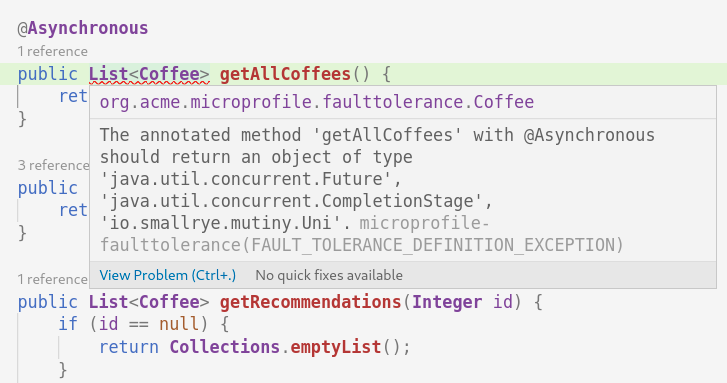
In the case of `@Scheduled`, we link the cron expression back to the application property definition, much like we do for the `name` member of `@ConfigProperty`. Such cases allow us to easily relate the Java source files to their Quarkus configuration file.
## It's the little things
For our existing functionality, we wanted to cover more existing use cases, and instances where a problem can be easily flagged and a solution suggested.
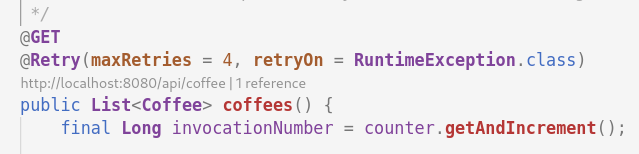
For example, when launching a Quarkus application, the code lens URL endpoints (enabled via. the `microprofile.tools.codeLens.urlCodeLensEnabled` setting) now supports `@ApplicationPath` and will take its value into account.
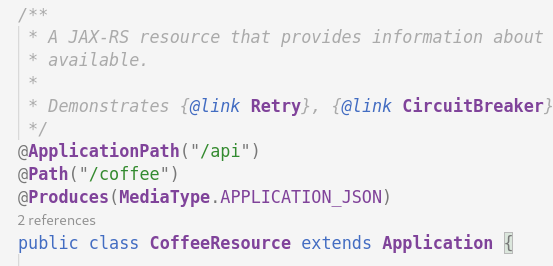
In this example, the `@ApplicationPath` is set to `/api`, and the code on the method declaration (below) takes that into account when generating the URL.
In other annotations, like `@Retry`, we've taken the time to really warn users about usage that, while technically permitted, might be undesired.

In this example, the delay between retrying the method, and the maximum duration in which to attempt a retry are the same. This would imply these settings are not being used as intended. When member values like `jitter` & `jitterDelayUnit` are used to add more complexity, these warnings can serve as a good indication of improperly configured values.
For the `@ConfigProperty` annotation, we now validate the `defaultValue` member against the field declaration for some added safety.
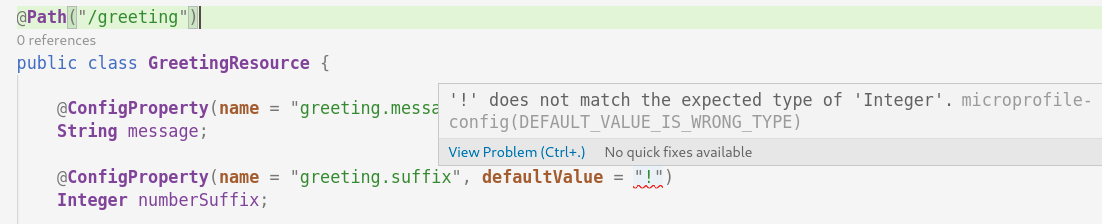
If you don't use a `defaultValue`, and your property isn't defined in the application properties, we have a code action to auto-generate it as well.

## Completions too !
At the end of the day, everyone wants to spend less time trying to hunt down some obscure setting, and more time developing the logic.
If you're using the `@CacheResult` annotation on a method in your Java sources, we automatically suggest the settings available to configure it from your configuration file. It's also fairly reactive to changes so you'll always know if something has gone wrong.

`@ConfigMapping` is now also supported with some basic validation as well as completions for the application properties.

We hope you’ll give our VS Code extension a try and look forward to getting feedback. A huge thanks goes out to the many contributors on [redhat-developer/vscode-quarkus](https://github.com/redhat-developer/vscode-quarkus), [redhat-developer/vscode-microprofile](https://github.com/redhat-developer/vscode-microprofile), [redhat-developer/quarkus-ls](https://github.com/redhat-developer/quarkus-ls), [eclipse/lsp4mp](https://github.com/eclipse/lsp4mp), [redhat-developer/vscode-java](https://github.com/redhat-developer/vscode-java), and [eclipse/eclipse.jdt.ls](https://github.com/eclipse/eclipse.jdt.ls), who have helped get the project to where it is today. Stay tuned for our post on the new Qute features that have been added.
## Links
- VS Code Marketplace:
- Open VSX:
- GitHub repository:
- Open a GitHub issue:
- Changelog: