# Getting Started with Quarkus and the A2A Java SDK
A couple of weeks ago, we [announced](https://quarkus.io/blog/a2a-project-launches-java-sdk/) that our [A2A Java SDK](https://github.com/a2aproject/a2a-java) has been contributed to the official A2A project! This was a collaboration between our WildFly and Quarkus teams at Red Hat and Google. Today, we have released A2A Java SDK 0.2.3.Beta1, which aligns with the v0.2.3 version of the [A2A specification](https://github.com/a2aproject/A2A/tree/v0.2.3). In this blog post, we'll cover how to easily get started with Quarkus and A2A using the A2A Java SDK.
You can also check out our [short video](https://www.youtube.com/watch?v=5CZzW-wvEQs) that gives an introduction to the A2A Java SDK.
[5CZzW-wvEQs](5CZzW-wvEQs)
## What's A2A?
Before jumping into the details, let's go through what [A2A](https://a2aproject.github.io/A2A/dev/specification) is. The *Agent2Agent* (A2A) protocol is an open standard developed by Google. It enables AI agents to communicate and collaborate with one another, regardless of each agent's underlying framework, language, or vendor. This is important, as it paves the way for polyglot multi-agent systems.
### Main Concepts
The A2A protocol involves a few important concepts:
- **User** - This is the end user who has a request that will require the help of one or more agents.
- **A2A Client** - This is the client that will send requests on the user's behalf to an A2A server agent.
- **A2A Server** - This is the server agent that will receive and respond to requests from an A2A client agent. An A2A server agent exposes an HTTP endpoint that implements the A2A protocol.
A2A client and A2A server agents can be implemented using different languages and frameworks. They just need to be able to speak with each other using the A2A protocol. Communication happens using JSON-RPC 2.0 over HTTP(S) as the transport. A2A SDKs written for various programming languages enable this interoperability.
The [A2A project](https://github.com/orgs/a2aproject/repositories) aims to provide SDKs for various languages. Using the [A2A Python SDK](https://github.com/a2aproject/a2a-python) and our [A2A Java SDK](https://github.com/a2aproject/a2a-java), for example, it's possible for an A2A client agent written in Python to communicate with an A2A server agent written in Java and vice versa.
## From a Quarkus LangChain4j AI Service to an A2A Server Agent
Let's say we have a [Quarkus LangChain4j AI service](https://docs.quarkiverse.io/quarkus-langchain4j/dev/ai-services.html) that can respond to user queries about the weather by making use of a weather MCP server:
```java
@RegisterAiService
@ApplicationScoped
public interface WeatherAgent {
@SystemMessage("""
You are a specialized weather forecast assistant. Your primary function is to
utilize the provided tools to retrieve and relay weather information in response
to user queries. You must rely exclusively on these tools for data and refrain
from inventing information. Ensure that all responses include the detailed output
from the tools used and are formatted in Markdown.
"""
)
@McpToolBox("weather") // <-- The weather MCP server that will be used
String chat(@UserMessage String question);
}
```
To turn this weather agent into an A2A server agent, there are a few simple steps we need to follow:
### Add an A2A Java SDK Server Dependency
> [!NOTE]
> The `io.github.a2asdk` `groupId` is temporary and will likely change for future releases. Keep an eye on the `a2a-java` [README](https://github.com/a2aproject/a2a-java/blob/main/README.md) for up-to-date documentation.
```xml
io.github.a2asdk
a2a-java-sdk-server-quarkus <1>
```
1. `a2a-java-sdk-server-quarkus` provides access to the core classes that make up the A2A specification and provides the HTTP endpoint that implements the A2A protocol. This dependency makes use of Quarkus Reactive Routes. If not using Quarkus, the `a2a-java-sdk-server-jakarta` dependency can be used to expose an A2A server agent in a Jakarta server supporting CDI and Jakarta RESTful Web Services.
### Add a Class that Creates an A2A `AgentCard`
The `AgentCard` is a class that describes the capabilities of an A2A server agent. Other agents or clients will use this to understand what our weather agent can do. The A2A Java SDK will automatically expose this agent card at the server agent's `.well-known/agent.json` URI. For example, if our A2A server agent is running on , the agent card will be available at .
```java
import io.a2a.server.PublicAgentCard;
import io.a2a.spec.AgentCapabilities;
import io.a2a.spec.AgentCard;
import io.a2a.spec.AgentSkill;
...
@ApplicationScoped
public class WeatherAgentCardProducer {
@Produces
@PublicAgentCard
public AgentCard agentCard() {
return new AgentCard.Builder()
.name("Weather Agent")
.description("Helps with weather")
.url("http://localhost:10001") <1>
.version("1.0.0")
.capabilities(new AgentCapabilities.Builder() <2>
.streaming(true)
.pushNotifications(false)
.stateTransitionHistory(false)
.build())
.defaultInputModes(Collections.singletonList("text"))
.defaultOutputModes(Collections.singletonList("text"))
.skills(Collections.singletonList(new AgentSkill.Builder()
.id("weather_search")
.name("Search weather")
.description("Helps with weather in city, or states") <3>
.tags(Collections.singletonList("weather"))
.examples(List.of("weather in LA, CA")) <4>
.build()))
.build();
}
}
```
1. The URL of our A2A server agent. We set `quarkus.http.port` to `10001` in our `application.properties` file so our A2A server agent will be available at .
2. Indicates the capabilities of our A2A server agent like whether it supports streaming, push notifications, and state transition history.
3. Describes what our agent can do.
4. An example query that our agent can handle.
### Add a class that creates an A2A `AgentExecutor`
The `AgentExecutor` is a class that will be used to process requests sent to our A2A server agent. It will pass the requests received from the A2A client to our Quarkus LangChain4j AI service and is responsible for returning the responses back to the A2A client. The A2A Java SDK will call this executor when a request is sent to our A2A server agent.
Notice that the `AgentExecutor` interface specifies two methods, `execute` and `cancel`, that we need to implement.
```java
import io.a2a.server.agentexecution.AgentExecutor;
import io.a2a.server.agentexecution.RequestContext;
import io.a2a.server.events.EventQueue;
import io.a2a.server.tasks.TaskUpdater;
import io.a2a.spec.JSONRPCError;
import io.a2a.spec.Message;
import io.a2a.spec.Part;
import io.a2a.spec.Task;
import io.a2a.spec.TaskNotCancelableError;
import io.a2a.spec.TaskState;
import io.a2a.spec.TextPart;
...
@ApplicationScoped
public class WeatherAgentExecutorProducer {
@Inject
WeatherAgent weatherAgent; <1>
@Produces
public AgentExecutor agentExecutor() {
return new WeatherAgentExecutor(weatherAgent);
}
private static class WeatherAgentExecutor implements AgentExecutor {
private final WeatherAgent weatherAgent;
public WeatherAgentExecutor(WeatherAgent weatherAgent) {
this.weatherAgent = weatherAgent;
}
@Override
public void execute(RequestContext context, EventQueue eventQueue) throws JSONRPCError { <2>
TaskUpdater updater = new TaskUpdater(context, eventQueue);
// mark the task as submitted and start working on it
if (context.getTask() == null) {
updater.submit();
}
updater.startWork();
// extract the text from the message
String userMessage = extractTextFromMessage(context.getMessage());
// call the weather agent with the user's message
String response = weatherAgent.chat(userMessage); <3>
// create the response part
TextPart responsePart = new TextPart(response, null);
List> parts = List.of(responsePart);
// add the response as an artifact and complete the task
updater.addArtifact(parts, null, null, null);
updater.complete();
}
@Override
public void cancel(RequestContext context, EventQueue eventQueue) throws JSONRPCError { <4>
Task task = context.getTask();
if (task.getStatus().state() == TaskState.CANCELED) {
// task already cancelled
throw new TaskNotCancelableError();
}
if (task.getStatus().state() == TaskState.COMPLETED) {
// task already completed
throw new TaskNotCancelableError();
}
// cancel the task
TaskUpdater updater = new TaskUpdater(context, eventQueue);
updater.cancel();
}
private String extractTextFromMessage(Message message) {
StringBuilder textBuilder = new StringBuilder();
if (message.getParts() != null) {
for (Part part : message.getParts()) {
if (part instanceof TextPart textPart) {
textBuilder.append(textPart.getText());
}
}
}
return textBuilder.toString();
}
}
}
```
1. This is our Quarkus LangChain4j AI service.
2. The `execute` method will be used to process requests from an A2A client.
3. Here we are invoking our Quarkus LangChain4j AI service.
4. The `cancel` method be used to cancel an ongoing request.
That's it, we can now start our Quarkus application as shown below and our A2A server agent will be available at . A2A client agents can now send weather-related queries to our A2A server agent and our agent will respond with the weather information.
```bash
$ mvn quarkus:dev
```
We've gone from a Quarkus LangChain4j AI service to an A2A server agent in just a few steps!
The source code for this example is available [here](https://github.com/a2aproject/a2a-samples/tree/main/samples/java/agents/weather_mcp).
## Validating our A2A Server Agent Using the A2A Inspector
The [A2A Inspector](https://github.com/a2aproject/a2a-inspector) is a web application that's very easy to run and can be used to inspect any A2A server agent.
We can use the A2A Inspector to validate our A2A server agent by specifying our server agent's URL in the `Connect` text box.
The A2A Inspector will obtain and show our server agent's agent card:
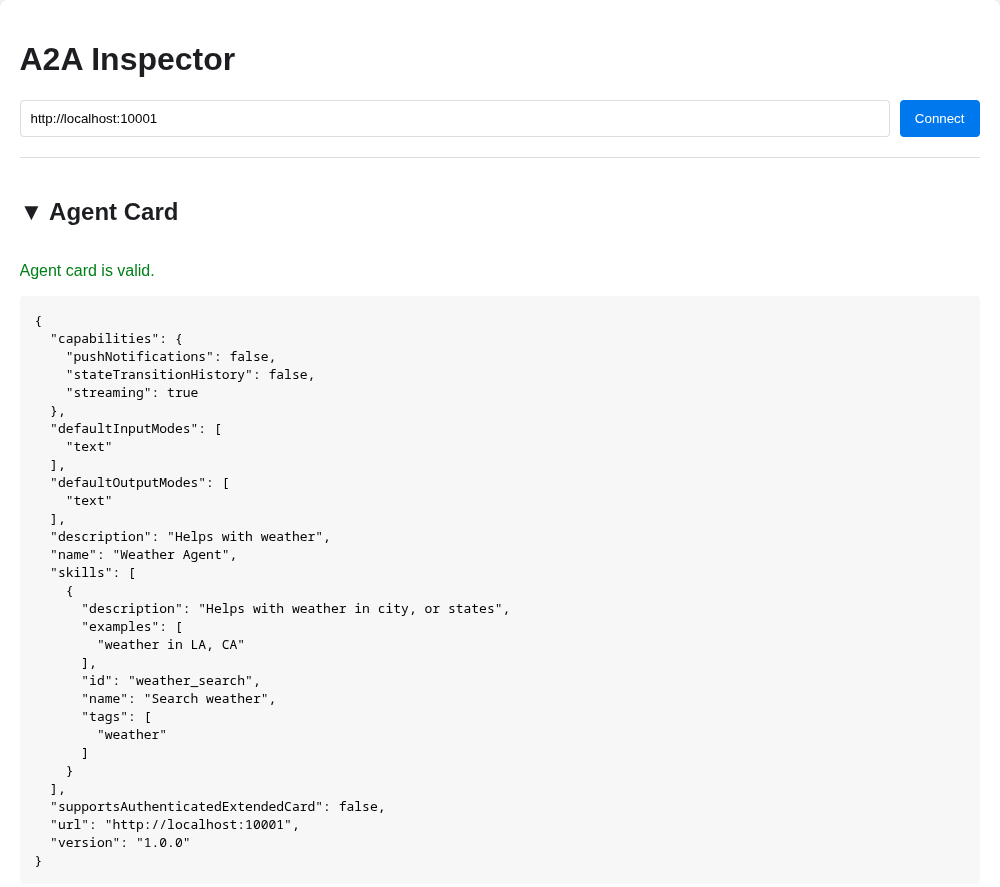
Notice that this matches the information we provided in our `WeatherAgentCardProducer` class.
You can also use the inspector to send requests to the A2A server agent and to view the raw HTTP requests and responses.
## Multi-Agent Orchestration with Python and Java Server Agents
Let's take a look at a more complex example that makes use of our weather A2A server agent.
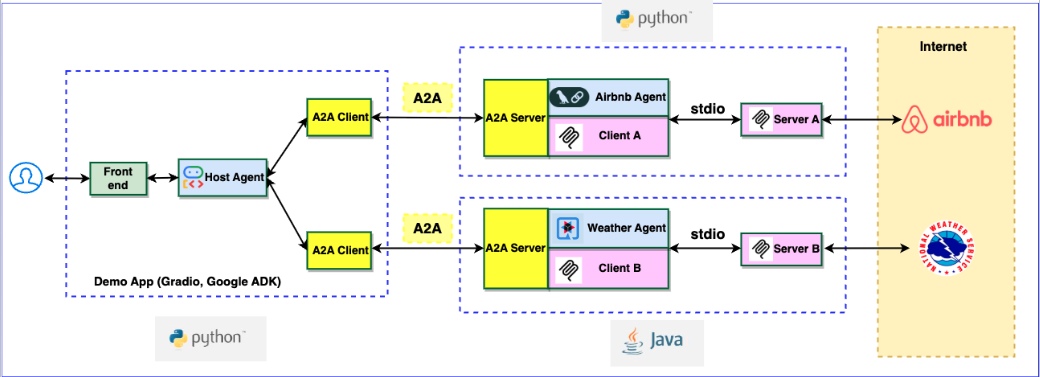
This is a multi-agent example where a host agent delegates requests to two different A2A server agents, an Airbnb agent and our Weather agent, based on the user's question. Under the hood, the host agent makes use of each agent's agent card to determine the capabilities of each agent and uses an LLM to determine which agent to delegate the request to based on their capabilities.
The [Airbnb agent](https://github.com/a2aproject/a2a-samples/tree/main/samples/python/agents/airbnb_planner_multiagent/airbnb_agent) is a Python agent that's implemented using LangGraph and makes use of the A2A Python SDK.
The [Weather agent](https://github.com/a2aproject/a2a-samples/tree/main/samples/java/agents/weather_mcp) is our Java agent that's implemented using Quarkus LangChain4j and makes use of the A2A Java SDK.
Notice that the host agent uses A2A clients written in Python to communicate with the server agents. It's also possible to use an [A2A client](https://github.com/a2aproject/a2a-java?tab=readme-ov-file#a2a-client) written in Java using our A2A Java SDK.
The complete source code for this example is available [here](https://github.com/a2aproject/a2a-samples/tree/main/samples/python/hosts/weather_and_airbnb_planner). To experiment with this multi-agent example, try sending different types of questions to the host agent, for example:
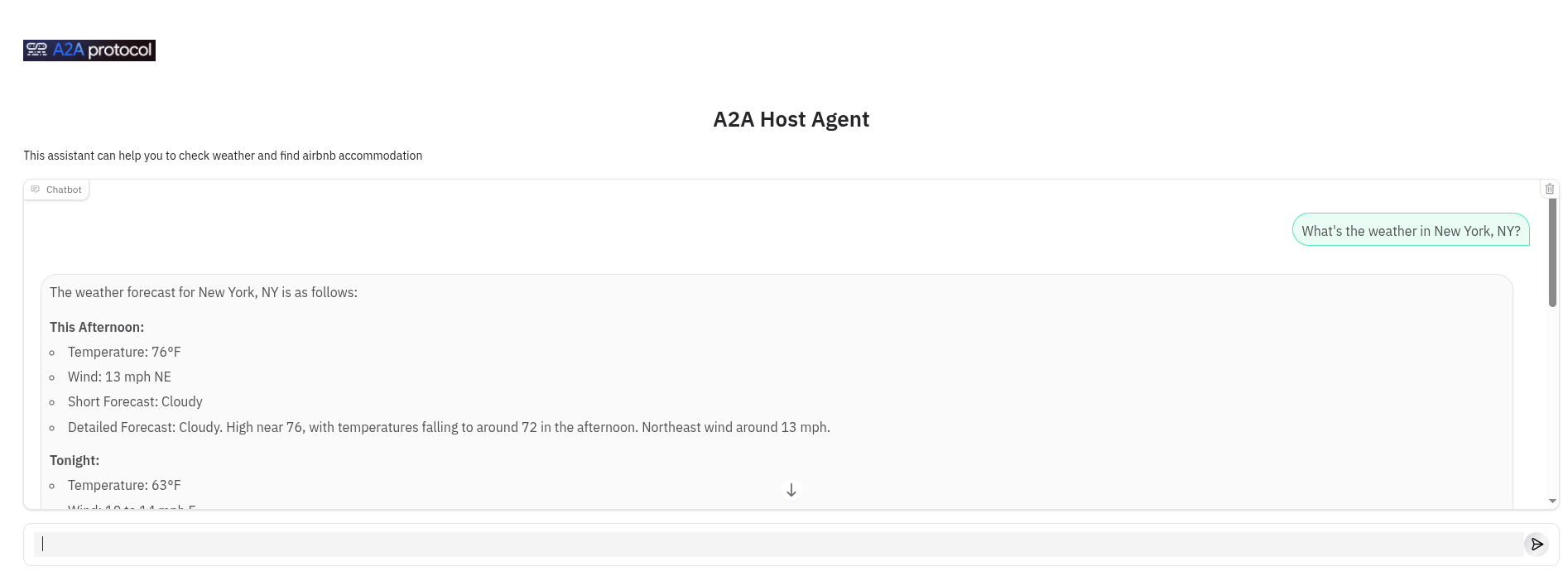
- What's the weather in New York, NY?
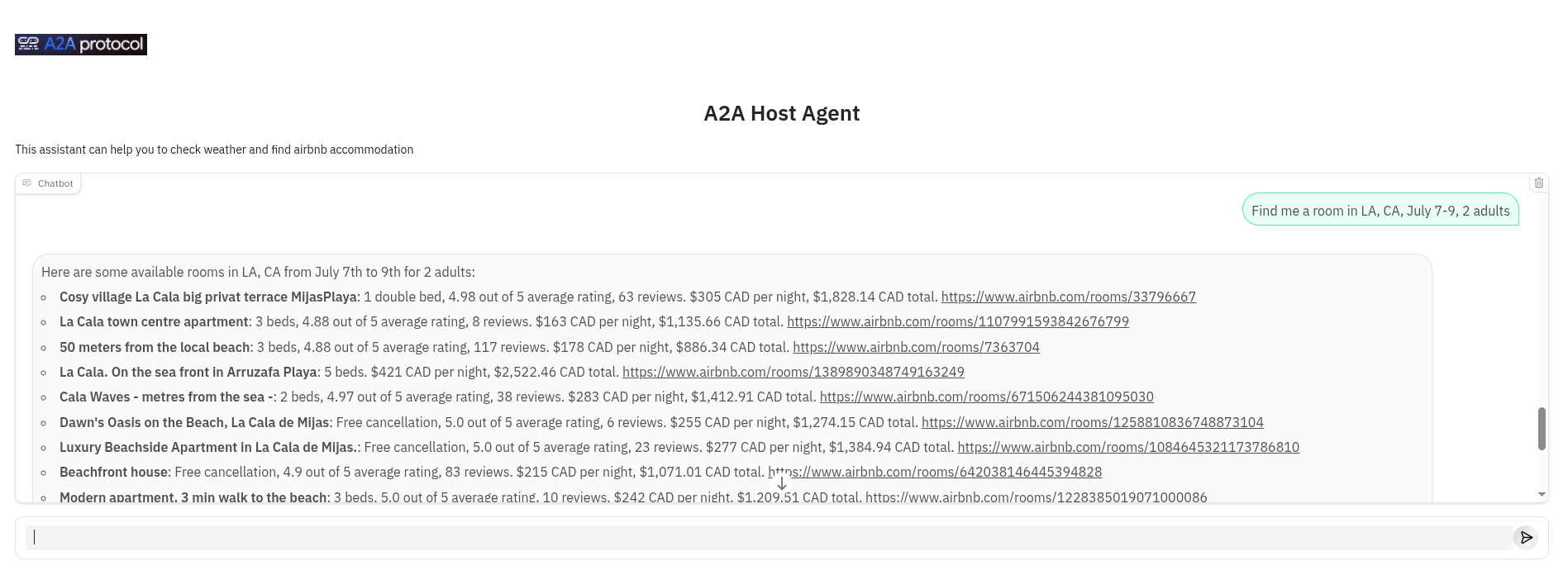
- Find me a room in LA, CA, July 7-9, 2 adults
Notice that the host agent will delegate the first question to the Weather agent and the second question to the Airbnb agent.
And the second question will be delegated to the Airbnb agent:
## Conclusion
We've seen how easy it is to get started with Quarkus and A2A using the A2A Java SDK. With just a few steps, we can turn a Quarkus LangChain4j AI service into an A2A server agent that can communicate with other A2A agents, regardless of the language or framework they are implemented in. The LangChain4j and Quarkus teams are also working on removing most of the boilerplate code to expose an A2A server and interact with A2A clients. So, stay tuned!
### Further Reading
- [A2A Specification](https://a2aproject.github.io/A2A/dev/specification)
- [A2A Java SDK Documentation](https://github.com/a2aproject/a2a-java/blob/main/README.md)