# Podman for Windows
# Quarkus Native with Podman for Windows

Developers who use Windows workstations might face the challenge of running Linux-native workflows. One way to achieve this is by using Podman, a container engine that provides a command line capability to run Linux containers. Podman supports running containers both as "rootful" and as "rootless", with the latter being the default that doesn't require elevated privileges. In this blog post, we'll explore how to use Podman with Quarkus Native to build and run applications on Windows.
## Installing Podman on Windows
In my latest experience, I used two setups, a Windows 10 on an older baremetal Xeon based desktop and a Windows 10 Qemu driven VM on my CentOS 8 Stream Linux laptop. The former being without any hiccups using [Podman for Windows](https://github.com/containers/podman/blob/main/docs/tutorials/podman-for-windows.md) guide while the latter required some [manual tweaks](/assets/examples/posts/podman-for-windows/win10.xml.txt) in `/etc/libvirt/qemu/win10.xml` to allow for nested virtualization. Your mileage might vary with guest Windows and hypervisor versions though.
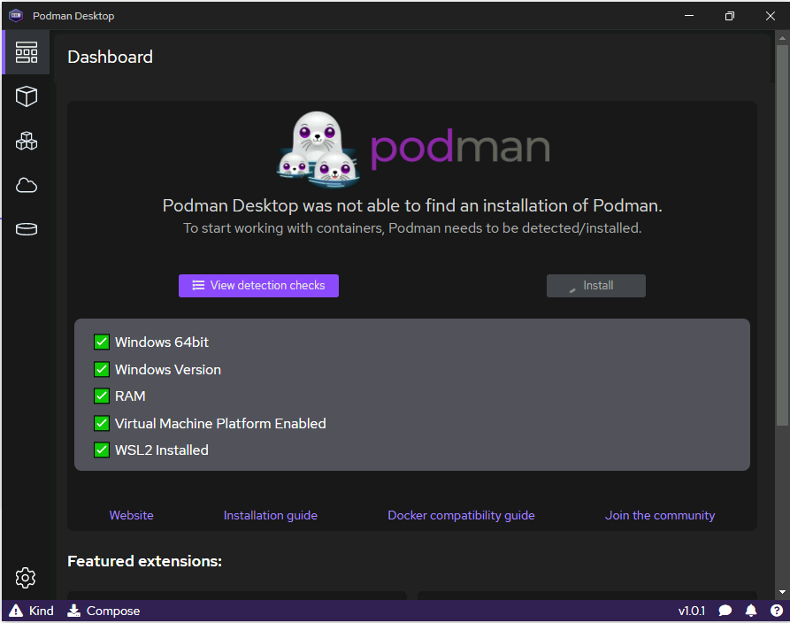
Besides the command line, there is also a full Podman Desktop experience available on . The installer checks your setup and guides you:
## Quarkus Native builder image
Both the latest Quarkus 2 and Quarkus 3 autodetects whether either Podman or Docker is installed, and it uses it to run containers.
We will use a QuickStart example that watermarks images. The example depends on Quarkus AWT extension that is not yet ported to run natively on Windows, yet we use a Windows workstation to develop our Java code, so using a Linux container to do the native build suits us well. We use [cmder](https://github.com/cmderdev/cmder) terminal on Windows, but a plain cmd prompt would do too.
```batch
C:\tmp
λ git clone https://github.com/quarkusio/quarkus-quickstarts.git
λ cd quarkus-quickstarts\awt-graphics-rest-quickstart
λ git checkout development
```
Depending on your Podman installation, you might need to run `podman machine start` too. [Podman output](/assets/examples/posts/podman-for-windows/podman-win-output-sdasff.txt).
```
C:\tmp\quarkus-quickstarts\awt-graphics-rest-quickstart (development -> origin)
λ mvnw package -Dnative -Dquarkus.native.container-build=true -Dquarkus.platform.version=3.1.2.Final
```
[Full output](/assets/examples/posts/podman-for-windows/podman-win-awt-quickstart-build.txt)
We can see in the log that Quarkus detected that we had `podman.exe` available, and it used Mandrel builder image to do the build, i.e. our Java bytecode alongside with various resources and properties was made available inside a Linux container where a `native-image` tool created an ELF64 Linux executable. We can see that artifact right in our `target` directory now:
```batch
λ file target\awt-graphics-rest-quickstart-1.0.0-SNAPSHOT-runner
target\awt-graphics-rest-quickstart-1.0.0-SNAPSHOT-runner: ELF 64-bit LSB executable, x86-64, version 1 (SYSV),
dynamically linked, interpreter /lib64/ld-linux-x86-64.so.2, for GNU/Linux 3.2.0,
BuildID[sha1]=20820fdafc19e803147d91fbba6823ad45024041, not stripped
```
We cannot run the executable here on our Windows workstation, yet we can immediately use another Linux image to run it in a container:
```batch
λ podman build -f src/main/docker/Dockerfile.native -t quarkus/awt-graphics-rest .
```
[Full output](/assets/examples/posts/podman-for-windows/podman-win-container-build.txt)
Let’s run it:
```batch
C:\tmp\quarkus-quickstarts\awt-graphics-rest-quickstart (development -> origin)
λ podman run -i --rm -p 8080:8080 quarkus/awt-graphics-rest
__ ____ __ _____ ___ __ ____ ______
--/ __ \/ / / / _ | / _ \/ //_/ / / / __/
-/ /_/ / /_/ / __ |/ , _/ ,< / /_/ /\ \
--\___\_\____/_/ |_/_/|_/_/|_|\____/___/
2023-06-22 15:53:03,890 INFO [io.quarkus] (main) awt-graphics-rest-quickstart 1.0.0-SNAPSHOT native (powered by Quarkus 3.1.2.Final) started in 0.169s. Listening on: http://0.0.0.0:8080
2023-06-22 15:53:03,890 INFO [io.quarkus] (main) Profile prod activated.
2023-06-22 15:53:03,890 INFO [io.quarkus] (main) Installed features: [awt, cdi, resteasy, resteasy-multipart, smallrye-context-propagation, vertx]
```
We can have the application watermark an image for us now. First, we need some image to watermark:

```batch
C:\tmp
λ curl https://quarkus.io/assets/images/posts/podman-for-windows/orig-790x230.png --output C:/tmp/example.png
```
Next, we use our locally running container to watermark it:
```batch
C:\tmp
λ curl -F "image=@C:/tmp/example.png" http://localhost:8080/watermark --output C:/tmp/result.png
```
And see the result, word Mandrel in the top left corner and a Quarkus logotype in the bottom right corner:
```batch
C:\tmp
λ mspaint.exe C:/tmp/result.png
```

## Linux containers in your test flow
You can use Podman to run your tests in Linux containers too. For example, you can take advantage of the `quarkus-container-image-docker` extension. Add it to the `pom.xml`:
```diff
...
quarkus-junit5
test
+
+ io.quarkus
+ quarkus-container-image-docker
+
io.rest-assured
rest-assured
...
```
Let's run it:
```batch
λ mvnw verify -Ddocker -Dnative -Dquarkus.native.container-build=true -Dquarkus.container-image.build=true -Dquarkus.platform.version=3.1.2.Final
```
Here is the [Full output](/assets/examples/posts/podman-for-windows/podman-win-test-in-linux-container.txt).
Browsing the log, we can see that the JVM based test passed first:
```
...
[INFO] Running org.acme.awt.rest.ImageResourceTest
INFO [io.quarkus] (main) awt-graphics-rest-quickstart 1.0.0-SNAPSHOT on JVM
...
```
Then the Linux builder image is used to build a Linux executable:
```
...
[INFO] [io.quarkus.deployment.pkg.steps.NativeImageBuildContainerRunner] Using podman to run the native image builder
[INFO] [io.quarkus.deployment.pkg.steps.NativeImageBuildContainerRunner] Checking image status quay.io/quarkus/ubi-quarkus-mandrel-builder-image:22.3-java17
...
[INFO] [io.quarkus.deployment.pkg.steps.NativeImageBuildRunner] podman run...
...
```
Next we can see that the integration testsuite decided to build a Linux container image with our newly built executable in it:
```
...
[INFO] [io.quarkus.container.image.docker.deployment.DockerProcessor] Starting (local) container image build for native binary using docker.
[INFO] [io.quarkus.container.image.docker.deployment.DockerProcessor] Executing the following command to build docker image: 'podman build -f C:\tmp\quarkus-quickstarts\awt-graphics-rest-quickstart\src\main\docker\Dockerfile.native -t karm/awt-graphics-rest-quickstart:1.0.0-SNAPSHOT C:\tmp\quarkus-quickstarts\awt-graphics-rest-quickstart'
...
```
Finally, the integration testsuite starts the application in a container and runs the tests against it:
```
...
[INFO] Running org.acme.awt.rest.ImageResourceIT
INFO [io.qua.tes.com.DefaultDockerContainerLauncher] (main) Executing "podman run...
...
```
We can check in the preserved `target/quarkus.log` that the application was indeed ran in a Linux container as a native executable:
```
λ type target\quarkus.log
--/ __ \/ / / / _ | / _ \/ //_/ / / / __/
-/ /_/ / /_/ / __ |/ , _/ ,< / /_/ /\ \
--\___\_\____/_/ |_/_/|_/_/|_|\____/___/
2023-06-22 21:41:27,637 INFO [io.quarkus] (main) awt-graphics-rest-quickstart 1.0.0-SNAPSHOT native (powered by Quarkus 3.1.2.Final) started in 0.062s. Listening on: http://0.0.0.0:8081
2023-06-22 21:41:27,637 INFO [io.quarkus] (main) Profile prod activated.
2023-06-22 21:41:27,637 INFO [io.quarkus] (main) Installed features: [awt, cdi, resteasy, resteasy-multipart, smallrye-context-propagation, vertx]
2023-06-22 21:41:30,264 INFO [io.quarkus] (Shutdown thread) awt-graphics-rest-quickstart stopped in 0.002s
```
This way we can have our test application executed in a Linux container while keeping our Windows development environment.
## Troubleshooting
\* **File permissions:** The Linux executable file might have missing its executable flag, so you might need to set it in your Dockerfile as we do in the Quickstart AWT example, i.e. `RUN chmod "ugo+x" /work/application`. \* **Podman machine must be inited:** If something goes south, an Administrator can fix it by removing the machine (the Linux VM providing podman services), e.g. `podman machine rm "podman-machine-default"` and then `podman machine init`. \* **Directory or a file access:** When more services or more complex multimodule projects are being built, one could hit `The process cannot access the file because it is being used by another process`. The easiest way to debug such situation is to use [Handle](https://download.sysinternals.com/files/Handle.zip) tool by Sysinternals.
Note that none of the aforementioned situations is Quarkus specific per se.
## Conclusion
Podman is perfectly capable of running your Linux containers on Windows, being it test apps or databases. It is definitely worth trying out.
Do you have a question regarding this post? Feel free to hit us up on [Zulip chat](https://quarkusio.zulipchat.com/#), [Stack Overflow](https://stackoverflow.com/questions/tagged/quarkus%20podman?sort=Newest) or on [GitHub](https://github.com/quarkusio/quarkus/issues?q=label%3Aenv%2Fpodman).